PROGRAMMER'S GUIDECD communication I / F (MPEG part)
BackForward
CD communication I / F (MPEG part)

5. MPEG stream


5.1 Transfer block

5.1.1 Transfer block function
The transfer block of the MPEG decoder has the following functions.

(1) Stream setting
Set the stream to be decoded by specifying the connection destination buffer partition of the decoder.
A stream number and a channel number can be specified to set a more detailed stream to be decoded. (This function is called "rear aperture".)

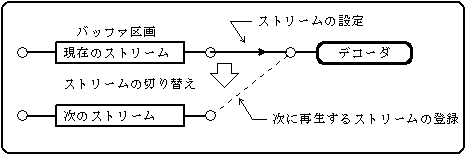
(2) Registration of the stream to be played next
Specify the buffer partition and register the stream to be played next. When the current stream ends, it switches to the registered next stream. At this time, the conditions for switching can be set.
The timing of switching may be as follows.

Figure 5.1 Registering the next stream to play
  1. When a system end code (SEC) is detected
  2. When the EOR bit is detected
  3. When the forced switch function is called

(3) Transfer of stream data
It monitors the specified buffer partition and transfers stream data to the decoder when the required amount of data is stored.

(4) Forced switching of videos
Forcibly switch to the registered next stream.

5.1.2 Transfer block state transition
The transfer block has the following states. This state is called the operating state of the MPEG decoder. (For details, refer to the data specification "MPEG operation status".)

Table 5.1 Transfer block status
Status explanation Transition condition Transition destination
 1
Stop The stream is not registered. Registration of current stream Preparation 1
 2
Preparation 1 Waiting for 2 sectors to be stored in the specified buffer partition. Get decode buffer size Preparation 2
Cancel the current stream Stop
 3
Preparation 2 Waiting for the data for the decode buffer size to be stored in the buffer partition. Stores the size of the decode buffer send on
Forced transfer instruction send on
Cancel the current stream Stop
 4
Transfer (playback) The sector data is being transferred to the decoder. (MPEG playback status) Buffer partition is empty Resurrection processing
Natural switching switching
Forced switching switching
Natural end Stop
forced termination Stop
 5
switching Waiting for the beginning of the next stream to be output. The beginning was output send on
Buffer partition is empty Resurrection processing
 6
Resurrection processing Waiting for a sector to be stored in an empty buffer partition. Stores required sectors Transfer / Switch *
* The transition destination from the restoration process returns to the state before the buffer partition became empty (becomes the restoration process).

Figure 5.2 shows the state transition diagram of the transfer block.
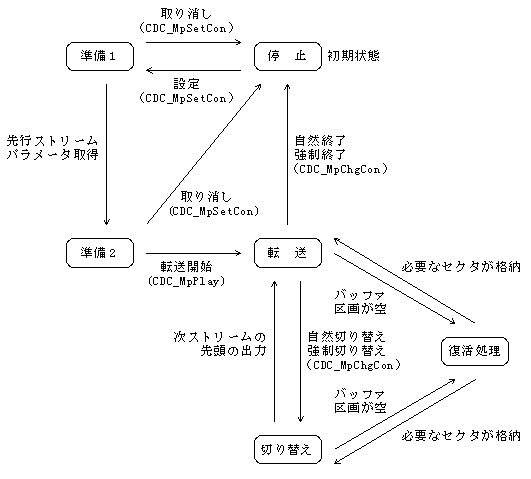
Figure 5.2 State transition diagram of the transfer block

If you execute the initialization function (CDC_MpInit) of the MPEG decoder, it will return to the stopped state from any state.

5.2 Stream switching

Switching streams means switching the currently playing stream to another stream. By registering the storage destination buffer partition of the stream to be played next, the stream is switched to the next stream and played by the end of the current stream or the forced switching function.

5.2.1 Picture input order and display order
In order to decode the B picture, the I picture or P picture to be the predicted image needs to be decoded first. Therefore, the input order of the pictures to the decoder and the actual display order are interchanged.

Figure 5.3 Input order and display order to the decoder

5.2.2 Clear video decode buffer
In order to switch streams smoothly, it is necessary to avoid the previously decoded data being output after the switching instruction. For that purpose, the decode buffer must be cleared in a timely manner.
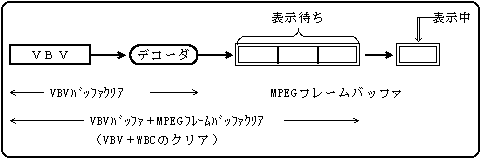
The MPEG / Video decoder has a VBV buffer in front of the decoder and an MPEG frame buffer behind it. The following two methods can be specified as the clearing method (timing and target buffer).

(1) Immediately clear VBV buffer + MPEG frame buffer (VBV + WBC)
In this case, the picture waiting to be displayed in the MPEG frame buffer is cleared, so that the instruction is immediately reflected in the display. The displayed picture is not cleared. Therefore, in reality, the current picture is displayed until the first few pictures in the next stream are decoded.
The display-waiting (decoded) MPEG frame buffer is abbreviated as WBC (Write Buffer Control).

(2) Wait for the start of decoding the next I or P picture and clear only the VBV buffer.
In this case, the picture waiting to be displayed in the MPEG frame buffer is not cleared. After the waiting picture is displayed, the next stream of pictures is displayed. Therefore, after the switching instruction, there is a delay of the picture waiting to be displayed.

Figure 5.4 MPEG video buffer configuration
5.2.3 Example of video stream switching
Due to the nature of the MPEG video stream, clearing the VBV buffer when detecting the picture start of a P-picture leads to a very clean connection.
If you simply switch when the picture start is detected, the response will be slightly better, but the frame may be skipped because it may switch at the start of the B picture.

As an example, the case of switching between the P picture and the B picture when the picture start is detected is compared. Only the VBV buffer can be cleared.

(1) When switching by P picture start detection
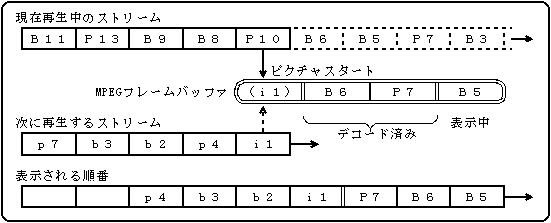
As shown in the following figure, if the stream is switched when the picture start of P picture (P10) is detected, the stream switches smoothly in the order of B5 → B6 → P7 → i1. (P10 is not decoded.)

Figure 5.5 Example of switching by P picture start detection
(2) When switching with B picture start detection
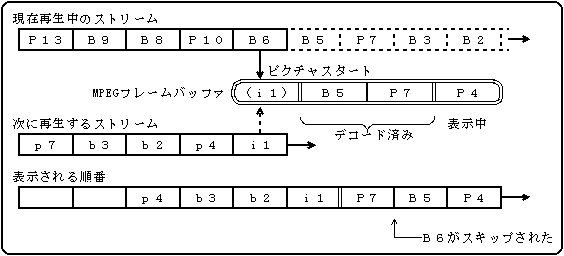
If the stream is switched when the picture start of B picture (B6) is detected in the same stream, B6, which is the display order before P7, is not decoded as shown in the following figure, so the frame B5 → P7 is skipped.

Figure 5.6 Example of switching with B picture start detection

5.2.4 Clear audio decode buffer
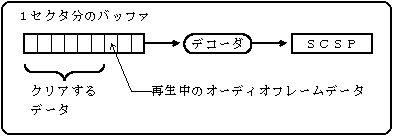
The MPEG / Audio decoder has a buffer for one sector in front of the decoder. The following two methods can be specified as the clearing method.

(1) Do not clear
It does not switch until the data for one sector is transferred.

(2) Clear
The buffer is cleared and switched immediately even in the middle of one sector.

Figure 5.7 MPEG audio buffer configuration

BackForward
PROGRAMMER'S GUIDECD communication I / F (MPEG part)
Copyright SEGA ENTERPRISES, LTD., 1997