■ Function
- ● System management system
- The system management system has the following functions.
function Intoback Non-intback | | |
|---|
Master SH2 ON | × | ○ |
Slave SH2 ON | × | ○ |
Slave SH2 OFF | × | ○ |
Sound ON | × | ○ |
Sound off | × | ○ |
CD ON | × | ○ |
CD OFF | × | ○ |
Whole system reset | × | ○ |
NMI request | × | ○ |
Hot reset enable | × | ○ |
Hot reset disable | × | ○ |
Cartridge code acquisition | ○ | × |
Area code acquisition | ○ | × |
Get system status | ○ | × |
SMPC memory settings | × | ○ |
SMPC memory acquisition | ○ | × |
Time setting | × | ○ |
Get time | ○ | × |
- ● Peripheral control system
- The library supports the following peripherals:
game machine Peripheral name | |
|---|
Saturn peripheral | Digital device |
Analog devices |
Pointing device (mouse) |
keyboard |
Multi-tap (6P) |
Mega Drive Peripheral | 3 button PAD |
6 button PAD |
4P adapter |
mouse |
- ● Library-incompatible peripherals
- The following peripherals are not supported by this library.
See the documentation for each for details.- Virtual Gun → Reference: Developer's Information STN-41
- Voice recognition → Added dedicated library (release date undecided )
■ Processing
- ● Issuing non-intback commands
- This is a non-intback process.
- ● Issuing an into-back command
- System data acquisition (excluding time)
- Peripheral data acquisition, time data acquisition <BR> This is a process required for each frame.
- ● Recommended example
- Here are some recommended examples for the following three patterns:
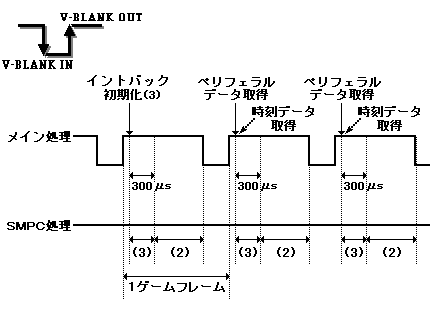
- Pattern 1
Intoback initialization (3) → Peripheral data acquisition + time data acquisition - Pattern 2
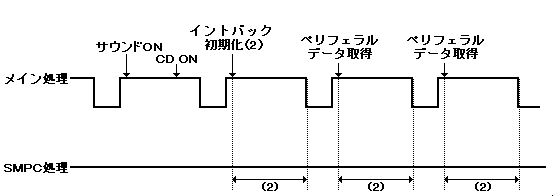
Non-intback command issuance → Intoback initialization (2) → Peripheral data acquisition - Pattern 3
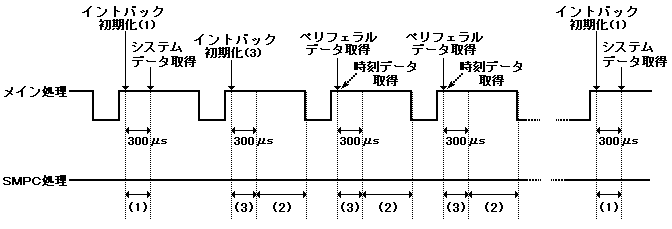
Intoback initialization (1) → System data acquisition → Intoback initialization (3) → Peripheral data acquisition + time data acquisition
- ● Explanation of the figure
- Main processing
- Intoback initialization (1): Specify system data acquisition
- Intoback initialization (2): Specify peripheral data acquisition
- Intoback initialization (3): Specify peripheral data acquisition + time data acquisition
- SMPC processing
- (1): System data collection process
- (2): Peripheral data collection process
- (3): Time data collection process
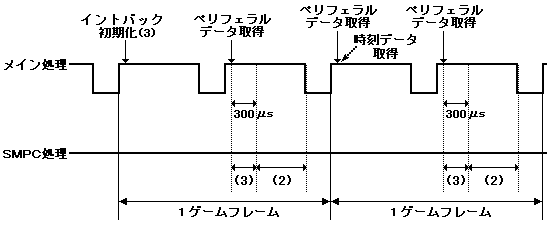
- (1) Pattern 1
- * When the game frame is 1 frame
- * When the game frame is 2 frames
- Peripheral data acquisition * does not acquire peripheral data.
- (2) Pattern 2
- (3) Pattern 3
- ● Restrictions
- << Common to all commands >>
- Do not issue the command until 300 μs after V-BLANK IN.
- Do not issue the command from the issuance of the into-back command to the next V-BLANK IN.
- Precautions for execution by multiple tasks When the interrupt task is switched when using the library with multiple tasks, the SMPC does not have exclusive control of the SMPC, so the SMPC may deadlock or the SMPC may operate incorrectly. You might.
Therefore, when executing with multiple tasks, it is necessary to perform exclusive control of the library separately on the user side. - See the SMPC User's Manual for restrictions from slave SH2.
- The command processing time may change from 20 μS to 100 μs due to SMPC internal processing once per second.
- << Non-intback command issuing function >>
- There are no restrictions other than common (above).
- << Intback command issuing function >>
- System data acquisition (excluding time)
- There are no restrictions other than common (above).
- Peripheral data acquisition, time data acquisition
- Do not issue the command from the issuance of the into-back command to the next V-BLANK IN.
- Issue the into-back command 14ms before the specified V-BLANK IN.
- Peripheral data collection processing in SMPC is performed during one vertical display period.
- Data that could not be acquired (timeout) by the V-BLANK IN specified from the issuance of the into-back command cannot be acquired after that.
- If frequent timeouts occur, treat the peripheral as unconnected.
- SMPC starts peripheral acquisition so that it is 1ms before V-BLANK IN, which specifies the end of peripheral acquisition.
- V-BLANK IN skip count The V-BLANK IN skip count indicates the execution timing of the peripheral data collection process in SMPC after the Intoback command is issued.
It is prepared for games that change frames with 2 or more frames.
Executes the peripheral data collection process in SMPC during the V-DISP before the (V-BLANK IN skip count + 1) th V-BLANK IN after issuing the into-back command.
Set to 0 when executing the V-BLANK IN immediately after issuing the into-back command.
■ Peripheral control
- Peripheral controls should be created to meet the game creation criteria.
This library does not process the data of the connected peripherals.
Checking unsupported peripherals (virtual guns) and checking the connection / non-connection of normal peripherals are all done on the application side. - ● Policy
- The peripheral acquisition process is created according to the following policy for flexible response to users.
- We will support peripherals to be released in the future as much as possible.
- Take measures against obstacles.
- ● Method
- Specify the following items to specify the input when initializing the library.
- (1) Number of peripherals to be acquired (2) Data size to be acquired
- (example)
- <Specified input value>
- Number of peripherals to get = 9
- Data size to get = 3
- <Connection status>
- Body connector 1 = Shuttle mouse
- Body connector 2 = Multi-terminal 6
- Multi-tap connector 1 = Saturn standard PAD
- Multi-tap connector 2 = not connected
- Multi-tap connector 3 = mission stick
- Multi-tap connector 4 = not connected
- Multi-tap connector 5 = not connected
- Multi-tap connector 6 = Saturn keyboard
- <Output 1: Peripheral data output>
- The library is divided into peripheral ID → peripheral type + data size and output.
No. | Peripheral type | Data size | Peripheral data (number of valid bytes) |
|---|
0 | pointing | 3 | Acquired data (3) |
1 | Digital | 2 | Acquired data (2) |
2 | disconnected | disconnected | Indefinite value |
3 | analog | Five | Acquired data (3) |
Four | disconnected | disconnected | Indefinite value |
Five | disconnected | disconnected | Indefinite value |
6 | keyboard | 3 | Acquired data (3) |
7 | Indefinite value | Indefinite value | Indefinite value |
8 | Indefinite value | Indefinite value | Indefinite value |
- <Output 2: Multi-tap information data output>
| Multitap ID | Number of multi-tap connectors |
|---|
Body terminal 1 | Direct connection | 1 |
Body terminal 2 | Multi-tap connection | 6 |
■ Calling sequence
- Calling sequence of pattern (3) of recommended example
#difine GET_NUM (9) / * Number of peripheral data you want to get * /
#difine GET_SIZE (4) / * Maximum data size of the corresponding peripheral * /
#define WORKSIZE (GET_NUM * (GET_SIZE + 2) * 2) + GET_SIZE) / * Work size * /
Uint32 work [WORKSIZE / 4]; / * Peripheral data acquisition work area * /
                              / * Note: Be sure to define it as a global variable * /
typedef struct {
                Uint8 type;
                Uint8 size;
                Uint16 data;
                Uint8 extend_data [(GET_SIZE --2)];
} PeriData;
PerGetSys * sys_data; / * System data * /

PeriData * get_per; / * Peripheral output data pointer * /
PerMulInfo * mul_info;
Uint8 * get_tim; / * Time output data pointer * /
● Intoback initialization (1) (immediately after V-BLANK OUT processing)
PER_LInit (PER_KD_SYS, 0, 0, 0, NULL, 0); / * Specify system data acquisition * /
 ...
● Intoback initialization (3) (immediately after V-BLANK OUT processing)
sys_data = PER_GET_SYS (); / * Get system data * /
PER_LInit (PER_KD_PERTIM, GET_NUM, GET_SIZE, work, 0);
/ * Specify peripheral data + time data acquisition. V-BLANK skip count is 0 * /
set_imask (0xF); / * All interrupts disabled * /
INT_SetScuFunc (INT_MSK_VBLK_OUT, vblank_out); / * Register V-BLANK_OUT interrupt function * /
INT_ChgMsk (INT_MSK_VBLK_OUT, INT_MSK_NULL); / * V-BLANK_OUT interrupt enabled * /
set_imask (0); / * All interrupts are valid * /
...
● Normally, MAIN-LOOP internal processing (immediately after V-BLANK OUT processing)
    ...
get_tim = PER_GET_TIM (); / * Get time * /
if ((mul_info [0] .con + mul_info [1])> = 3) {/ * Check the number of valid terminals * /
    if ((get_per [2] .id! = PER_ID_NCON_UNKNOWN) && / * Unconnected check * /
        (get_per [2] .id! = PER_ID_PNT)) {/ * Non-mouse check * /
        if (((get_per [2] .data) & PER_DGT_U) == PER_DGT_U) {
              / * Is the current peripheral data of connector 3 UP? * /
    ...
● Normally, the second and subsequent V-BLANK OUT interrupt processing
void vblank_out (void) {
    SCL_VblankEnd (); / * Give top priority to framebuffer switching * /
    PER_LGetPer ((PerGetPer **) & get_per, & mul_info); / * Get peripheral data * /
}

