INDEX ▲ | STN-38 | STN-39 | STN-40 | STN-41 | STN-42 | STN-43 | STN-44

STN-41

Virtual Gun User's Manual Ver.1.00


 issue number:
STN-41
 date of issue:
96/02/16
 media:
● Communication ○ CD-ROM ○ Cartridge ○ Other
 connection:
○ Program ● Hard ○ Manual ○ Tools ○ Game ○ Bug ○ Other
 Information distinction:
● New regulations ○ Change ○ Addition
 importance:
● Strict adherence ○ Recommendation ○ Reference ○ Other
 Attachment:
● None ○ Yes
 Subject supplement:

Contents


Virtual Gun User's Manual

Ver1.00


■ 1. Overview

Virtua Gun is a game-specific peripheral that connects to the control terminal of the Sega Saturn main unit and shoots enemies on the TV screen. The switch has a trigger and a start button.

● Basic specifications

Operating environment: 14-inch monitor used, environment with standard room light
Recommended screen size: 14 inches or more
Effective range: Approximately 5 meters from the TV screen
Effective incident angle: 30 degrees up, down, left and right with respect to the center of the TV screen
Note: The above values may change depending on the screen size and the brightness of the outside light.

■ 2. TV with virtual gun not working

The virtual gun detects the scanning line light of the CRT of the TV, determines the coordinate position in correlation with the display timing of the TV, and returns it to the application.
Due to this operating principle, some TVs may not work or may be unstable.

● Non-operation depending on the model and scanning method
LCD TVs, LCD projectors, etc. do not operate because they do not use CRTs.
High-definition televisions do not work because the screen display method is different.
Double-scanning TV (EDTV2, clear vision) does not work because the drawing speed of scanning lines is different.

● Non-operation due to display mode
In special display modes such as split screen and picture-in-picture, image data is temporarily stored in the frame buffer and displayed, causing a timing shift and causing problems.
Action : Set to normal display mode.

Some wide TVs do not work at 4: 3 display.
Correspondence : Set to wide display mode.

● Other
A TV with a dirty screen or a TV whose brightness is adjusted to be dark.
Action : Wipe the screen dirty. Also, adjust the brightness so that the screen becomes brighter.

A television with a small screen size has insufficient brightness, which makes it difficult to detect scanning line light.
Correspondence : Use a recommended size of 14 inches or more. Alternatively, add this judgment adjustment mode in the application.

■ 3. Peripheral specifications of Virtual Gun

● About SMPC operation mode
Since the virtual gun uses the HV counter to detect the position on the screen, the SMPC must be used by switching to S "H-2 direct mode".

● Initialization method (SMPC control mode → SH-2 direct mode)
  1. Set the external latch enable bit (EXTLEN: bit 9) of the external signal enable register (EXTEN: 180002H offset) of VDP2 to [1].

  2. Set the SMPC to SH-2 direct mode.
    Set the IOSEL bit of the parallel I / O register (2010007DH) to [1].
    • 1P terminal: IOSEL1 (bit0)
    • 2P terminal: IOSEL2 (bit1)

  3. Set the port I / O setting to "Input".
    Set all DDR bits (bit0 to bit6) of the parallel I / O register to [0].
    • 1P terminal: DDR1 (20100079H) All bits (bit6 to bit0) [0]
    • 2P terminal: DDR2 (2010007BH) All bits (bit6 to bit0) [0]

    Set all bits of the input set PDR to [1].
    • 1P terminal: PDR1 (20100075H) All bits (bit6 to bit0) [1]
    • 2P terminal: PDR2 (20100077H) All bits (bit6 to bit0) [1]

  4. Bit 6 of the port is used as the external latch input for VDP2.
    Set the EXLE bit of address 2010007FH to [1]. (Usually [0])
    • 1P terminal: EXLE 1 bit (2010007FH: bit0) [1]
    • 2P terminal: EXLE 2 bit (2010007FH: bit1) [1]
Note: Byte access when accessing SMPC from SH-2

reference:
"HARDWARE MANUAL / SMPC User's Manual" ■ Parallel I / O Register
"HARDWARE MANUAL / VDP2 User's Manual" ● External signal enable register

● Read the position
  1. Read the external latch flag (EXLTFG: bit9) of the screen status register (TVSTAT: 180004H offset) of VDP2, and if this bit is [1], read the value of the HV counter.
    Actually, the target position and the position of the HV counter will be different, so please correct the difference in the application by referring to the "Aiming correction mode" described later.
    • H counter register (HCNT: 180008H offset)
    • V counter register (VCNT: 18000AH offset)

  2. Since the screen status register (TVSTAT) is cleared to [0] after reading is completed, it can be read only once during V_INT.
    As a precaution when reading the HV counter, it cannot be read if the screen is dark (EXLTFG does not become [1]), so the screen should be whitened (brightened) for the next 1 / 60th of a second after the virtual gun trigger is pulled. The position is determined by using the value read at that time.

● White color sample RGB format
Sprite dot color data White = FFFFH (32768 colors)
Scroll dot color data = 7FFFH (32768 colors)
Scroll dot color data = 00FFFFFFH (16.77 million colors)

reference:
"HARDWARE MANUAL / VDP2 User's Manual" ■ H counter register

● Read the button (SH-2 direct mode)
There are two buttons, a trigger and a start button. Read the PDR of the parallel I / O register.

Note : Byte access from SH-2 on both terminals

Port assignment
PDRn
n = terminal number
bit7 bit6 bit5 bit4 bit3 bit2 bit1 bit0
* latch Start button Trigger * * * *

● Acquisition of virtual gun ID in SMPC control mode

reference:
"HARDWARE MANUAL / SMPC User's Manual"
● Mega Drive Peripheral ID for each peripheral

● Acquisition of virtual gun ID in SH-2 direct mode
After setting SMPC to direct mode, you will not be able to get the peripheral ID with the INTBACK command. The acquisition method in direct mode is shown below.

  1. The ID is checked during V_INT.

  2. Set the port input / output settings to [bit6 = output] and [bit5 to 0 = input].
    • 1P terminal input / output setting register (20100079H) = [40H] (bit6 output setting)
    • 2P terminal input / output setting register (2010007BH) = [40H] (bit6 output setting)

  3. How to calculate peripheral ID in SH-2 direct mode.
    • For the ID, the port data read with a 4-bit length (ID3 to ID0) is calculated by the following formula.
    • Terminal 1 port address (20100075H)
    • Terminal 2 port address (20100077H)

    • ID3 = (BIT3 or BIT2) and (BIT6 = 1) ----- Calculation formula for ID3 to ID0
    • ID2 = (BIT1 or BIT0) and (BIT6 = 1)
    • ID1 = (BIT3 or BIT2) and (BIT6 = 0)
    • ID0 = (BIT1 or BIT0) and (BIT6 = 0)

    • Make sure the virtual gun is connected with peripheral ID = AH.

  4. Restore the I / O settings of the port.
    • Set all bits (bit6 to bit0) of the parallel I / O register to the input setting [0].
      → Return to the setting where the virtual gun can be used

reference:
"HARDWARE MANUAL / SMPC User's Manual"
■ 3.4 Peripheral access protocol

■ 4. Precautions for application production

● Corresponding peripheral character code
The character code of Virtual Gun is "G" .
Describe "G" in the corresponding peripheral (start address 50H) in the SYSTEM ID.

reference:
"Programmer's Guide / DISC Format Standard Specifications"
Boot system / supported peripherals

● Aiming adjustment mode
In this adjustment mode, the user adjusts the aim before playing the game because the degree of deviation between the point and coordinates that the player is aiming for differs depending on the environment such as the TV used, the distance between the TV screen and the virtual gun, and the amount of indoor light. Mode for.

<<< Recommended example of aiming adjustment method >>>

  1. A cross-shaped target (hereinafter referred to as the target) is displayed in the center of the TV screen.

  2. From the play position, hold the muzzle toward the center of the target and pull the trigger.

  3. If the aim is off or not adjusted, the landing point will be displayed at a position off the center of the target.

  4. Press the start button to clear the previous correction value.

  5. Point the muzzle at the center of the target, hold the muzzle and pull the trigger. The difference between the HCNT and VCNT values at this time and the target center coordinates is used as the correction value.

  6. Display the message of the end of adjustment.

● About the start button of the virtual gun
In this manual, it is described as "start button" , but please note that it is different from the signal of "start button" of the control pad when creating an application.

The multiplayer screen of BOOT ROM cannot be operated.

● About enemies (targets) at the edge of the screen during the game
Depending on the TV, the entire screen may not be displayed, so avoid aiming within about 16 dots from the top, bottom, left, and right edges of the screen.

● When two players are playing at the same time
When two people use the virtual gun at the same time, the main processing is 2 frames (1 / 30sec.) And the reading processing of the virtual gun is divided into even frames and odd frames.

● This judgment adjustment mode (recommended)
If the TV screen is small, the target to be displayed will be small, and even a slight camera shake will shift the aim and increase the difficulty of the game, so make it possible to adjust this judgment with the application like "Virtua Cop". It is recommended.

● Connection with multi-terminal
Please do not connect the virtual gun as it is not compatible with multi-terminals.

● About the display of the virtual gun on the game screen
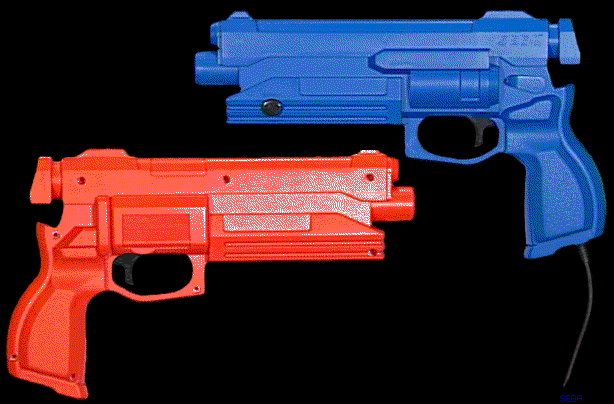
There are three types of virtual guns with different colors depending on the destination area. This takes into account the regulations of toys that imitate the shape of guns by each country. When displaying a virtual gun in OPTION mode, there are no particular restrictions on colors.

<Table / color of virtual gun by region>
Place of destination Body color Trigger / start button name
Japan / Southeast Asia black black Virtual Gun
USA / Canada Orange black STUNNER
Europe Blue black VIRTUA GUN

<STUNNER / VIRTUA GUN color sample>

that's all
INDEX ▲ | STN-38 | STN-39 | STN-40 | STN-41 | STN-42 | STN-43 | STN-44
Copyright SEGA ENTERPRISES, LTD., 1997