SGL User's ManualPROGRAMMER'S STRUCT
BackForward

8-10. Special scroll function

In addition to the normal scrolling function, Sega Saturn has some special scrolling functions. Among these, the SGL library function supports the ASCII scroll function and the transparent color bit control function.

ASCII scroll

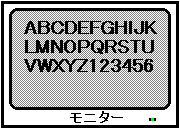
The ASCII scroll function uses data called ASCII cells as character pattern data instead of normal scroll character pattern data. An ASCII cell is a conversion of so-called ASCII data (ABCDEFG ... XYZ) into a data format (cell data) that can be used by scrolling, and the figure below illustrates this.

Figure 8-25 ASCII scroll image

● ASCII scroll uses ASCII data as scroll data.
● Half-width alphanumeric characters are displayed consecutively, and the order corresponds to the ASCII code.

In SGL, ASCII cells are stored in VRAM at the stage of system initialization.
ASCII scrolling can be enabled by using this data when setting the normal scroll function.

ASCII scroll is composed of 128 cells and 256 colors in the system initialization state, and is set to use the normal scroll screen "NBG0". In addition, ASCII scroll data is stored in the following RAM areas.

Character data: 2000H from address 0x25e60000
Map data: 1000H from address 0x25e76000
Palette data: 20H from address 0x25f00000

If for some reason other scroll data is written in the above area, the ASCII scroll will be replaced with those data, and the scroll will be drawn in a different (incorrect) state from the default.

The following sample program (Listing 8-7) draws ASCII scrolls on the TV screen.

Listing 8-7 sample_8_10_1: ASCII scrolling

/ * ------------------------------------------------ ---------------------- * /
/ * Ascii Scroll * /
/ * ------------------------------------------------ ---------------------- * /
#include "sgl.h"
#include "ss_scrol.h"

#define NBG1_CEL_ADR VDP2_VRAM_B1
#define NBG1_MAP_ADR (VDP2_VRAM_B1 + 0x18000)
#define NBG1_COL_ADR VDP2_COLRAM
#define BACK_COL_ADR (VDP2_VRAM_A1 + 0x1fffe)

void ss_main (void)
{
	FIXED ascii_posx = SIPOSX, ascii_posy = SIPOSY;

	slInitSystem (TV_320x224, NULL, 1);
        slTVOff ();
	slPrint ("Sample program 8.10.1", slLocate (9,2));

	slColRAMMode (CRM16_1024);
	slBack1ColSet ((void *) BACK_COL_ADR, 0);

	slCharNbg1 (COL_TYPE_256, CHAR_SIZE_1x1);
	slPageNbg1 ((void *) NBG1_CEL_ADR, 0, PNB_1WORD | CN_10BIT);
	slPlaneNbg1 (PL_SIZE_1x1);
	slMapNbg1 ((void *) NBG1_MAP_ADR, (void *) NBG1_MAP_ADR, (void *) NBG1_MAP_ADR, (void *) NBG1_MAP_ADR);
	Map2VRAM (ascii_map, (void *) NBG1_MAP_ADR, 32, 4, 0, 0);

	slScrAutoDisp (NBG0ON | NBG1ON);
	slTVOn ();

	while (1) {
		slScrPosNbg1 (ascii_posx, ascii_posy);
		ascii_posx + = POSX_UP;
		slSynch ();
	} 
}
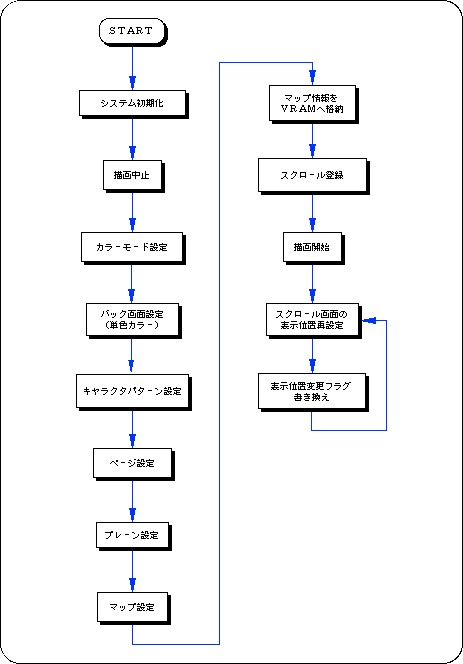
Flow 8-9 sample_8_10_1: ASCII scroll

Transparent color bit

In Sega Saturn, when the palette format is selected for scroll color data, the 0th color data in one palette can be made transparent regardless of the originally registered color data.
A transparent color is a color specification that literally performs processing as if the dot part specified by the transparent color is transparent, and gives priority to drawing such as scrolling behind the scroll specified by the transparent color. Is called. The figure below illustrates this.

<Fig. 8-26 Transparent setting image model>
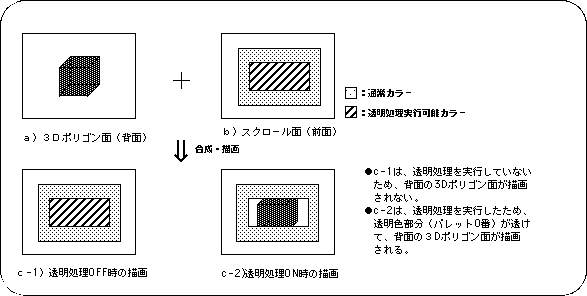
To use the transparent color function in SGL, use the library function "slScrTransparent".
Scrolling after using the function “slScrTransparent” is drawn according to the function specification.

[Void slScrTransparent (Uint16 trns_flag);]
When the palette format is selected for scroll color data, select whether to make the 0th color data in the palette data transparent or not.
Substitute the values in the table below corresponding to the scroll surface on which transparency processing is executed.
Also, by connecting multiple parameters with the or operator "|", it is possible to specify the transparency processing of multiple scroll surfaces.

Table 8-21 Parameter assignment values for “slScrTransparent” (trns_flag)
Scroll surface that performs transparency processing
NBG0 NBG1 NBG2 NBG3 RBG0
Price NBG0ON NBG1ON NBG2ON NBG3ON RBG0ON
Note) The above values are defined in “sl_def.h” attached to the system.

The following sample program (Listing 8-8) actually uses the SGL library function "slScrTransparent" to realize scroll transparent color processing.

Listing 8-8 sample_8_10_2: Controlling transparent code

#include "sgl.h"
#include "ss_scrol.h"

#define NBG1_CEL_ADR VDP2_VRAM_B0
#define NBG1_MAP_ADR (VDP2_VRAM_B0 + 0x10000)
#define NBG1_COL_ADR (VDP2_COLRAM + 0x00200)
#define NBG2_CEL_ADR (VDP2_VRAM_B1 + 0x02000)
#define NBG2_MAP_ADR (VDP2_VRAM_B1 + 0x12000)
#define NBG2_COL_ADR (VDP2_COLRAM + 0x00400)
#define BACK_COL_ADR (VDP2_VRAM_A1 + 0x1fffe)

void ss_main (void)
{
    Uint16 trns_flg = NBG1ON;
    FIXED yama_posx = SIPOSX, yama_posy = SIPOSY;
    FIXED am2_posx = SIPOSX, am2_posy = SIPOSY;
    
    slInitSystem (TV_320x224, NULL, 1);
    slTVOff ();
    slPrint ("Sample program 8.10.2", slLocate (9,2));

    slColRAMMode (CRM16_1024);
    slBack1ColSet ((void *) BACK_COL_ADR, 0);

    slCharNbg1 (COL_TYPE_256, CHAR_SIZE_1x1);
    slPageNbg1 ((void *) NBG1_CEL_ADR, 0, PNB_1WORD | CN_10BIT);
    slPlaneNbg1 (PL_SIZE_1x1);
    slMapNbg1 ((void *) NBG1_MAP_ADR, (void *) NBG1_MAP_ADR, (void *) NBG1_MAP_ADR, (void *) NBG1_MAP_ADR);
    Cel2VRAM (am2_cel, (void *) NBG1_CEL_ADR, 16000);
    Map2VRAM (am2_map, (void *) NBG1_MAP_ADR, 32, 32, 1, 0);
    Pal2CRAM (am2_pal, (void *) NBG1_COL_ADR, 256);

    slCharNbg2 (COL_TYPE_256, CHAR_SIZE_1x1);
    slPageNbg2 ((void *) NBG2_CEL_ADR, 0, PNB_1WORD | CN_12BIT);
    slPlaneNbg2 (PL_SIZE_1x1);
    slMapNbg2 ((void *) NBG2_MAP_ADR, (void *) NBG2_MAP_ADR, (void *) NBG2_MAP_ADR, (void *) NBG2_MAP_ADR);
    Cel2VRAM (yama_cel, (void *) NBG2_CEL_ADR, 31808);
    Map2VRAM (yama_map, (void *) NBG2_MAP_ADR, 32, 16, 2, 256);
    Pal2CRAM (yama_pal, (void *) NBG2_COL_ADR, 256);

    slScrPosNbg2 (yama_posx, yama_posy);
    slScrPosNbg1 (am2_posx, am2_posy);
    slScrTransparent (trns_flg);

    slScrAutoDisp (NBG0ON | NBG1ON | NBG2ON);
    slTVOn ();

    while (1)
    {
        if (yama_posx> = (SX + SIPOSX))
        {
            if (trns_flg == NBG1ON)
                trns_flg = 0;
            else else
                trns_flg = NBG1ON;
            yama_posx = SIPOSX;
            slScrTransparent (trns_flg);
        }

	slScrPosNbg2 (yama_posx, yama_posy);
	yama_posx + = POSX_UP;

	slScrPosNbg1 (am2_posx, am2_posy);
	am2_posy + = POSY_UP;

	slSynch ();
    } 
}
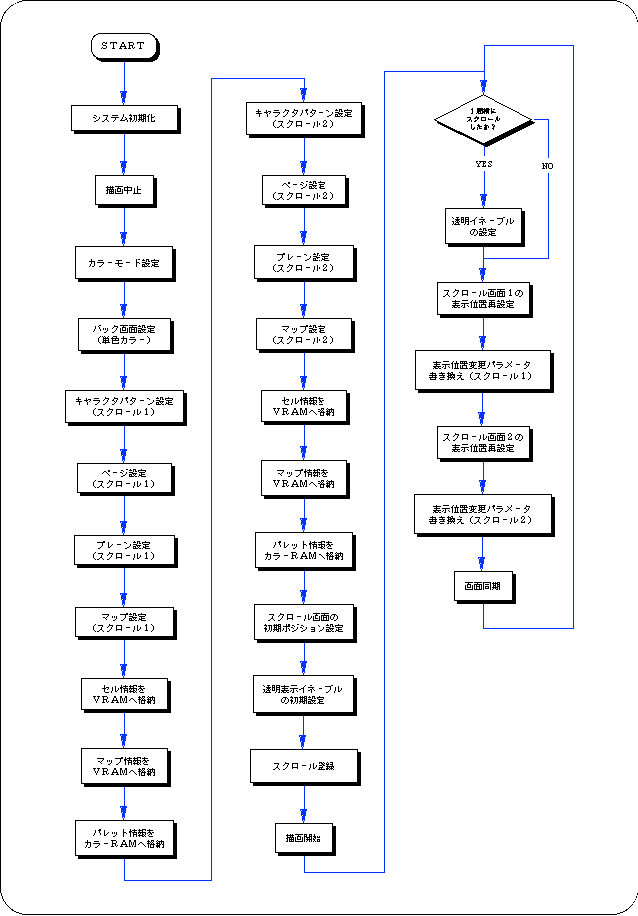
Flow 8-10 sample_8_10_2: Control of transparent code

Color calculation

In SGL, it is possible to calculate the color data of the top image and the second image obtained by comparing the priority of each scroll screen with the sprite at the specified ratio and display it on the screen.
By using this function, it is possible to draw other scroll surfaces and sprites that are hidden behind one scroll so that they gradually emerge.

To perform color arithmetic processing, you need to take the following steps.

1) Various settings for color calculation processing
Use the function “slColorCalc” to make various settings for color calculation processing, and use the function “slColorCalcOn” to determine the scroll surface affected by the color calculation.

[Void slColorCalc (Uint16 flag);]
Make various settings for color calculation processing.

Substitute the values shown in the figure below for the parameters that correspond to the color calculation processing control to be used.
For details on the parameters, refer to "HARDWARE MANUAL vol.2: VDP2 User's Manual Chapter 12 Color Calculation".

Figure 8-27 Parameter assignment value (flag) of “slColorCalc”

● ColorCalc substitution value ●
Calculation method: [CC_RATE | CC_ADD] |
Calculation designated image: [CC_TOP | CC_2ND] |
Extended color calculation: [CC_EXT] |
Registration side: [NBG0ON | NBG1ON | NBG2ON | NBG3ON | RBG0ON | LNCLON | SPRON] |

Note) The above values are defined in “sl_def.h” attached to the system.

There are two main modes for color calculation.

Add by ratio: Color calculation (CC_RATE) by specifying the calculation ratio of TOP image and 2ND image
Add as it is: Color calculation (CC_ADD) with a simple addition value of TOP image and 2ND image

[Void slColorCalcOn (Uint16 flag);]
Determines the scroll plane affected by color arithmetic processing.
Substitute the values in the table below that correspond to the scroll surface on which you want to perform color operations.
Also, by concatenating multiple parameters with the or operator "|", it is possible to specify color operations for multiple scroll planes at the same time.

Table 8-22 Parameter assignment value (flag) of “slColorCalcOn”
Scroll surface that performs color operations
NBG0 NBG1 NBG2 NBG3 RGB0 LNCL SPRITE
Price NBG0ON NBG1ON NBG2ON NBG3ON RBG0ON LNCLON SPRITEON
Note) The values in the above table are defined in “sl_def.h” attached to the system.

2) Setting color calculation values
The scroll surface that has been set and registered for color calculation actually executes color calculation processing by using the functions "slColRateNbg0 to 3", "slColRateRbg0", "slColRateLNCL", and "slColRateBACK" corresponding to each scroll surface. Can be (specified by ratio).

However, if the addition method is adopted for the color calculation, the ratio specification has no meaning.
[Void slColRateNbg0 ~ 3 (Uint16 rate);]
[Void slColRateRbg0 (Uint16 rate);]
[Void slColRateLNCL (Uint16 rate);]
[Void slColRateBACK (Uint16 rate);]
Set the color calculation ratio for each scroll surface specified by the function.
Substitute the color calculation ratio (range 0 to 31) used in the color calculation for the parameter.
The function "slColRateNbg0-3" is used for each normal scroll screen, the function "slColRateRbg0" is used for the rotary scroll screen, the function "slColRateLNCL" is used for the line color screen, and the function "slColRateBACK" is used for setting the color calculation ratio of the back screen.

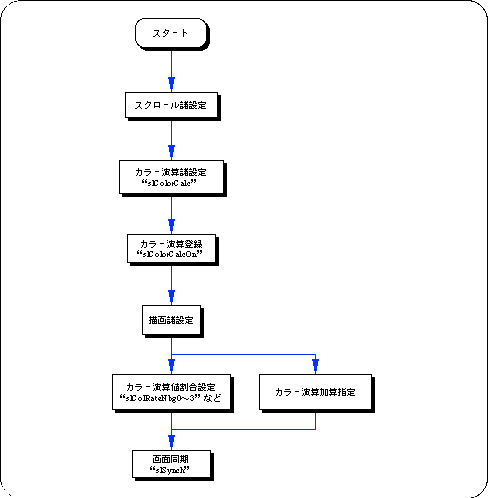
The flow of color calculation processing can be roughly summarized as follows.

Flow 8-11 Flow of color calculation processing

Line color screen

The line color screen is a special scroll surface prepared only for forcibly inserting the top image of the specified scroll surface (the image actually drawn on the monitor) as the second image and performing color calculation.
On the line color screen, you can set the color for the entire screen or for each line.
In addition, it is necessary to store the set of color RAM address data of the color used for each line in the VRAM area as a line color table.

reference
For details on the line color screen, refer to "HARDWARE MANUAL vol.2: Line screen of VDP2 User's Manual".

To use the line color screen, you need to take the following steps:

1) Line color screen settings
When using the line color screen, you must first specify the line color table in which the line color data is stored.
Also, don't forget to store the color data specified in the line color table in the color RAM area.

[Void slLineColTable (void * adr);]
Specify the line color table address.
The parameter specifies the address in the VRAM area where the line color table is stored.

If you want to use a single color for the line color screen, use the function “slLine1ColSet”.

[Void slLine1ColSet (void * adr, Uint16 col);]
The line color screen is set to a single color, and the color is also determined at the same time.

2) Registration of scroll surface
Next, register the scroll surface affected by the line color screen.
Use the function “slLineColDisp” to register the scroll plane.

[Void slLineColDisp (Uint16 flag);]
Line color Determines the scroll plane affected by the screen.
Substitute the values in the table below corresponding to the scroll surface you want to register for the parameters.
Also, by connecting multiple parameters with the or operator "|", multiple scroll planes can be registered at the same time.

Table 8-23 Parameter assignment value (flag) of “slLineColDisp”
Scroll surface to register
NBG0 NBG1 NBG2 NBG3 RBG0
Price NBG0ON NBG1ON NBG2ON NBG3ON RBG0ON
Note) The values in the above table are defined in “sl_def.h” attached to the system.

3) Color calculation using the line color screen
The scroll surface that has been registered with the function "slLineColDisp" can be used together with the above-mentioned color calculation processing settings to execute color calculation processing using a line color image.
For color calculation processing, refer to the previous section "Color calculation".

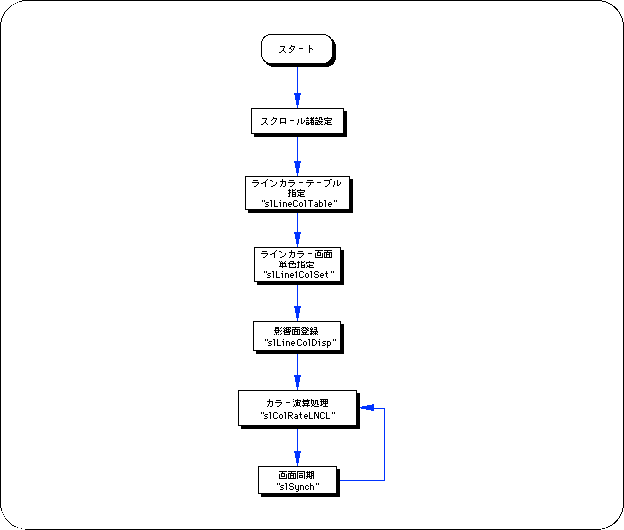
Flow 8-12 Line color screen processing flow

Color offset

In SGL, the color displayed on the screen can be changed by adding or subtracting an offset value to the color RAM data of the sprite and each scroll screen (this value itself does not change).
If you want to use the color offset function, you need to follow the steps below.

1) Various color offset settings
There are two types of color offset, color offset A and B.
For the scroll surface that you want to use the color offset function, you need to register the scroll surface in one of the two color offsets.
Use the functions “slColOffsetOn” and “slColOffsetBUse” to register the scroll.

[Void slColOffsetOn (Uint16 flag);]
Register the scroll surface for which you want to use the color offset function.
Substitute the values in the table below corresponding to the scroll surface to be registered for the parameters.

[Void slColOffsetBUse (Uint16 flag);]
Register the scroll surface for which you want to use color offset B.
Offset A is used for the scroll surface registered only by the function “slColOffsetOn”.
Substitute the values in the table below corresponding to the scroll surface to be registered for the parameters.

Table 8-24 Parameter assignment values (flag) for “slColOffsetOn” and “slColOffsetBUse”

Scroll surface to register
NBG0 NBG1 NBG2 NBG3 RBG0 BACK SPRITE
Price NBG0ON NBG1ON NBG2ON NBG3ON RBG0ON BACKON SPRON
Note) The values in the above table are defined in “sl_def.h” attached to the system.

2) Offset value setting
Each scroll surface that has been registered is displayed on the screen under the influence of the offset value set for each color offset.
Use the function “slColOffSetA, B” to set the offset value for each color offset.

[Void slColOffsetA (Sint16 r, Sint16 g, Sint16 b);]
[Void slColOffsetB (Sint16 r, Sint16 g, Sint16 b);]
Sets the color offset value for each color offset.
The offset value (signed 9 bits) of each RGB color element is assigned to the parameter.
The function "slColOffSetA" is used to set the offset value of color offset A, and the function "slColOffSetB" is used to set the offset value of color offset B.


BackForward
SGL User's ManualPROGRAMMER'S STRUCT
Copyright SEGA ENTERPRISES, LTD., 1997