 ★ SGL User's Manual ★ PROGRAMMER'S STRUCT
 In this chapter, we will explain the recognition method and actual operation of the Sega Saturn data input device using the Sega Saturn PAD, which is a typical Sega Saturn input device.
The Sega Saturn PAD has four direction keys, ABCXYZ buttons, an LR button on the top of the controller, and a start button as input devices.
We will explain how the data input using each input device of these controllers is judged inside Sega Saturn together with the sample program.
The data input device mainly used in Sega Saturn is a control PAD attached to the main body called Sega Saturn PAD. Sega Saturn PAD is a direction key, start button, ABC button, XYZ arranged to point in four directions. It is an input device consisting of buttons and LR buttons.
Figure 9-1 Example of input device (Sega Saturn PAD)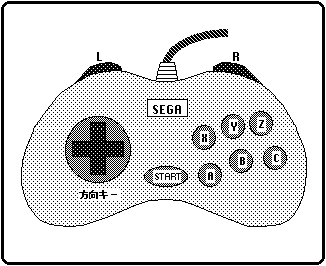
Genus | Name | Input composition | remarks |
|---|---|---|---|
| Digital | Sega Saturn PAD | Arrow keys, start, 8 buttons | Sega Saturn standard pad |
| Sega Saturn Mouse | XY movement amount, start, 3 buttons | The amount of mouse movement is stored as an absolute value. | |
| Megadora 3 button pad | Arrow keys, start, 3 buttons | Can be connected with Sega Tap | |
| Megadora 6 button pad | Arrow keys, start, 6 buttons | Can be connected with Sega Tap | |
| analog | Analog joystick (Mission stick) | Direction lever, start, 8 buttons | The amount of movement is the absolute value of the unsigned A / D output. |
| Special | Sega Saturn keyboard | Compatible with IBM keyboards | |
| Auxiliary device | Sega Saturn 6P multi-tap | Number of connects 6 | |
| Sega tap | Number of connects 4 | Used to connect the Megadora PAD |
Sega Saturn PAD is processed as a set of bits as follows.
| bit7 | bit6 | bit5 | bit4 | bit3 | bit2 | bit1 | bit0 | |
|---|---|---|---|---|---|---|---|---|
| Peripheral ID | 0 | 0 | 0 | 0 | 0 | 0 | 1 | 0 |
| 1st DATA | → | ← | ↓ | ↑ | Start | A | C | B |
| 2nd DATA | R | X | Y | Z | L | 1 | 1 | 1 |
Figure 9-2 Input state bit array of Sega Saturn PAD (16-bit display)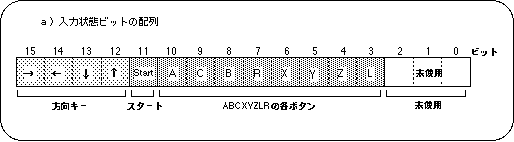
Figure 9-3 Changes in input state bit string (Sega Saturn PAD)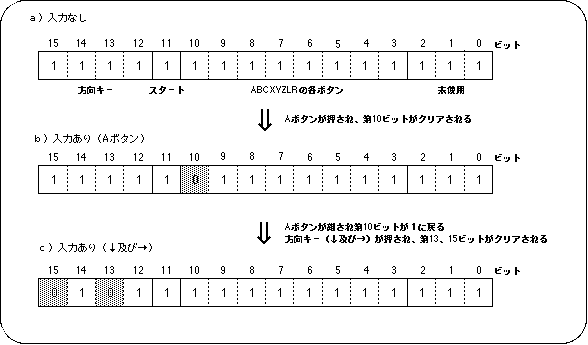
● Definition of PerDigital structure ●

typedef struct {/ * digital device * /
	Uint8 id; / * Peripheral ID * /
	Uint16 data; / * Current peripheral data * /
	Uint16 push / * Pressed switch data * /
	Uint16 pull / * Data of released switch * /
} PerDigital;
data: 16-bit long peripheral data (indicating the current bit state)
push: 16-bit long peripheral data (bits are changed only at the moment when input is executed)
pull: 16-bit long peripheral data (bits are changed only at the moment when input is released)
id: 8-bit data string indicating the device peripheral ID
Note <BR> For details on peripherals, refer to "HARDWEAR MANUAL vol.1" and the header file "sl_def.h" attached to the system.
● Pat assignment ●
#define PER_DGT_KR (1 << 15) / * Arrow keys (→) * /
#define PER_DGT_KL (1 << 14) / * Arrow keys (←) * /
#define PER_DGT_KD (1 << 13) / * Direction key (↓) * /
#define PER_DGT_KU (1 << 12) / * Arrow keys (↑) * /
#define PER_DGT_ST (1 << 11) / * Start button * /
#define PER_DGT_TA (1 << 10) / * A button * /
#define PER_DGT_TC (1 << 9) / * C button * /
#define PER_DGT_TB (1 << 8) / * B button * /
#define PER_DGT_TR (1 << 7) / * R trigger * /
#define PER_DGT_TX (1 << 6) / * X button * /
#define PER_DGT_TY (1 << 5) / * Y button * /
#define PER_DGT_TZ (1 << 4) / * Z button * /
#define PER_DGT_TL (1 << 3) / * L trigger * /
Figure 9-6 Pad assignment details (for PER_DGT_TA)
Figure 9-7 Confirmation of input status using assignment data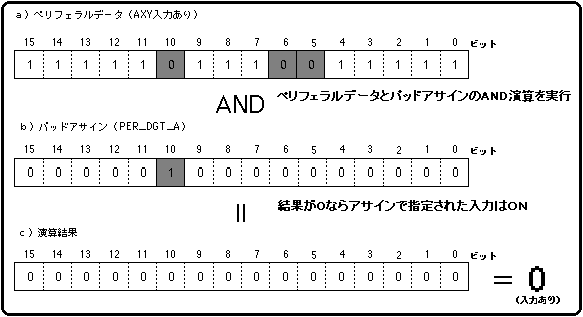
/ * ------------------------------------------------ ---------------------- * /
/ * Pad Control * /
/ * ------------------------------------------------ ---------------------- * /
#include "sgl.h"
#include "sega_sys.h"

#define NBG1_CEL_ADR (VDP2_VRAM_B1 + 0x02000)
#define NBG1_MAP_ADR (VDP2_VRAM_B1 + 0x12000)
#define NBG1_COL_ADR (VDP2_COLRAM + 0x00200)
#define BACK_COL_ADR (VDP2_VRAM_A1 + 0x1fffe)
#define PAD_NUM 13

static Uint16 pad_asign [] = {
	PER_DGT_KU,
	PER_DGT_KD,
	PER_DGT_KR,
	PER_DGT_KL,
	PER_DGT_TA,
	PER_DGT_TB,
	PER_DGT_TC,
	PER_DGT_ST,
	PER_DGT_TX,
	PER_DGT_TY,
	PER_DGT_TZ,
	PER_DGT_TR,
	PER_DGT_TL,
};

extern pad_cel [];
extern pad_map [];
extern pad_pal [];
extern TEXTURE tex_spr [];
extern PICTURE pic_spr [];
extern FIXED stat [] [XYZS];
extern SPR_ATTR attr [];
extern ANGLE angz [];

static void set_sprite (PICTURE * pcptr, Uint32 NbPicture)
{
	TEXTURE * txptr;

	for (; NbPicture-> 0; pcptr ++) {
		txptr = tex_spr + pcptr-> texno;
		slDMACopy ((void *) pcptr-> pcsrc,
			(void *) (SpriteVRAM + ((txptr-> CGadr) << 3)),
			(Uint32) ((txptr-> Hsize * txptr-> Vsize * 4) >> (pcptr-> cmode)));
	}
}

static void disp_sprite ()
{
	static Sint32 i;
	Uint16 data;

	if (! Per_Connect1) return;
	data = Smpc_Peripheral [0] .data;

	for (i = 0; i <PAD_NUM; i ++) {
		if ((data & pad_asign [i]) == 0) {
			slDispSprite ((FIXED *) stat [i],
				(SPR_ATTR *) (& attr [i] .texno), (ANGLE) angz [i]);
		}
	}
}

void ss_main (void)
{
	slInitSystem (TV_320x224, tex_spr, 1);
	slTVOff ();
	set_sprite (pic_spr, 1);
	slPrint ("Sample program 9.1", slLocate (9,2));

	slColRAMMode (CRM16_1024);
	slBack1ColSet ((void *) BACK_COL_ADR, 0);

	slCharNbg1 (COL_TYPE_256, CHAR_SIZE_1x1);
	slPageNbg1 ((void *) NBG1_CEL_ADR, 0, PNB_1WORD | CN_12BIT);
	slPlaneNbg1 (PL_SIZE_1x1);
	slMapNbg1 ((void *) NBG1_MAP_ADR, (void *) NBG1_MAP_ADR, (void *) NBG1_MAP_ADR, (void *) NBG1_MAP_ADR);
	Cel2VRAM (pad_cel, (void *) NBG1_CEL_ADR, 483 * 64);
	Map2VRAM (pad_map, (void *) NBG1_MAP_ADR, 32, 19, 1, 256);
	Pal2CRAM (pad_pal, (void *) NBG1_COL_ADR, 256);

	slScrPosNbg1 (toFIXED (-32.0), toFIXED (-36.0));
	slScrAutoDisp (NBG0ON | NBG1ON);
	slTVOn ();

	while (1) {
		disp_sprite ();
		slSynch ();
	}
}
| Forwarding destination | ||||
|---|---|---|---|---|
| Increment | Decrement | Fixed | ||
| Forwarding source | Increment | Sinc_Dinc_Byte | Sinc_Ddec_Byte | Sinc_Dfix_Byte |
| Decrement | Sdec_Dinc_Byte | Ban | Sdec_Dfix_Byte | |
| Fixed | Sfix_Dinc_Byte | Sfix_Ddec_Byte | Ban | |
Functional type | Seki several people | Parameter | function |
|---|---|---|---|
| void | slDispSprite | FIXED * pos, ATTR * atrb, ANGLE Zrot | Sprite display by specifying the position, scale, and display angle |
| void | slPutSprite | FIXED * pos, ATTR * atrb, ANGLE Zrot | Sprite display according to perspective conversion |
| void | slSetSprite | SPRITE * parms, FIXED Zpos | Set in a buffer to transfer sprite data to hardware |
| void | slDMACopy | void * src, void * dst, Uint32 cnt | DMA transfer only C from A to B (same bus transfer possible) |
| void | slDMAWait | void | Wait until the DMA transfer ends |
| void | slDMAXCopy | void * src, void * dst, Uint32 cnt, Uint16 mode | DMA transfer from A to B in C only D transfer mode (same bus transfer possible) |
★ SGL User's Manual ★ PROGRAMMER'S STRUCT