SGL User's ManualPROGRAMMER'S STRUCT
BackForward
PROGRAMMER'S STRUCT

10. Event control


This chapter describes the specific usage of the event structure and event management functions.
By using the idea of events, it is possible to describe a program as a combination of program events (each element in the program), which makes it very easy to understand the flow of the entire program. Furthermore, since each program event can be used in common, the program can be simplified.

10-1. Event structure

Event processing

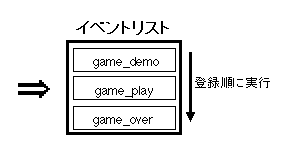
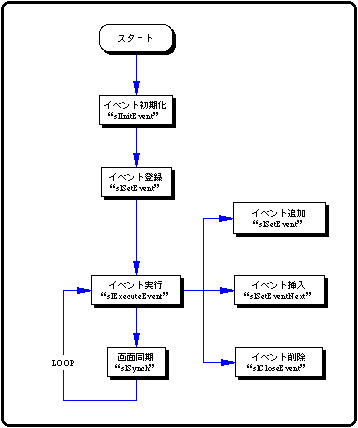
Event processing is a process in which a group of functions appearing in a program list is represented by a label called an event, and a list of consecutive events is executed in order from the beginning.
By using event processing, it is possible to process complicated functions that are executed continuously as a simple list of labels. Also, the execution order can be easily changed as an operation of the label registered as an event.
Therefore, the flow of the entire program can be grasped, and common use of events and simplification of the program can be achieved.

Figure 10-1 Event image

/ * Omitted * /

slInitEvent (); / * Event initialization * /

slSetEvent ((void *) game_demo ); / * Event registration * /
slSetEvent ((void *) game_play );
slSetEvent ((void *) game_over );

slExecuteEvent (); / * Execute event * /

void game_demo (EVENT * evptr) {/ * Execute event 1 (game_demo) * /
		::
}

void game_play (EVENT * evptr) {/ * Execute event 2 (game_play) * /
		::
}

void game_over (EVENT * evptr) {/ * Execute event 3 (game_over) * /
		::
}

/ * Abbreviation * /

The functions registered as events and the execution order of events are processed in the event management area called the EVENT structure secured in the event RAM area.
In SGL, the event execution order is called the event list.

EVENT structure

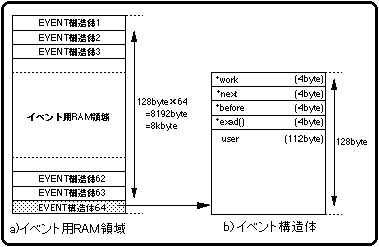
The event is defined as an EVENT structure in the event RAM area (8kbyte). One EVENT structure consists of 128 bytes, and up to 64 EVENT structures can be defined in this RAM area. The EVENT structure is structured as shown in Figure 10-2.

Figure 10-2 EVENT structure

Each EVENT structure consists of the following members:

* work: The start address of the WORK structure for user area extension.
* next: The start address of the next event to be executed.
* before: The start address of the event that is executed immediately before.
* exit (): The start address of the area where the function to be executed as an event is stored.
user []: User area for storing variables used by event-registered functions.
       It is also possible to expand the user area using work.

Also, if each member of “* work”, “* next”, and “* before” does not have the corresponding address, NULL is assigned.

When the user uses the user area in the EVENT structure, it is very convenient to cast the user area with a structure defined for the user.

The user area of one EVENT structure is composed of 112 bytes, but if you want to use the user area beyond this, you can extend the user area by using a work or the like. For details on expanding the user area, refer to "Section 10-4: Expanding the user area".

Event list

Each event defined as an EVENT structure in the event RAM area organizes the list according to the order of the events to be executed.
A list is a series of events that are concatenated and executed by “* next” and “* before” reserved in the event structure, and are called an event list.
In addition, events that are executed continuously in the event list do not necessarily have to be stored in the event RAM area continuously, and if the pointers are concatenated with "* next" and "* before", It runs continuously.

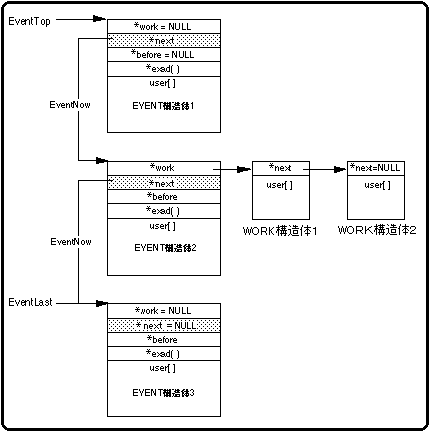
Figure 10-3 Event list structure

Note) NULL (0) if the corresponding event work does not exist

The system has the start address of the EVENT structure registered at the beginning of the event list as the EventTop variable, and when executing the event, the event specified by "EventTop" is executed in order.
The executed event passes the value of the pointer “* next” in the EVENT structure to the EventNow variable, and the system executes the EVENT structure starting from the address pointed to by “EventNow” next. The system executes the events in order according to “EventNow”, and ends the event execution process when the value pointed to by “* next” becomes NULL (there is no event to follow).
The EventLast variable points to the start address of the EVENT structure registered at the end of the list and is used when adding / registering an event. In addition, the EventLast variable is changed only when "slSetEvent", "slSetEventNext", and "slCloseEvent" are executed in the library functions.
“* Before” is used when inserting / registering / deleting an event.

10-2. Event processing using SGL function

Here, we will explain the actual event processing using the SGL library function.

Event initialization

In order to use event processing in SGL, it is necessary to first initialize the buffer and event list related to the event.

To perform event initialization in SGL, use the library function "slInitEvent".

[Void slInitEvent (void);]
Performs all initialization related to event processing (event list, buffer initialization, etc.).

 caution
If event processing is used without executing event initialization, it will be inconsistent with uninitialized buffers, event lists, etc., and in the worst case, the CPU may stop.
(Detail is
See "Section 10-5: Precautions for event processing").

Creating an event list

To process events, you need to register the events as an event list in the order of execution.
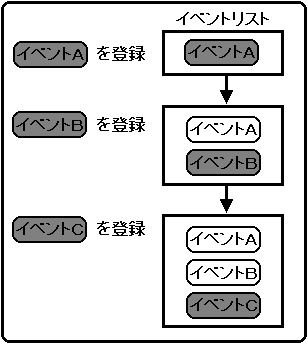
Events are added to the event list by the event registration library function “slSetEvent” as shown in Figure 10-4.
The registered events are sequentially registered at the end of the event list, and are executed in order from the beginning of the event list by the event execution library function "slExecuteEvent".

Figure 10-4 Creating an event list

Use the library function “slSetEvent” to register the event.

[EVENT * slSetEvent (void (* func) ());]
Allocate an EVENT structure (128 bytes) in the event RAM area, and add / register a new event at the end of the event list. Substitute the execution address value of the event to be registered in the parameter.
The function “slSetEvent” returns the start address of the registered EVENT structure as a return value. If registration of the event fails, NULL is returned.

See the next section for the format and structure of the event.

Event format

The function group registered as an event should have the format shown in Figure 10-5.

Figure 10-5 Event format
● Event format ●

void function_name (EVENT * evptr) {execute_contents} ↑ ↑ ↑ | | Event execution content | Start address of EVENT structure Event name

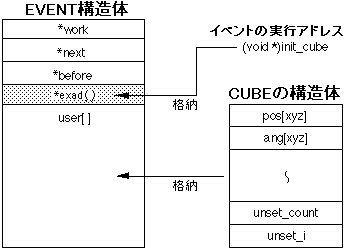
In addition, the events to be registered and executed are managed by the EVENT structure.
The EVENT structure stores the execution address of the event to be registered and the structure for variables used in the event, and manages the event with these two.

Figure 10-6 Event structure
/ * Omitted * /
slSetEvent ((void *) init_cube);

slExecuteEvent ();

typedef struct cube {FIXEDpos [xyz];
				ANGLE ang [xyz]
;
		::
			Sint16 unset_count;
			Sint16 unset_i;
		} CUBE;

void init_cube (EVENT * evptr)
{
	CUBE * cubeptr;

	cubeptr = (CUBE *) evptr-> user;

	cubeptr-> pos [x] = pos_x;

		::

	cubeptr-> unset_count = 0;

	disp_cube (evptr);
}

/ * Abbreviation * /

  • Functions registered as events are controlled by the EVENT structure.
  • The member “* exad ()” stores the execution address of the registered event, and the member “user []” stores the structure used in the event.
  • The structure is used for variables in the event, but be careful that the structure does not exceed the user area (size: 112 bytes).
  • If you want to use more variables, extend the user area by using a WORK structure etc. so that the structure itself is also divided and stored.

    About the structure for variables in the event

    When using various variables in an event, those variables must be defined as a structure.
    <The defined in-event variable structure is stored in the user area (112 bytes) in the EVENT structure when the event is registered (the storage work is done by the user), and is used at any time after that when the event is executed.
    Therefore, the in-event variable structure cannot be set beyond the size of the user area (112 bytes) in which the structure is stored.
    <However, if you want to use more variables, extend the user area using a WORK structure, etc., and store and use the in-event variable structure by dividing it to fit the size of the user area. (For how to extend the user area, refer to "10-4: Extending the user area").

    Event execution

    The events registered in the event list are executed in order by the event management function.
    The library function “slExecuteEvent” is used to execute the event.

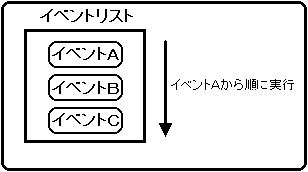
    For example, if event A, event B, and event C are registered in the event list in order using the library function "slSetEvent", each event will be executed in the order shown in the figure below according to the event list.

    Figure 10-7 Executing an event

    [Void slExecuteEvent (void);]
    The events registered in the event list are executed in the order of the list.

    10-3. Change the event list

    Add event

    You can add an event to the events registered in the event list.
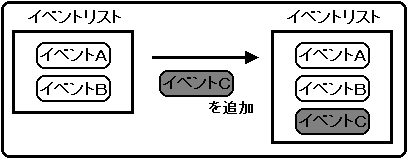
    The event is added to the end of the event list.
    To add an event, use the same library function “slSetEvent” that was used for event registration.

    Figure 10-8 Adding an event

    [EVENT * slSetEvent (void (* func) ());]
    Allocate an EVENT structure (128 bytes) in the event RAM area, and add / register a new event at the end of the event list. Substitute the execution address value of the event to be registered in the parameter.
    The function “slSetEvent” returns the start address of the registered EVENT structure as a return value.
    If registration of the event fails, NULL is returned.

    Insert event

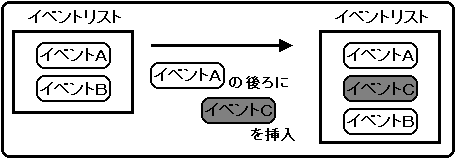
    You can insert an event into an event registered in the event list.
    The event will be inserted after the specified event.
    Use the library function “slSetEventNext” to insert an event.

    Figure 10-9 Inserting an event

    [EVENT * slSetEventNext (EVENT * evptr, void (* func) ());]
    An EVENT structure (128 bytes) is secured in the event RAM area, and a new event is inserted / registered in the middle of the event list. Substitute the start address of the EVENT structure immediately before inserting the event and the execution address of the event to be inserted / registered in the parameters.
    The function “slSetEventNext” returns the start address of the registered EVENT structure as a return value.
    If registration of the event fails, NULL is returned.

    Delete event

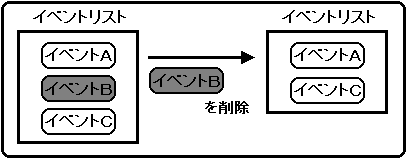
    Events registered in the event list can be deleted from the event list.
    Use the library function “slCloseEvent” to delete an event.

    Figure 10-10 Deleting an event

    [Void slCloseEvent (EVENT * evptr);]
    Deletes the event specified by the parameter from the event list.
    At the same time, if the member "work" of the specified event is not NULL, all attached works are returned to the system assuming that there is a work list.
    Assign the start address of the EVENT structure to be deleted to the parameter.
    Also, the function “slCloseEvent” does not check whether the area to be returned is a registered EVENT structure. Therefore, if you accidentally return the extended user area to the system, you will not know.
    In this case, various problems may occur, and in the worst case, the CPU may stop (see "10-5: Precautions for event processing" for details).

    Change the event list during event execution

    If you try to change the event list in any way while executing the event registered event list (such as changing the event list within an event), the changed event will be affected as shown in the following figure.

    Figure 10-11 Modifying the event list during event execution
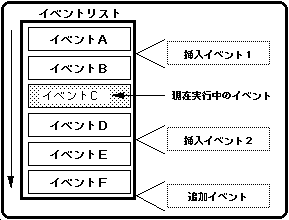
    Changes to the (executed) event list before the currently running event will be applied the next time the event list is executed. Changes to the (unexecuted) event list that are currently running and after the event will be executed in the order of the event list that was changed when this event was executed. Any changes to add, insert or delete events will be made under this application.

    10-4. Expansion of user area

    When writing a program using event processing, the variable group (structure) used by the function executed as an event may not fit in the user area (112 bytes) of the event in some cases.
    In such a case, SGL can extend the user area and use it.
    There are two ways to expand the user area, one is to use an extension-only area called work, and the other is to acquire an extension area of the same size as the EVENT structure from the event RAM area.

    Extension of user area using work area

    In SGL, the user area expansion dedicated area called work can be used to extend the user area of the EVENT structure.
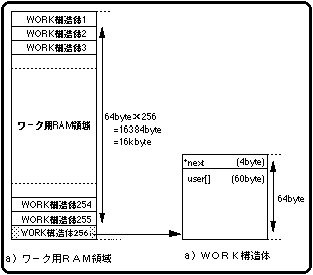
    A work is defined as a WORK structure (64 bytes) in the work RAM area, and up to 256 works can be used.
    The size of the user area that can be expanded per work is 60 bytes.
    The remaining 4 bytes of the WORK structure are used to address the WORK structure to be concatenated.

    Figure 10-12 WORK structure

    The members of the WORK structure are as follows:

    * next: The start address of the WORK structure that you want to connect as a chain structure.
          If there is no work to follow as a chain structure, NULL is assigned.
    
    user []: Extended user area (60 bytes).
    

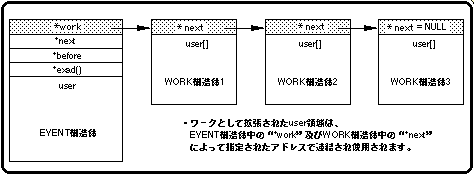
    The work acquired as a WORK structure is concatenated by substituting the start address of the WORK structure for “* work” in the EVENT structure to form a chain structure.
    In addition, the work can further expand the user area by acquiring the work again in the WORK structure. At this time, by substituting the start address of the WORK structure to be linked to “* next” in the WORK structure, the linked work can be made into a chain structure.
    When there is no WORK structure that follows as a chain structure, NULL is assigned to “* next”.

    Figure 10-13 Work concatenation

    To use the work in SGL, use the library functions "slGetWork" and "slReturnWork". “SlGetWork” is used to acquire the work, and “slReturnWork” is used to release the work.

    [WORK * slGetWork (void);]
    Allocate a WORK structure (64 bytes) in the work RAM area.
    The function “slGetWork” returns the WORK structure address value of the allocated work area as a return value. If space allocation fails, the function returns NULL.

    [Void slReturnWork (WORK * wkptr);]
    Returns / releases the work area specified by the parameter. Assign the WORK structure address value of the work area to be returned to the parameter. Also, when returning or releasing a part of the workpieces connected by the chain structure to the system, adjust so that the chain structure of the remaining workpieces is correct. If adjustments are not made, the chain structure and work processing may become inconsistent, and the CPU may stop in the worst case (see “10-5: Precautions for event processing” for details).

    About the operation of the concatenated WORK structure by releasing the EVENT structure

    The work does not necessarily have to form a chain structure using “* work” and “* next”, and the start address of the WORK structure to be linked can be stored in the user area.
    However, for the work connected by "* work" and "* next", the work is returned and released to the system at the same time by releasing the event, but the work connected from the user area releases the event. Does not release the WORK structure.
    Therefore, the WORK structure connected from the user area must be returned / released to the system by the library function “slReturnWork” when the event is released.

    Expansion of user area using event area

    If the size of one user area to be expanded is not enough for the WORK structure (60 bytes), a user area of the same size (128 bytes) as the EVENT structure can be secured from the event RAM area.
    However, since the area originally allocated for one event is used as the user area, the maximum number of events that can be registered will be reduced by that amount.

    Figure 10-14 Expanding the user area using the event RAM area
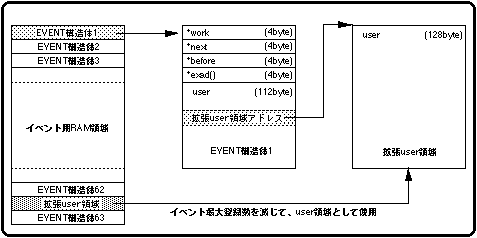
    To extend the user area of the EVENT structure using the event RAM area in SGL, use the library functions "slGetEvent" and "slReturnEvent". “SlGetEvent” is used to secure the user area, and “slReturnEvent” is used to release the user area.

    [EVENT * slGetEvent (void);]
    Extract the RAM area of the same size (128 bytes) as the event from the event RAM area and use it as the user area. Also, since the area allocated for the EVENT structure is used as the user area, the number of events that can be registered is reduced accordingly.
    The function “slGetEvent” returns the start address of the allocated RAM area as a return value.
    If space allocation fails, the function returns NULL.

    [Void slReturnEvent (EVENT * evptr);]
    Returns / releases the event RAM area specified by the parameter to the system.
    Assign the start address of the RAM area to be returned to the parameter.
    Also, the function “slReturnEvent” does not check if the area to be returned is an extended user area. Therefore, even if you mistakenly return the EVENT structure registered as an event to the system, you will not know. In this case, various problems will occur, and in the worst case, the CPU may stop (see “10-5: Precautions for event processing” for details).

    10-5. Precautions for event processing

    When processing events, pay special attention to returning / releasing to the system in various areas. This is caused because the return / release operation does not check whether the area pointed to by the specified parameter of the function to be operated is the type of area that the function should handle.

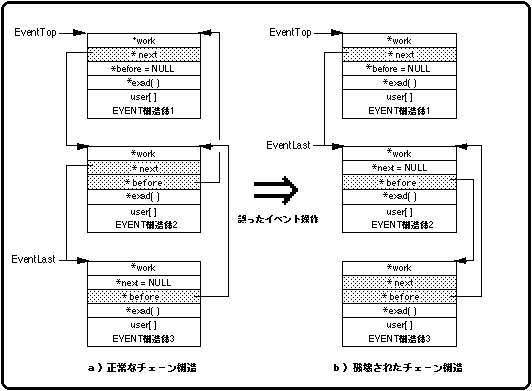
    For example, when you try to return / release the extended user area using the library function "slReturnEvent", if you accidentally return / release the area registered as a normal event, the following adverse effects will occur. In the worst case, the CPU may stop.

    1. Return of area <BR> The EVENT structure specified by the function "slReturnEvent" is returned to the system.

    2. Event list
      The EVENT structure is not released as an event and therefore remains in the event list.

    3. Since the new event registration <BR> area is systematically free, it can be freely used by using the function "slSetEvent" or the like.

    4. Inconsistency in chain structure <BR> Although it is registered in the event list, the contents of the EVENT structure are rewritten because the area is in a free state, which causes a problem in the chain structure.

    5. CPU stop <BR> The chain structure becomes inconsistent, and in the worst case, the CPU stops.

    Figure 10-15 Incorrect event operation

    10-6. Event processing flow

    The following flowchart shows the general flow of event processing. In event processing, the user area is expanded as needed inside the event to be executed, and variables are used by using structures.

    Flow 10-1 Event processing flow

    10-7. Example of using the event

    The sample program “sample_10” (Listings 10-1 and 10-2) is an example of actual plumming using event processing. The program uses events to control and execute the display and non-display of cubes.

    The program is roughly divided into two. Listing 10-1 “main.c” shows system initialization and event execution, and Listing 10-2 “sample.c” shows event initialization / event content definition / registration. I am doing.

    Listing 10-1 sample_10: Event processing (main.c)
    / * ------------------------------------------------ ---------------------- * /
    / * Event Demo * /
    / * ------------------------------------------------ ---------------------- * /
    #include "sgl.h"
    
    void ss_main (void)
    {
    	slInitSystem (TV_320x224, NULL, 1);
    	slPrint ("Sample program 10", slLocate (9,2));
    
    	set_event ();
    	while (-1) {
    		slExecuteEvent ();
    		slSynch ();
    	}
    }
    

    Flow 10-2 sample_10: Main loop
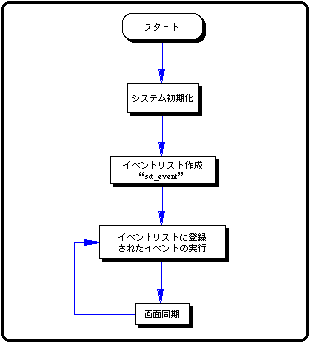
    Listing 10-2 shows the part of “sample10” where the event is registered and the event execution contents are defined. In addition, the contents of the event list are changed (added / deleted) in the user-defined function "disp_cube".

    Listing 10-2 sample_10: Event processing (sample.c)
    #include "sgl.h"
    
    extern PDATA PD_CUBE;
    
    #define POS_X toFIXED (0.0)
    #define POS_X_UP 200.0 
    #define POS_Y toFIXED (20.0)
    #define POS_Z toFIXED (270.0)
    #define POS_Z_UP 50.0
    #define SET_COUNT 500
    
    static void init_cube2 (EVENT *);
    
    typedef struct cube {
    	FIXED pos [XYZ];
    	ANGLE ang [XYZ];
    	ANGLE angx, angz;
    	ANGLE angx_up, angz_up;
    	PDATA * poly;
    	Sint16 set_count, set_i;
    	Sint16 unset_count, unset_i;
    } CUBE;
    
    static void disp_cube (EVENT * evptr)
    {
    	CUBE * cubeptr;
    
    	cubeptr = (CUBE *) evptr-> user;
    	slPushMatrix ();
    	{
    		slTranslate (cubeptr-> pos [X], cubeptr-> pos [Y], cubeptr-> pos [Z]);
    		cubeptr-> pos [X] = POS_X + POS_X_UP * slSin (cubeptr-> angx);
    		cubeptr-> pos [Y] = cubeptr-> pos [Y];
    		cubeptr-> pos [Z] = POS_Z + POS_Z_UP * slCos (cubeptr-> angz);
    		cubeptr-> angx + = cubeptr-> angx_up;
    		cubeptr-> angz + = cubeptr-> angz_up;
    		slRotY (cubeptr-> ang [Y]); 
    		slRotX (cubeptr-> ang [X]); 
    		slRotZ (cubeptr-> ang [Z]); 
    		cubeptr-> ang [X] + = DEGtoANG (5.0);
    		cubeptr-> ang [Y] + = DEGtoANG (5.0);
    		cubeptr-> ang [Z] + = DEGtoANG (5.0);
    		slPutPolygon (cubeptr-> poly);
    	}
    	slPopMatrix ();
    	cubeptr-> set_count-= cubeptr-> set_i;
    	if (cubeptr-> set_count <0) {
    		slSetEvent ((void *) init_cube2);
    		cubeptr-> set_count = SET_COUNT;
    	}
    	cubeptr-> unset_count-= cubeptr-> unset_i;
    	if (cubeptr-> unset_count <0) slCloseEvent (evptr);
    }
    
    static void init_cube1 (EVENT * evptr)
    {
    	CUBE * cubeptr;
    
    	cubeptr = (CUBE *) evptr-> user;
    	cubeptr-> pos [X] = POS_X;
    	cubeptr-> pos [Y] = POS_Y;
    	cubeptr-> pos [Z] = POS_Z;
    	cubeptr-> ang [X] = cubeptr-> ang [Y] = cubeptr-> ang [Z] = DEGtoANG (0.0);
    	cubeptr-> angx = cubeptr-> angz = DEGtoANG (0.0);
    	cubeptr-> angx_up = cubeptr-> angz_up = DEGtoANG (0.0);
    	cubeptr-> set_count = SET_COUNT;
    	cubeptr-> set_i = 1;
    	cubeptr-> unset_count = 0;
    	cubeptr-> unset_i = 0;
    	cubeptr-> poly = & PD_CUBE;
    	evptr-> exit = (void *) disp_cube;
    	disp_cube (evptr);
    }
    
    static void init_cube2 (EVENT * evptr)
    {
    	CUBE * cubeptr;
    
    	cubeptr = (CUBE *) evptr-> user;
    	cubeptr-> pos [X] = POS_X;
    	cubeptr-> pos [Y] = POS_Y-toFIXED (50);
    	cubeptr-> pos [Z] = POS_Z + POS_Z_UP;
    	cubeptr-> ang [X] = cubeptr-> ang [Y] = cubeptr-> ang [Z] = DEGtoANG (0.0);
    	cubeptr-> angx = cubeptr-> angz = DEGtoANG (0.0);
    	cubeptr-> angx_up = cubeptr-> angz_up = DEGtoANG (3.0) * (-1);
    	cubeptr-> set_count = 0;
    	cubeptr-> set_i = 0;
    	cubeptr-> unset_count = SET_COUNT / 2;
    	cubeptr-> unset_i = 1;
    	cubeptr-> poly = & PD_CUBE;
    	evptr-> exit = (void *) disp_cube;
    	disp_cube (evptr);
    }
     
    static void init_cube3 (EVENT * evptr)
    {
    	CUBE * cubeptr;
    
    	cubeptr = (CUBE *) evptr-> user;
    	cubeptr-> pos [X] = POS_X;
    	cubeptr-> pos [Y] = POS_Y + toFIXED (50);
    	cubeptr-> pos [Z] = POS_Z + POS_Z_UP;
    	cubeptr-> ang [X] = cubeptr-> ang [Y] = cubeptr-> ang [Z] = DEGtoANG (0.0);
    	cubeptr-> angx = cubeptr-> angz = DEGtoANG (0.0);
    	cubeptr-> angx_up = cubeptr-> angz_up = DEGtoANG (3.0);
    	cubeptr-> set_count = 0;
    	cubeptr-> set_i = 0;
    	cubeptr-> unset_count = 0;
    	cubeptr-> unset_i = 0;
    	cubeptr-> poly = & PD_CUBE;
    	evptr-> exit = (void *) disp_cube;
    	disp_cube (evptr);
    }
     
    void * event_tbl [] = {
    	init_cube1,
    	init_cube2,
    	init_cube3
    };
    
    void set_event ()
    {
    	EVENT * evptr;
    	void ** exptr;
    	Uint16 cnt;
    
    	slInitEvent ();
    	for (exptr = event_tbl, cnt = sizeof (event_tbl) / sizeof (void *); cnt-> 0;) {
    		evptr = slSetEvent (* exptr ++);
    	}
    }
    

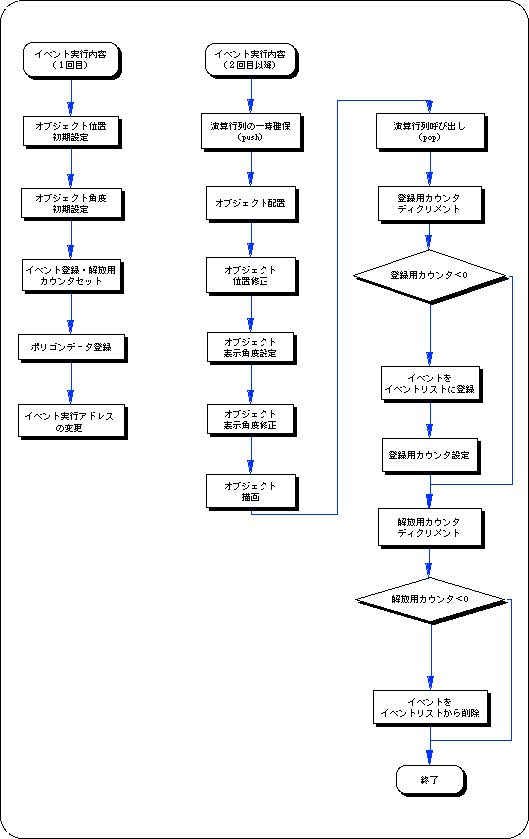
    The following flow chart is a brief summary of the event execution details.
    The event execution content differs between the first loop and the second and subsequent loops.
    In the figure, the left is the execution content of the first event, and the right is the execution content of the second and subsequent events.

    Flow 10-3 samp_10: Event execution content
    Appendix SGL library functions that appeared in this chapter

    In this chapter, the functions in the following table are explained.

    Table 10-1 SGL library functions introduced in this chapter
     Functional type
     Seki several people
     Parameter
             function
    void slInitEvent void Initialize the event
    EVENT * slSetEvent void (* func) () Event list Register / add events
    void slExecuteEvent void Executes the events registered in the list in order
    EVENT * slSetEventNext EVENT * evptr, void (* func) () Inserts / registers a new event immediately after the specified event
    void slCloseEvent EVENT * evptr Deletes the event from the event list, and at the same time returns and releases the attached work to the system.
    WORK * slGetWork void Secure work area
    void slReturnWork WORK * wkptr Return / release the work area
    EVENT * slGetEvent void Allocate a RAM area of the same size as the event in the event RAM
    void slReturnEvent EVENT * evptr The area secured by the function "slGetEvent" is returned / released to the system.


  • BackForward
    SGL User's ManualPROGRAMMER'S STRUCT
    Copyright SEGA ENTERPRISES, LTD., 1997