SGL User's ManualPROGRAMMER'S STRUCT
BackForward
PROGRAMMER'S STRUCT

12. CD-ROM library


This chapter describes how to access a CD-ROM using the CD-ROM library. By using the CD-ROM library, you can read data and programs from the CD-ROM and play music. This chapter also contains a list of function references for the CD-ROM library.


12-1. About the CD-ROM library

SGL provides functions for accessing CD-ROMs and virtual CDs. By using these functions, you can achieve the following functions:

 caution
CD-ROM library functions are listed later in this chapter, not in the separate “Function Reference ”.

For details on how to burn a CD-ROM, refer to "Chapter 3: How to Burn a CD-ROM".


12-2. Access to CD-ROM

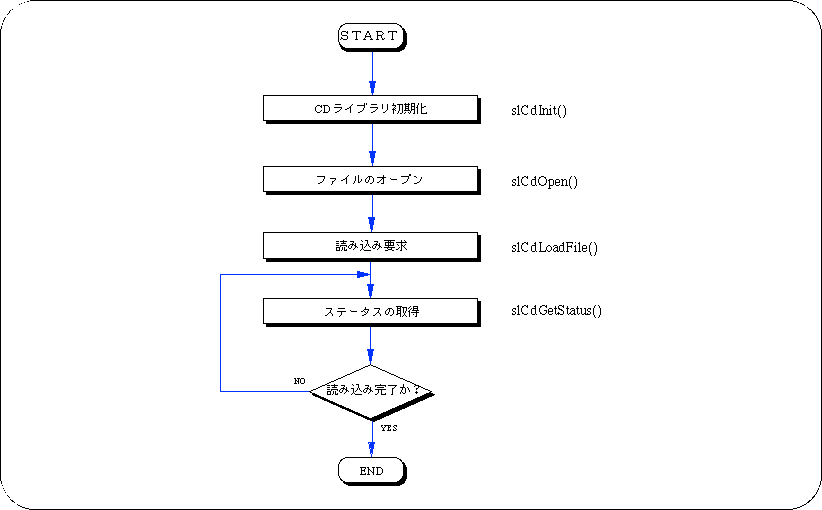
The flow of reading data from a CD-ROM is as follows.

Figure 12-1 CD-ROM access flow

Since accessing the CD-ROM involves mechanical operation, the data is not read into the memory at the moment when the read request is made. Also, the speed at which data is read from the CD-ROM is very slow compared to the speed of the CPU. SGL adopts a method of accessing the CD-ROM while monitoring the read status so that programs other than the CD-ROM access can be executed during this waiting time.

CD-ROM logical structure

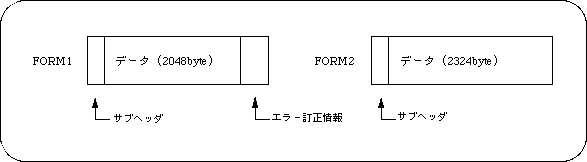
A CD-ROM is composed of units called sectors. Generally, the sector is 2048 bytes (FORM1), but if you want to secure the transfer capacity in the case where it does not matter if it is read by mistake like music data, you can set it to 2324 bytes (FORM2). I can do it. Each sector in the same file has information called a subheader , which consists of channel number, submode, and coding information. The structure of the sector can be simply expressed as follows.

Figure 12-2 Sector structure

SGL has a function to classify data according to subheaders. In SGL, this information is called the "key". The submode and coding information are meaningful for each bit, and SGL selects and reads only the sector in which the specified bit is 1.

Read file

Use the functions “slCdOpen”, “slCdLoadFile” and “slCdGetStatus” to load the file.

[CDHN slCdOpen (Sint8 * pathname, CDKEY key []);]
Specify the file to read.
“Key” is the type of sector to read. You can specify multiple types of sectors. After specifying all sector types, specify "CDKEY_TERM" as the last channel number.
If the file can be opened correctly, a non-null file handle is returned as the return value.
However, if the total number of keys in the open file is 24 or more, the open will fail. Opened files are automatically closed when they are interrupted or completed.

[Sint 32 slCdLoadFile (CDHN cdhn, CDBUF buf []);]
Specify the read destination area.
The order of “buf” corresponds to the order of “key” in the function “slCdOpen”.

To copy the data on the CD-ROM to the work RAM, specify as follows.
buf [i]. type = CDBUF_COPY;
buf [i]. trans.copy.addr = address of read area;
buf [i]. trans.copy.unit = Read area size unit (CDBUF_FORM1 / CDBUF_FORM2 / CDBUF_BYTE);
buf [i]. trans.copy.size = number of units in read area;

If “addr” is set to NULL and size is set to 0, it will not be read. For "unit", match the unit of the size of the read area to the sector type of the CD-ROM. This allows you to read the data efficiently. The actual read area should be "unit" x "size" on a 4-byte boundary.

If you want to read while processing the data, you can register the function as follows.
buf [i]. type = CDBUF_FUNC;
buf [i]. trans.func.func. = Function pointer;
buf [i]. trans.func.obj = value to pass to the first argument of the function;

The registration function is “Sint32 (* func) (void * obj, Uint32 * addr, Sint32 adinc, Sint32 nsct)”.
The value of “buf [i]. Trans.func.obj” is entered as it is in “obj”.
“Addr” is the address from which the data is copied.
“Adinc” is the value added to “addr” when 4 bytes are taken out from “addr”, in 4-byte units.
“Nsct” is the number of sectors that can be read. The return value is the number of sectors actually transferred. After specifying all the transfer areas, specify "CDBUF_TERM" for the last "buf []. Type".

[Sint32 slCdGetStatus (CDHN cdhn, Sint32 ndata []);]
Call the function “slCdGetStatus” periodically in the main loop, etc., and monitor the read status.
When the function value becomes “CDSTAT_COMPLETED”, reading is complete.
The number of bytes read is stored in "ndata" in the order corresponding to the "key" of the function "slCdOpen".

Sample program 1 shows an example of a file reading program.

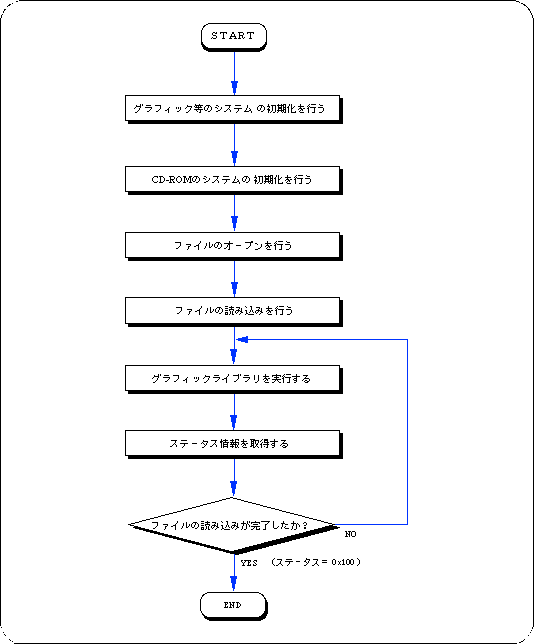
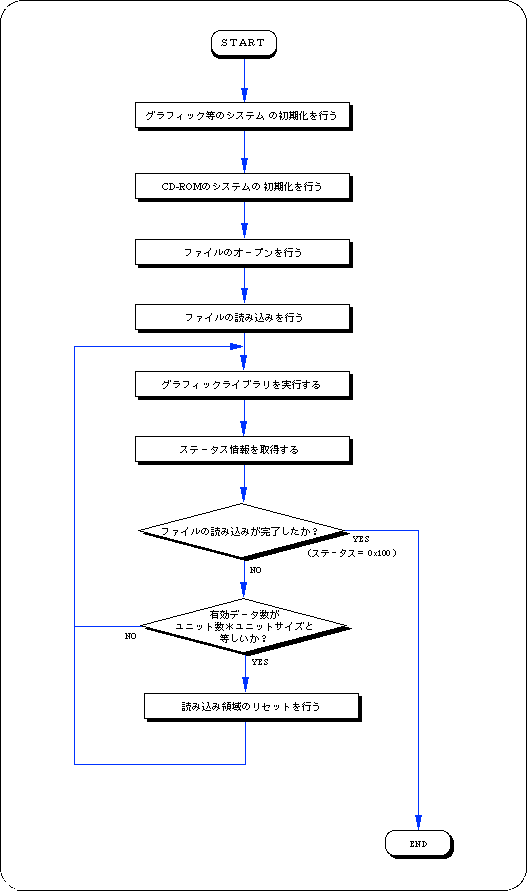
This sample program is a process for reading a file on a CD-ROM, and is an example of using a basic library that reads a file from a CD-ROM. The procedure is explained along with flow 12-1.

  1. Initializes the system such as graphics.

  2. Initializes the CD-ROM system.

  3. Open the file.
    There is key information for classifying data in the input parameter of the function that opens the file, so set this information as necessary.

  4. The file is read using the file handle of the return value of the file open function and the read area information as parameters.

  5. Execute the graphic library (function “slSynch ()”).
    The file specified by reading the file is actually read little by little at this time.

  6. Get the status information and check if the file has finished reading.
    If the file has not finished reading, it loops until the status is finished reading.
    In this loop, call the function “slSynch ()”.

Flow 12-1 Sample program 1 (reading the file sample_cd1 / main.c)
Listing 12-1 Sample program 1 (reading the file sample_cd1 / main.c)
/ ***************************************************** ****************************
 *
 * Copyright (c) 1994 SEGA
 *
 * File: main.c
 * Date: 1995-02-20
 * Version: 0.00
 * Auther:
 ****************************************************** ************************** /
#include "sgl.h"
#include "sgl_cd.h"

/ ***************************************************** *************************** /
#define MAX_FILE 128
#define READSECT 50
/ ***************************************************** *************************** /
Sint32 dirwork [SLCD_WORK_SIZE (MAX_FILE)];
Sint32 readbuf [READSECT * CDBUF_FORM1 / sizeof (Sint32)];
    
/ ***************************************************** *************************** /
void ss_main (void)
{
    Sint32 ndir;
    CDHN cdhn;
    CDKEY key [2];
    CDBUF buf [2];
    Sint32 stat;
    Sint32 len [2];
    Sint32 ypos = 1;

    slInitSystem (TV_320x224, NULL, 1);		
    ndir = slCdInit (MAX_FILE, dirwork);	
    slPrint ("slCdInit:", slLocate (1, ypos));
    slPrintFX (toFIXED (ndir), slLocate (11, ypos));
    ypos ++;

    key [0] .cn = key [0] .sm = key [0] .ci = CDKEY_NONE;
    key [1] .cn = CDKEY_TERM;	
    cdhn = slCdOpen ("S2100D0_.M", key);	
    slPrint ("slCdOpen:", slLocate (1, ypos));
    slDispHex ((Uint32) cdhn, slLocate (11, ypos));

    buf [0] .type = CDBUF_COPY;	
    buf [0] .trans.copy.addr = readbuf;	
    buf [0] .trans.copy.unit = CDBUF_FORM1;
    buf [0] .trans.copy.size = READSECT;	
    buf [1] .type = CDBUF_TERM;
    slCdLoadFile (cdhn, buf);		
    ypos ++;

    while (1) {
	slSynch ();     			
	stat = slCdGetStatus (cdhn, len);
	slPrint ("stat:", slLocate (1, ypos));
	slDispHex ((Uint32) stat, slLocate (7, ypos));
	ypos ++;
	if (ypos> = 27) ypos = 1;
	if (stat == CDSTAT_COMPLETED) break;
    }
    while (1);
}

Split reading of files

Use the function "slCdResetBuf" to divide and read a large amount of data such as movies.

[Bool slCdResetBuf (CDHN cdhn, CDKEY * key);]
Returns the read destination of the data corresponding to the “key” of the file handle to the beginning of the area specified by the function “slCdLoadFile”.
The function “slCdGetStatus” gets the number of valid data in the read area, and when the read area is full, the data is processed and the function “slCdResetBuf” is called.

Sample program 2 shows an example of a program that divides and reads data.

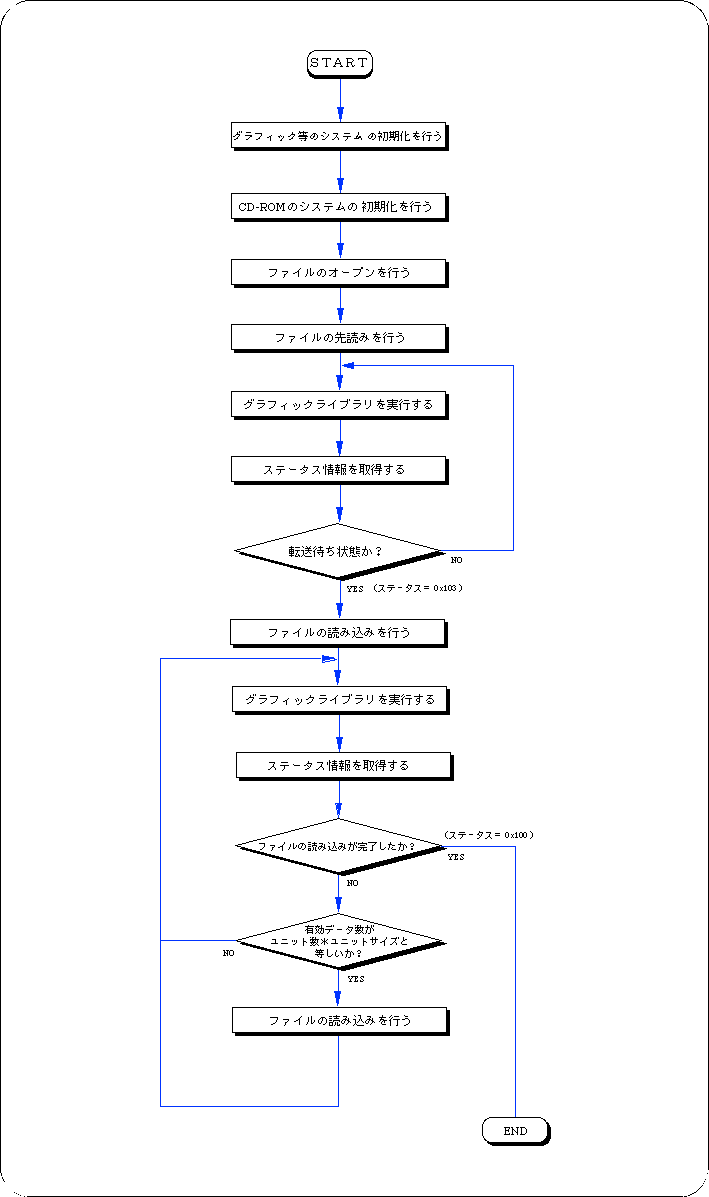
This sample program is a process for dividing and reading a file on a CD-ROM, and is an example of using a basic library that reads a file from a CD-ROM. The procedure is explained along with Flow 12-2.

  1. Initializes the system such as graphics.

  2. Initializes the CD-ROM system.

  3. Open the file.
    There is key information for classifying data in the input parameter of the function that opens the file, so set this information as necessary.

  4. The file is read using the file handle of the return value of the file open function and the read area information as parameters.

  5. Execute the graphic library (function “slSynch ()”).
    The file specified by reading the file is actually read little by little at this time.

  6. Get the status information and check if the file has finished reading.
    At the same time, check if the read area is full. If it is full, process the data as needed and then reset the read area.
    If the file has not finished reading, it loops until the status is finished reading.
    In this loop, call the function “slSynch ()”.

Flow 12-2 Sample program 2 (split reading of file sample_cd2 / main.c)
Listing 12-2 Sample program 2 (split reading of file sample_cd2 / main.c)
/ ***************************************************** ****************************
 *
 * Copyright (c) 1994 SEGA
 *
 * File: main.c
 * Date: 1995-02-20
 * Version: 0.00
 * Auther:
 ****************************************************** ************************** /
#include "sgl.h"
#include "sgl_cd.h"

/ ***************************************************** *************************** /
#define MAX_OPEN 128	
#define FNAME "S2100D0_.M"
#define slsize 2	

/ ***************************************************** *************************** /
Sint32 lib_work [SLCD_WORK_SIZE (MAX_OPEN)];
Sint32 readbuf [(CDBUF_FORM1 * slsize) / sizeof (Sint32)];

/ ***************************************************** *************************** /
void ss_main (void)
{
    Sint32 ndir;			
    Sint32 ypos = 1;	
    Sint32 ret;		
    Sint32 ndata [2];	
    CDHN cdhn;		
    CDKEY key [2];
    CDBUF buf [2];

    slInitSystem (TV_320x224, NULL, 1);	
    ndir = slCdInit (MAX_OPEN, lib_work);
    slPrint ("slCdInit:", slLocate (1, ypos));
    slPrintFX (toFIXED (ndir), slLocate (11, ypos));
    ypos ++;

    key [0] .cn = key [0] .sm = key [0] .ci = CDKEY_NONE;
    key [1] .cn = CDKEY_TERM;	
    cdhn = slCdOpen (FNAME, key);	
    slPrint ("slCdOpen:", slLocate (1, ypos));
    slDispHex ((Uint32) cdhn, slLocate (11, ypos));

    buf [0] .type = CDBUF_COPY;
    buf [0] .trans.copy.addr = readbuf;
    buf [0] .trans.copy.unit = CDBUF_FORM1;
    buf [0] .trans.copy.size = slsize;	
    buf [1] .type = CDBUF_TERM;
    ypos ++;

    slCdLoadFile (cdhn, buf);	 
    while (1) {

	slSynch ();			
	ret = slCdGetStatus (cdhn, ndata);
	slPrint ("stat:", slLocate (1, ypos));
	slDispHex ((Uint32) ret, slLocate (7, ypos));
	ypos ++;
	if (ypos> = 27) ypos = 3;
	if (ret == CDSTAT_COMPLETED) break;
	if (ndata [0] == CDBUF_FORM1 * slsize) {
		slCdResetBuf (cdhn, & (key [0]));
	} 
   }
    while (1);          
}

About the look-ahead function

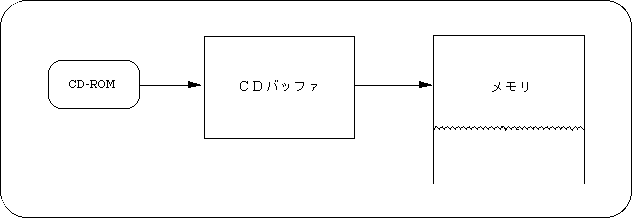
When reading data from a CD-ROM, the mechanical operation of the CD drive is involved, so the data is not actually read the moment you start reading. The function that minimizes this waiting time is the look-ahead function. Sega Saturn has an area to temporarily store the data read from the CD-ROM. This area is called the CD buffer. When the next file to read is decided, the data is started to be read into the CD buffer, and when the data is needed, it is transferred to the memory.

Figure 12-3 CD buffer

Set the read area address of the function “slCdLoadFile” to NULL and the size of the read area to 0, and when the return value of the function “slCdGetStatus” becomes “CDSTAT_WAIT”, the look-ahead is complete. After that, if you set the address and size of the loading area with the function “slCdLoadFile”, the transfer will start immediately. You can also set the address and size of the read area before the read-ahead to the CD buffer is complete.

[Sint32 slCdLoadFile (CDHN cdhn, CDBUF buf []);]
In the CD buffer, specify the following to read ahead.
buf [i]. type = CDBUF_COPY;
buf [i]. trans.copy.addr = NULL;
buf [i]. trans.copy.unit = CDBUF_FORM1;
buf [i]. trans.copy.size = 0;

After specifying all the transfer areas, specify "CDBUF_TERM" for the last "type".

Sample program 3 shows an example of a look-ahead program.

This sample program is a process for reading a file on a CD-ROM, and is a basic usage example of a library process that pre-reads a file from a CD-ROM. The procedure is explained along with flow 12-3.

  1. Initializes the system such as graphics.

  2. Initializes the CD-ROM system.

  3. Open the file.
    There is key information for classifying data in the input parameter of the function that opens the file, so set this information as necessary.

  4. The file is read using the file handle of the return value of the file open function and the read area information as parameters.
    At this time, set NULL for the read destination area address of the read area information and set 0 for the size, and pre-read the file.

  5. Execute the graphic library (function “slSynch ()”).

  6. Get the status information and check if it is waiting for transfer.
    If it is in the transfer waiting state, the loop is terminated.
    Call the function “slSynch ()” in this loop.

  7. Read the file again.
    At this time, the address is set in the read destination area address of the read area information, and the file is read.

  8. Execute the graphic library (function “slSynch ()”).
    The file specified for reading the file is actually read at this time.

  9. Get the status information and check if the file has finished reading.
    If the file has not finished reading, it loops until the status is finished reading.
    In this loop, call the function “slSynch ()”.

Flow 12-3 Sample program 3 (look-ahead sample_cd3 / main.c)
Listing 12-3 Sample program 3 (look-ahead sample_cd3 / main.c)
/ ***************************************************** ****************************
 * Copyright (c) 1994 SEGA
 *
 * File: main.c
 * Date: 1995-02-20
 * Version: 0.00
 * Auther:
 *
 ****************************************************** ************************** /
#include "sgl.h"
#include "sgl_cd.h"

/ ***************************************************** *************************** /
#define MAX_OPEN 128	
#define FNAME "S2100D0_.M"
#define slsize 2

/ ***************************************************** *************************** /
Sint32 lib_work [SLCD_WORK_SIZE (MAX_OPEN)];	
Sint32 readbuf [(CDBUF_FORM1 * slsize) / sizeof (Sint32)];
	
/ ***************************************************** *************************** /
void ss_main (void)
{
    Sint32 ndir;		
    Sint32 ypos = 1;	
    Sint32 ret;		
    Sint32 ndata [2];	
    CDHN cdhn;			
    CDKEY key [2];	
    CDBUF buf [2];		

    slInitSystem (TV_320x224, NULL, 1);		
    ndir = slCdInit (MAX_OPEN, lib_work);
    slPrint ("slCdInit:", slLocate (1, ypos));
    slPrintFX (toFIXED (ndir), slLocate (11, ypos));
    ypos ++;
 					
    key [0] .cn = key [0] .sm = key [0] .ci = CDKEY_NONE;
    key [1] .cn = CDKEY_TERM;	
    cdhn = slCdOpen (FNAME, key);	
    slPrint ("slCdOpen:", slLocate (1, ypos));
    slDispHex ((Uint32) cdhn, slLocate (11, ypos));

    buf [0] .type = CDBUF_COPY;	
    buf [0] .trans.copy.addr = NULL;
    buf [0] .trans.copy.unit = CDBUF_FORM1;
    buf [0] .trans.copy.size = 0;	
    buf [1] .type = CDBUF_TERM;	
    slCdLoadFile (cdhn, buf);
    ypos ++;

    while (1) {
	slSynch ();			
	ret = slCdGetStatus (cdhn, NULL);	
	slPrint ("stat1:", slLocate (1, ypos));
	slDispHex ((Uint32) ret, slLocate (7, ypos));
	ypos ++;
	if (ypos> = 27) ypos = 3;
	if (ret == CDSTAT_WAIT) {	
		buf [0] .trans.copy.addr = readbuf; 
    		buf [0] .trans.copy.size = slsize; 
		break;
	}
    }

    slCdLoadFile (cdhn, buf);	

    while (1) {

	slSynch ();				
	ret = slCdGetStatus (cdhn, ndata);
	slPrint ("stat2:", slLocate (1, ypos));
	slDispHex (ret, slLocate (7, ypos));
	ypos ++;
	slPrint ("ndata:", slLocate (1, ypos));
	slDispHex (ndata [0], slLocate (7, ypos));
	ypos ++;
	if (ypos> = 27) ypos = 3;
 	if (ret == CDSTAT_COMPLETED) break;
	if (ndata [0] == CDBUF_FORM1 * slsize) {
		slCdLoadFile (cdhn, buf);
	}
    }
    while (1);          
}

Playing CDDA files

To play a CDDA file, initialize the sound and use the functions “slCdOpen”, “slCdLoadFile” and “slCdGetStatus”.

[Sint 32 slCdLoadFile (CDHN cdhn, CDBUF buf []);]
To play the CDDA file, specify:

buf [0]. type = CDBUF_COPY;
buf [0]. trans.copy.addr = NULL;
buf [0]. trans.copy.unit = CDBUF_FORM1;
buf [0]. trans.copy.size = 0;
buf [1]. type = CDBUF_TERM;

Sample program 4 shows an example of a CDDA file playback program.

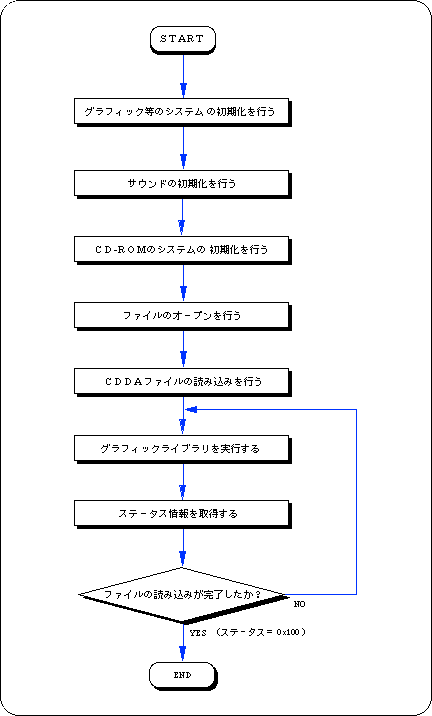
This sample program is a process for reading a CDDA file on a CD-ROM, and is an example of using a basic library for playing a CDDA file on a CD-ROM.
The procedure is explained along with flow 12-4.

  1. Initializes the system such as graphics.

  2. Initializes the sound.

  3. Initializes the CD-ROM system.

  4. Open the file.
    There is key information for classifying data in the input parameter of the function that opens the file, but this information is unnecessary, so please do not select it here.

  5. Plays a CDDA file.
    Plays a CDDA file using the file handle of the return value of the file open function and the read area information as parameters.

  6. Execute the graphic library (function “slSynch ()”).

  7. Get the status information and check if the CDDA file has finished playing.
    When the playback is finished, end the loop.
    Call the function “slSynch ()” in this loop.

Flow 12-4 Sample program 4 (CDDA file playback sample_cd4 / main.c)
Listing 12-4 Sample program 4 (Playing a CDDA file sample_cd4 / main.c)
/ ***************************************************** ****************************
 *
 * Copyright (c) 1994 SEGA
 *
 * File: main.c
 * Date: 1995-02-20
 * Version: 0.00
 * Auther:
 *
 ****************************************************** ************************** /
#include "sgl.h"
#include "sgl_cd.h"
#include "sddrvs.dat"

/ ***************************************************** *************************** /
#define WIN_ORG_X 0		
#define WIN_ORG_Y 0		
#define WIN_SIZE_X 320		
#define WIN_SIZE_Y 240	
#define MAX_FILE 128
Sint32 dirwork [SLCD_WORK_SIZE (MAX_FILE)];

Uint8 sdmap [] = {
	0x00, 0x00, 0xB0, 0x00, 0x00, 0x00, 0x80, 0x00,
	0x10, 0x01, 0x30, 0x00, 0x00, 0x00, 0x10, 0x00,
	0x11, 0x01, 0x40, 0x00, 0x00, 0x00, 0x20, 0x00,
	0x20, 0x01, 0x60, 0x00, 0x00, 0x00, 0x06, 0x00,
	0x21, 0x01, 0x68, 0x00, 0x00, 0x00, 0x06, 0x00,
	0x22, 0x01, 0x70, 0x00, 0x00, 0x00, 0x06, 0x00,
	0x23, 0x01, 0x78, 0x00, 0x00, 0x00, 0x06, 0x00,
	0x24, 0x01, 0x80, 0x00, 0x00, 0x00, 0x06, 0x00,
	0x01, 0x01, 0x86, 0x00, 0x00, 0x04, 0x00, 0x00,
	0x30, 0x05, 0xA0, 0x00, 0x00, 0x02, 0x00, 0x00,
	0xFF, 0xFF
    };
    
/ ***************************************************** *************************** /

void ss_main (void)
{
    Sint32 ndir;
    CDHN cdhn;
    CDBUF buf [2];
    CDKEY key [2];
    Sint32 stat;

    slInitSystem (TV_320x224, NULL, 1);
    slInitSound (sddrvstsk, sizeof (sddrvstsk), sdmap, sizeof (sdmap));
    slCDDAOn (127, 127, 0, 0);
    ndir = slCdInit (MAX_FILE, dirwork);

    key [0] .cn = CDKEY_NONE;
    key [0] .sm = CDKEY_NONE;
    key [0] .ci = CDKEY_NONE;
    key [1] .cn = CDKEY_TERM;
    cdhn = slCdOpen ("cdda1", key);

    buf [0] .type = CDBUF_COPY;
    buf [0] .trans.copy.addr = NULL;
    buf [0] .trans.copy.unit = CDBUF_FORM1;
    buf [0] .trans.copy.size = 0;
    buf [1] .type = CDBUF_TERM;
    slCdLoadFile (cdhn, buf);

    while (1) {
	slSynch ();
	stat = slCdGetStatus (cdhn, NULL);
	if (stat == CDSTAT_COMPLETED) break;
    }
    while (1)
	;
}

Other general matters

● About read error
If a read error occurs during reading, the CD block will first recover hard. If recovery is still not possible, the library will perform a certain number of recovery processes. If it cannot finally be recovered, the status capture function suspends the read and returns a read error error code.

● About the path name
Specify the directory as \ or /. In addition, the directory name and file name can be used in both uppercase and lowercase letters.

● Advanced usage of the CD-ROM library
In SGL, you can use the functions of the file system library and stream system library. Use these functions, such as when using Cinepak or MPEG. For details, refer to the manual of each library.
If you are calling the function “slCdInit”, you do not need to initialize the file system and stream system.
When using the file system or stream system while reading a file with SGL, call the function "slCdPause" and check that the status is "CDSTAT_PAUSE", or call the function "slCdAbort".
It is also necessary to stop reading when the file system or stream system finishes reading and returns to SGL.

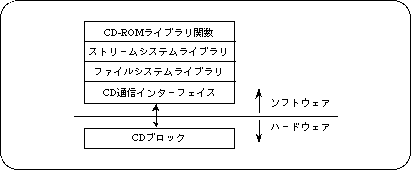
Figure 12-4 Internal structure of the CD-ROM library

12-3. CD library functions


CDHN file handle
Commentary
A file handle for reading a file.

CDKEY Key for classifying sector data

structure
typedef struct {
    Sint16 cn;
    Sint16 sm;
    Sint16 ci;
} CDKEY;

member
 cn
 Channel number
 sm
 Submode
 ci
 Coding information

Commentary
Specifies the key to classify sector data using subheaders.

remarks
If not selected, specify CDKEY_NONE.
Set CDKEY_TERM in the terminal cn.

CDBUF read area information

structure
typedef struct {
         void * addr;
         Sint32 unit;
         Sint32 size;
         } TRANS_COPY;

typedef struct {
         Sint32 (* func) (void * obj, Uint32 * addr,
                          Sint32 adinc, Sint32 nsct);
         void * obj;
         } TRANS_FUNC;

typedef struct {
     Sint32 type;
         union {
                 TRANS_COPY copy;
                 TRANS_FUNC fucn;
         } trans;
} CDBUF;

member
type CDBUF_COPY Copy to work RAM CDBUF_FUNC Transfer function CDBUF_TERM Termination -------------------------------------- -----------------
If type = CDBUF_COPY: copy
-------------------------------------------------- -----
addr address of read area (null if not read)
unit CDBUF_FORM1 Read area size is in 2048 bytes CDBUF_FORM2 Read area size is in 2324 bytes CDBUF_BYTE Read area size is in bytes size Number of units in read area (0 if not read)

-------------------------------------------------- -----
If type = CDBUF_FUNC: func
-------------------------------------------------- -----
func transfer function obj object

Commentary
Set the read area or transfer function.

remarks
The read area must be bordered by 4 bytes.

Sint32 slCdInit (Sint32 nfile, void * work) Initialization

Parameters
 nfile
 Maximum number of files in one directory
 work
 Work area

function
Make the initial settings for using the CD.

Return value
Number of files in the root directory (error code if negative)

remarks
The size of the area is calculated by SLCD_WORK_SIZE (nfile).
nfile Maximum number of files in each directory The work area must be a 4-byte boundary.

Sint32 slCdChgDir (Sint8 * pathname) Move directory

Parameters
 pathname
 Path name (relative path / absolute path can be specified)

function
Move the directory.

Return value
Number of files in the directory (if negative, error code)

CDHN slCdOpen (Sint8 * pathname, CDKEY key []) File open

Parameters
 pathname
 Path name (relative path / absolute path can be specified)
 key
 Key information for classifying stream data

function
Open the file.

Return value
File handle (null if unopenable)

remarks
It will be automatically closed when the reading is interrupted or completed.

Sint32 slCdLoadFile (CDHN cdhn, CDBUF buf []) File loading

Parameters
 cdhn
 File handle
 buf
 Read area information (corresponds to the key at the time of opening)

function
Start playing and read the data from the CD.

Return value
Error code

remarks
If NULL is specified for the read area and 0 is specified for the number of units, look-ahead is executed.
If a read area is specified, it will be transferred using CPU DMA.

Sint32 slCdTrans (CDHN cdhn, CDBUF buf [], Sint32 ndata []) Stream transfer

Parameters
 cdhn
 File handle
 buf
 Read area information
 ndata
 Number of valid data in the transfer area (NULL if not required)

function
Only data transfer is performed while file reading is paused.

Return value
Error code

remarks
You can only transfer to the key for which NULL is specified in the transfer area with “slCdLoadFile ()”.
This function does not end until the end of transfer.

Bool slCdResetBuf (CDHN cdhn, CDKEY * key) Reset transfer area

Parameters
 cdhn
 File handle
 key
 Key information for classifying data

function
Initializes the transfer destination pointer.

Return value
 TRUE
 normal termination
 FLASE
 An unopened key was specified. 

Sint32 slCdAbort (CDHN cdhn) Read interruption

Parameters
 cdhn
 File handle

function
Suspend file reading

Return value
Error code

Sint32 slCdPause (CDHN cdhn) Pause reading

Parameters
 cdhn
 File handle

function
Pauses loading of the file.

Return value
Error code

Sint32 slCdGetStatus (CDHN cdhn, Sint32 ndata []) Get status

Parameters
 cdhn
 File handle
However, you can get the state of the CD block by specifying the following constants.
 CDREQ_FREECD
 Get the number of free sectors in a block
 CDREQ_FAD
 Current pickup position
 CDREQ_DRVCD
 Drive status
 ndata
 If a file handle is specified, the number of valid data in the transfer area (NULL if not required)

function
Gets the status for the issued request.

Return value
Status when a file handle is specified (if negative, error code)
 CDSTAT_PAUSE
 Loading is stopped
 CDSTAT_DOING
 Loading
 CDSTAT_WAIT
 Waiting for transfer
 CDSTAT_COMPLETED
 Loading completed
 When CDREQ_FREE is specified
 Number of free sectors in the CD block
 When CDREQ_FAD is specified
 Pickup position
 When CDREQ_DRV is specified
 CD drive status
 CDDRV-BUSY
 During state transition
 CDDRV_PAUSE
 During the pose
 CDDRV_STDBY
 stand-by
 CDDRV_PLAY
 Playing a CD
 CDDRV_SEEK
 Seeking
 CDDRV_SCAN
 Scan playback
 CDDRV_OPEN
 The tray is open
 CDDRV_NODISC
 No disk
 CDDRV_RETRY
 Read retry processing in progress
 CDDRV_ERROR
 Read error occurred
 CDDRV_FATAL
 Fatal error occurred

Error code

Table 12-1 Error codes
Constant name meaning Constant value
CDERR_OK normal termination (0)
CDERR_RDERR Reed Ella (-1)
CDERR_NODISC No disc is set (-2)
CDERR_CDROM The disc is not a CR-ROM (-3)
CDERR_IPARA Invalid initialization parameter (-Four)
CDERR_DIR Move to other than directory (-6)
CDERR_NEXIST The file does not exist (-9)
CDERR_NUM Negative number of bytes (-14)
CDERR_PUINUSE Pickup is in operation (-20)
CDERR_ALIGN The work area is not on the 4-byte boundary (-twenty one)
CDERR_TMOUT time out (-twenty two)
CDERR_OPEN Tray open (-twenty three)
CDERR_FATAL CD drive is <FATAL> (-twenty five)
CDERR_BUSY During state transition (-50)


BackForward
SGL User's ManualPROGRAMMER'S STRUCT
Copyright SEGA ENTERPRISES, LTD., 1997