 ★ SGL User's Manual ★ PROGRAMMER'S STRUCT
 Sega Saturn has a built-in buffer memory of 32 kbytes. This chapter describes the backup library for using this built-in buffer memory.
The main body of the backup library is compressed and stored in the Sega Saturn B00TROM. You can use this backup library to exchange data with buffer memory and external cartridges.
| Device number | Device type |
|---|---|
| 0 | Built-in memory cartridge |
| 1 | Memory cartridge or parallel interface |
Figure 13-1 Device configuration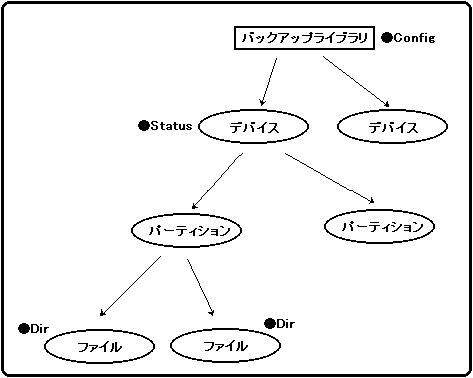
caution | The backup library destroys data if processing is interrupted while writing data. Therefore, when initializing, formatting, writing, or deleting the backup library, use “slResetDisable ()” (peripheral function) in the system library to disable the reset button. |
|---|
Flow 13-1 Sample program that uses the backup library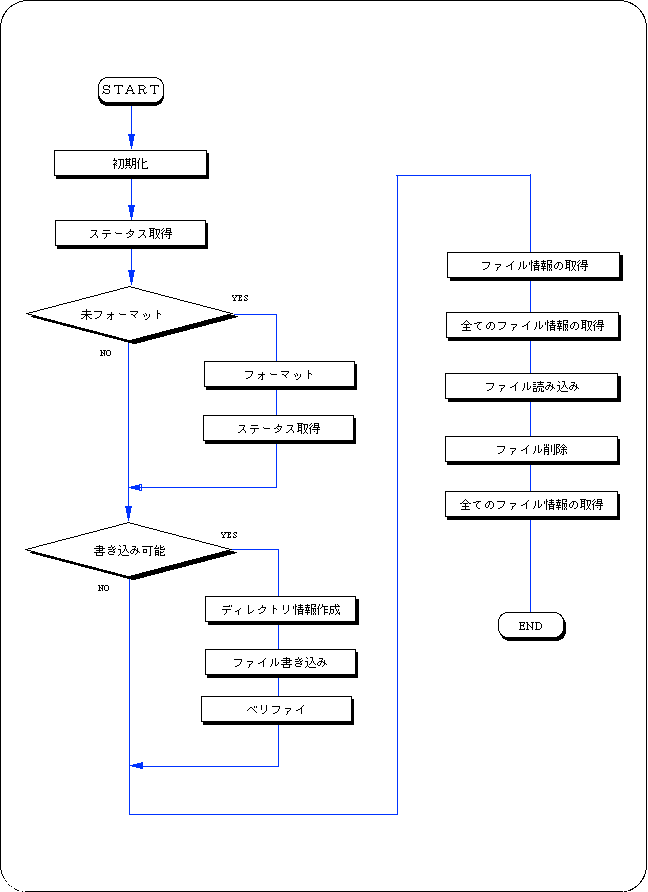
#include "sgl.h"
#define BUP_START_ADDR 0x6070000
#include "sega_bup.h"

#define FILE_NAME "FILE_NAME01"
#define BACKUP_DEVICE (Uint32) 0
#define TEST_DATA "It's a pen"
#define TEST_SIZE 10
#define DIR_SIZE 8
#define HEX2DEC (x) ((0x0f & (x)) + ((x) >> 4) * 10)

/ ***************************************************** ** **

  sample for backupram

****************************************************** * /

Uint32 BackUpRamWork [2048 + 30];

void BackUpInit (BupConfig cntb [3])
{
	slResetDisable ();
	BUP_Init ((Uint32 *) BUP_START_ADDR, BackUpRamWork, cntb);
	slResetEnable ();
}

Sint32 BackUpWrite (Uint32 device, BupDir * dir, Uint8 * data, Uint8 sw)
{
	Sint32 ret;
	SmpcDateTime * time;
	BupDate date;

	if (! dir-> date) {
		time = & (Smpc_Status-> rtc);
		date.year = (Uint8) (slDec2Hex ((Uint32) time-> year)-1980); / * Modify KT * /
		date.month = (Uint8) (time-> month & 0x0f);
		date.week = (Uint8) (time-> month >> 4);
		date.day = (Uint8) (slDec2Hex ((Uint32) time-> date)); / * Modify KT * /
		date.time = (Uint8) (slDec2Hex ((Uint32) time-> hour)); / * Modify KT * /
		date.min = (Uint8) (slDec2Hex ((Uint32) time-> minute)); / * Modify KT * /
		dir-> date = BUP_SetDate (& date);
	}
	slResetDisable ();
	ret = BUP_Write (device, dir, data, sw);
	slResetEnable ();

	return (ret);
}

Sint32 BackUpDelete (Uint32 device, Uint8 * filename)
{
	Sint32 ret;

	slResetDisable ();
	ret = BUP_Delete (device, filename);
	slResetEnable ();

	return (ret);
}


Sint32 BackUpFormat (Uint32 device)
{
	Sint32 ret;

	slResetDisable ();
	ret = BUP_Format (device);
	slResetEnable ();

	return (ret);
}


void ss_main ()
{
    BupConfig conf [3];
    BupStat sttb;
    BupDir dir, dirs [DIR_SIZE];
    BupDate datetb, date;
    Uint8 * time;
    Sint32 status;
    Uint8 buf [256];
    int i, lin = 4;

    slInitSystem (TV_352x224, (TEXTURE *) NULL, 1);

    slPrint ("Sample program Backup Library", slLocate (9,2));

    slGetStatus ();
    for (i = 0; i <100; i ++)
      {
	  slSynch ();
      }

    BackUpInit (conf);

    if ((status = BUP_Stat (BACKUP_DEVICE, 10, & sttb)) == BUP_UNFORMAT)
      {
	  status = BackUpFormat (BACKUP_DEVICE);
	  slPrint ("Formatting device", slLocate (10, lin));
	  BUP_Stat (BACKUP_DEVICE, TEST_SIZE, & sttb);
      }

    if (sttb.freeblock> 0)
      {
	  strncpy (dir.filename, FILE_NAME, 11);
	  strncpy (dir.comment, "Test desu", 10);
	  dir.language = BUP_ENGLISH;
	  dir.datasize = TEST_SIZE;
	  dir.date = 0;
 	  slPrint ("Writing file.", SlLocate (10, ++ lin));
	  slPrint ("Filename =", slLocate (13, ++ lin));
	  slPrint (FILE_NAME, slLocate (23, lin));
	  status = BackUpWrite (BACKUP_DEVICE, & dir, (Uint8 *) TEST_DATA, OFF);
	  status = BUP_Verify (BACKUP_DEVICE, (Uint8 *) FILE_NAME, (Uint8 *) TEST_DATA);
      }

    status = BUP_Dir (BACKUP_DEVICE, (Uint8 *) FILE_NAME, DIR_SIZE, dirs);
    status = BUP_Dir (BACKUP_DEVICE, (Uint8 *) "", DIR_SIZE, dirs);
    for (i = 0; i <status && i <10; i ++)
      {
	  char cmnt [11] = "Dirs =";

	  cmnt [6] = (char) (i + 20);
	  slPrint ("Dirs =", slLocate (10, ++ lin));
	  slPrint (dirs [i] .filename, slLocate (20, lin));
      }
    status = BackUpWrite (BACKUP_DEVICE, & dir, (Uint8 *) TEST_DATA, OFF);
    status = BUP_Read (BACKUP_DEVICE, (Uint8 *) FILE_NAME, buf);
    slPrint ("Reading file.", SlLocate (10, ++ lin));
    slPrint ("Filename =", slLocate (13, ++ lin));
    slPrint (FILE_NAME, slLocate (23, lin));
#if 0
    status = BackUpDelete (BACKUP_DEVICE, (Uint8 *) FILE_NAME);
    status = BUP_Dir (BACKUP_DEVICE, (Uint8 *) "", DIR_SIZE, dirs);
    slPrint ("Deleting =", slLocate (10, ++ lin));
    slPrint ("Filename =", slLocate (13, ++ lin));
    slPrint (FILE_NAME, slLocate (23, lin));
#endif
    for (i = 0; i <status && i <10; i ++)
      {
	  char cmnt [11] = "Dirs =";

	  cmnt [6] = (char) (i + 20);
	  slPrint ("Dirs =", slLocate (10, ++ lin));
	  slPrint (dirs [i] .filename, slLocate (20, lin));
      }

    for (;;)
      {
	  slSynch ();
      }
}
number | Seki several people | function |
|---|---|---|
| 1 | BUP_Init | Backup library initialization |
| 2 | BUP_SelPart | Partition selection |
| 3 | BUP_Format | Formatting |
| Four | BUP_Stat | Get status |
| Five | BUP_Write | Writing data |
| 6 | BUP_Read | Read data |
| 7 | BUP_Delete | Delete data |
| 8 | BUP_Dir | Get directory information |
| 9 | BUP_Verify | Display data |
| Ten | BUP_GetDate | Deployment of date data |
| 11 | BUP_SetDate | Compression of date data |
★ SGL User's Manual ★ PROGRAMMER'S STRUCT