SGL User's ManualPROGRAMMER'S STRUCT
Back | ■
PROGRAMMER'S STRUCT

14. Sound library


This chapter describes the procedure and precautions for outputting sound with Sega Saturn using the sound control library.

14-1. Overview of sound control

In Sega Saturn, MC68000 is listed as a CPU for sound control, and it can operate independently of the master CPU.
The master CPU and sound CPU exchange functions through a RAM called a command buffer. Since the function is issued by the sound control library, the user can control the sound without being aware of the interaction between the CPUs.
There are PCM and CD sound sources that can be used with Sega Saturn, and the sound driver controls the PCM sound source.

Figure 14-1 Sound driver system configuration
┏━━━━━━┓ ┏━━━━━━┓ ┏━━━━━━┓ 
┃Sound ┃┃┃┃┃┃ 
┃ Library ┃ ← → ┃ Master ┃ ← → ┃ Slave ┃ 
┠──────┨ ┃ CPU ┃ ┃ CPU ┃ 
┃ ┃ ┃ ┃ ┃ ┃ 
┃ ┃ ┗━━━━━━┛ ┗━━━━━━┛ 
┃ ┃ ↑ 
┃ ┃ ↓ 
┃ ┃ ┏━━━━━━┓ 
┃ ┃ ┃ Sound ┃ 
┃ ┃ ┃ Driver ┃ ┏ ━━━━━━━━┓ 
┃ ┃ ┠ ────── ┨ ┃ Sound CPU ┃ 
┗━━━━━━┛ ┃ Command ┃ ← → ┃ MC68000 ┃ 
┃ Buffer ┃ ┃ ┃ 
┃ ┃ ┗━━━━━━━━┛ 
┠──────┨ ↓ 
┃ ┃ ┏━━━━━┓ 
┃Sound ┃┃PCM sound source ┃ → speaker ┃data ┃┗━━━━━┛ 
┗━━━━━━┛ 
Shared RAM 
 

14-2. Sound driver settings

To control the sound with Sega Saturn using the sound driver, follow the procedure below.

Figure 14-2 Sound control procedure
┏━━━━━━━━━━━━━━┓
┃Sound driver set ┃
┃ and start MC68000 ┃
┗━━━━━━━━━━━━━━┛
↓ 
┏━━━━━━━━━━━━━━┓
┃Sound data set ┃
┗━━━━━━━━━━━━━━┛
↓ 
┏━━━━━━━━━━━━━━┓
┃BGM performance / sound effect, ┃
┃ PCM sound source control ┃
┗━━━━━━━━━━━━━━┛

Set sound driver and start MC68000

In order to use sound, you must first start the MC68000 for sound control. You also need a driver program that runs on this MC68000. These can be set by executing the library function “slInitSound ()”.

[Void slInitSound (void * drv, Uint32 drvsz, void * map, Uint32 mapsz);]
Performs a set of sound drivers and initialization of the sound CPU (MC68000). “Drv” is a sound driver program that runs on the MC68000 and is loaded from address 0 of the MC68000. “Drvsz” is the size of this driver program.
Normally,
slInitSound (drv, sizeof (drv), maptbl, sizeof (maptbl));
Use like.

This function “slInitSound ()” performs the following steps:

  1. Reset MC68000
  2. Memory area of MC68000 0 clear up to 0xB000
  3. Transfer of driver program (size from address 0)
  4. Transfer of map data (size from address 0xA000)
  5. Registration of memory area for PCM playback
  6. Start of MC68000
  7. Registration of map data

Set of sound data

Just by executing the above "slInitSound ()", the data for playing has not been set yet, so set it. The data for performance is stored after 0xB000 (0x25A0B000 in the program) in the memory area of MC68000 (it may differ depending on the map data, so please contact the sound designer). Transfer using the following function.

Figure 14-3 Example of sound data set
┌ ┐
│ slDMACopy (sounddat, (void *) 0x25a0b000, sizeof (sounddat)); │
│ slDMAWait (); │
└ ┘

Now you are ready to play.

BGM performance

Music (and sound effects) is treated in units called sequences. A sequence is playing a series of sound combinations (flows) from start to finish (this can be a song or a one-shot sound effect), which Sega Saturn's sound drivers do. You can play up to 8 at the same time. In SGL, the 0th of these 8 sequences is assigned for BGM. To play BGM, execute the "slBGMOn ()" function.

[Bool slBGMOn (Uint16 Song, Uint8 Prio, Uint8 Volume, Uint8 Rate);]
Start playing BGM.

Song: Song (sound effect) number Prio: Priority when using the sound source Volume: Volume Rate: Time to reach Volume

The priority "Prio" is called the priority when using a sound source. Since multiple sequences share a sound source with 32 channels to produce sound, when the total number of channels used by each exceeds 32. This is to secure a channel by deleting the sounds with low priority.

The volume “volume” can be selected from 0 to 127, and the larger the value, the louder the volume. Rate "Rate" is the time it takes to reach the specified volume, and 0 to 255 can be specified. If it is 0, the volume will be changed immediately, and if it is 1 to 255, the volume will fade in from 0 to the specified volume.

BGM can change the tempo and volume, and stop, pause, and resume the performance with the following functions.

slBGMTempo (Sint16 Tempo); / * Tempo change * /
slBGMFade (Uint8 Volume, Uint8 Rate); / * Change volume * /
slBGMOff (); / * Stop playing * /
slBGMPause (); / * Pause playing * /
slBGMCont (); / * Resume playing * /
slBGMStat (); / * Check if playing * /

Sound effect output

Sound effects are also managed as a sequence like the above BGM. To output the sound effect, execute the function “slSequenceOn ()”.

[Uint8 slSequenceOn (Uint16 Song, Uint8 Prio, Uint8 Volume, Uint8 Pan);]
Song: Song (sound effect) number Prio: Priority when using the sound source Volume: Volume Pan: Sorting the left and right volumes

The parameters are similar to the functions for BGM, but the parameter Pan is different. This shows how to divide the left and right volumes, and can be used to determine from which direction the sound is heard. You can specify a value from -128 to +127 for Pan, where -128 is the left, 0 is the front, and +127 is the right.

Substitution value of parameter Pan:
Left: -128 << 0 >> +127: Right

If you set Volume or Pan according to the distance and direction, such as when a 3D shooting game explodes, you should feel more realistic.

This function “slSequenceOn ()” returns the pronunciation control number of the specified sound effect. This pronunciation control number is used when making changes to the output sound effect using the following functions.

slSequenceTempo (Uint8 Seqnm, Sint16 Tempo); / * Change tempo * /

slSequenceFade (Uint8 Seqnm, Uint8 Volume, Uint8 Rate); / * Change volume * /

slSequencePan (Uint8 Seqnm, Uint8 Pan); / * Change the direction of occurrence * /

slSequenceOff (Uint8 Seqnm); / * Stop the sequence * /

slSequencePause (Uint8 Seqnm); / * Pause the sequence * /

slSequenceCont (Uint8 Seqnm); / * Resume the paused sequence * /

slSequenceStat (Uint8 Seqnm); / * Check if the sequence is playing * /

Sound effect output using PCM sound source

You can use a PCM sound source to output sampled sound effects such as voice and explosion sounds. Sound effect reproduction by PCM stream can output up to 4 channels at the same time separately from the above sequence. To use the PCM stream, execute the function "slPCMOn ()".

[Sint 8 slPCMOn (PCM * pdat, void * data, Uint32 size);]
Start playing with the PCM sound source.
pdat: PCM type structure data such as PCM stream playback mode data: PCM stream sound source data size: PCM stream data size

The PCM type structure data has the following configuration and is used to specify the playback parameters of the PCM stream.

Figure 14-4 PCM type structure data


typedef struct {
	Uint8 mode; / * Mode * /
	Uint8 channel; / * PCM Channel Number * /
	Uint8 level; / * 0 ~ 127 * /
	Sint8 pan; / * -128 ~ +127 * /
	Uint16 pitch;
	Uint8 eflevelR; / * Effect level for Right (nomo) 0 ~ 7 * /
	Uint8 efselectR; / * Effect select for Right (mono) 0 ~ 15 * /
	Uint8 eflevelL; / * Effect level for Left (mono) 0 ~ 7 * /
	Uint8 efselectL; / * Effect select for Left (mono) 0 ~ 15 * /
	} PCM;

	mode: Specify _Stereo or _Mono, _PCM16Bit or _PCM8Bit channel: PCM playback channel (set by this function)
	level: Volume pan: Volume left and right distribution pitch: Playback rate (pitch changes)
	eflevelR: Degree of applying effects (for right channel)
	efselectR: Effect number (for right channel)
	eflevelL: Degree of applying effect (for left channel)
	efselectL: Effect number (for left channel)

Unlike the above sequence, the PCM stream is played back while the master CPU sets the data used by the SCSP LSI for sound, which increases the load on the master CPU. Please consult with your sound designer to decide whether to output the sound in the above sequence or use the PCM stream. This function "slPCMOn ()" returns the management number of the specified PCM stream output. In addition to this function, the following functions are used to play sound effects using the PCM stream.

slPCMOff (PCM * pdat); / * Stop playing * /
slPCMParmChange (PCM * pdat); / * Change parameters * /
slPCMStat (PCM * pdat); / * Check if the specified PCM channel is playing * /

Functions that affect the overall sound output

The above functions were for individual sound outputs, but the following functions affect the overall sound output.

slSndVolume (Uint8 Volume); / * Overall volume * /
slSoundAllOff (); / * Stop all sound sequences * /
slDSPOff (); / * Stop DSP for effect * /
slSndMixChange (Uint8 Tbank, Uint8 Mixno); / * Mixer switching * /
slSndMixParmChange (Uint8 Effect, Uint8 Level, Uint8 Pan);
/ * Change mixer parameters * /

14-3. Memory map

The memory map of the sound CPU is roughly as follows. If you do not use the PCM stream, you do not need a PCM playback buffer, so you can use it for sequence data.

Figure 14-5 Sound CPU memory map
25A00000┏━━━━━━━━━━━━┓
        ┃ ┃
        ┃ Exception vector etc. ┃
        ┃ ┃
25A00500 ┣━━━━━━━━━━━━┫
        ┃ ┃
        ┃Current map data ┃
        ┃ ┃
25A00700 ┣━━━━━━━━━━━━┫
        ┃ ┃
        ┃ Command buffer ┃
        ┃ ┃
25A00800 ┣━━━━━━━━━━━━┫
        ┃ ┃
        ┃Sound driver ┃
        ┃ ┃
25A0A000 ┣━━━━━━━━━━━━┫
        ┃ ┃
        ┃ Map data ┃
        ┃ ┃
25A0B000 ┣━━━━━━━━━━━━┫
        ┃ ┃
        ┃Tone, sequence ┃
        ┃ ┃
25A78000 ┣━━━━━━━━━━━━┫
        ┃ ┃
        ┃ PCM playback buffer ┃
        ┃ ┃
25A7FFFF ┗━━━━━━━━━━━━┛

14-4. Sample program

Sample program for BGM and sound effect playback test

The following sample program was created for BGM and sound effect playback tests. The data file used in this sample has the following structure.

Figure 14-6 Sample program data file

Bank Song Contents ------ ------ ------- 0 0 songs (no loops) 1 song (with loop) 10 Pass (C3) 1 Pass (D3) 2 Pass (E3) 3 Pass (F3) 4 Pass (G3) 5 Pass (A3) 6 Pass (B3) 7 Pass (C4) 20 Ye 30 Long violin sound 1 Short violin sound (loop)

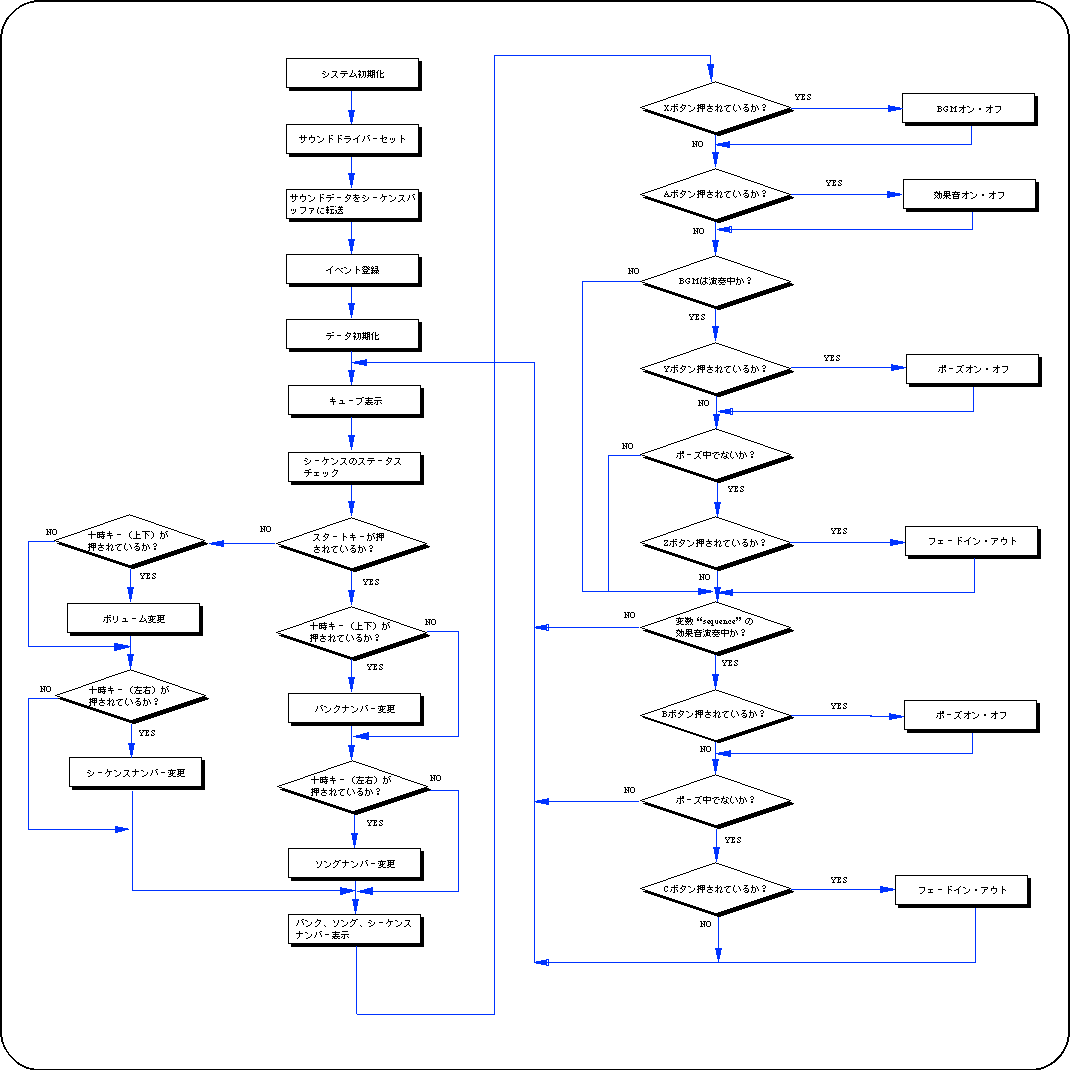
The song specified in the bank and song is played as BGM with the X button, and played as a sound effect with the A button. Use the start key and 10 o'clock key to specify the bank and song. The Y button and B button are pause on / off for BGM and sound effects, respectively, and the Z button and C button are fade in / out. You can specify the sequence number of the sound effect with the left and right of the 10 o'clock key, and you can set the overall volume with the up and down of the 10 o'clock key.

Listing 14-1 sampsnd1: BGM and sound effect playback test
main.c

Flow 14-1 sampsnd1: BGM and sound effect playback test

Sample program for PCM sound source playback test

The following sample program was created for testing PCM sound source playback.
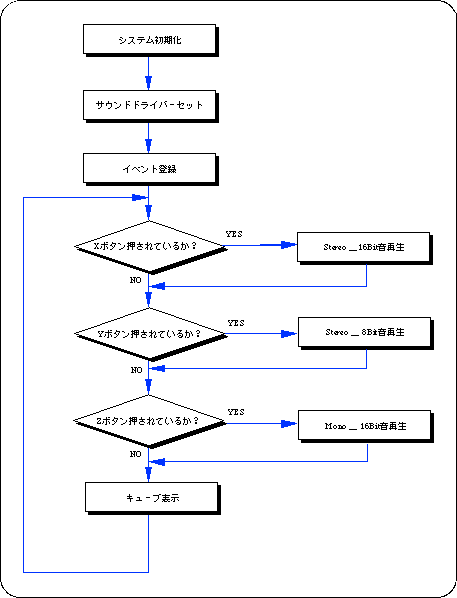
There are three types of sample data for PCM sound sources: 16-bit stereo, 8-bit stereo, and 16-bit monaural, which are played back by inputting the X, Y, and Z buttons, respectively.

Listing 14-2 sampsnd2: PCM sound source playback test
main.c

Flow 14-2 sampsnd2: PCM sound source playback test

Appendix Sound library functions that appeared in this chapter

In this chapter, the functions in the following table are explained.

Table 14-1 Sound library functions introduced in this chapter
 Functional type
 Seki several people
 Parameter
         function
void slInitSound void * drv, Uint32 drvsz, void * map, Uint32 mapsz Sound driver set and sound control CPU initialization
Bool slBGMOn Uint16 Song, Uint8 Prio, Uint8 Volume, Uint8 Rate Start of BGM performance
Bool slBGMTempo Sint16 Tempo Change of BGM playing speed
Bool slBGMFade Uint8 Volume, Uint8 Rate Change BGM performance volume
Bool slBGMOff void Stop playing BGM
Bool slBGMPause void Pause BGM performance
Bool slBGMCont void Paused BGM performance resumed
Bool slBGMStat void Check during BGM playback
Uint8 slSequenceOn Uint16 Song, Uint8 Prio, Uint8 Volume, Uint8 Rate Start generating the specified sound effect
Bool slSequenceTempo Uint8 Seqnm, Uint16 Tempo Change the speed of the specified sound effect
Bool slSequenceFade Uint8 Seqnm, Uint8 Volume, Uint8 Rate Change the volume of the specified sound effect
Bool slSequencePan Uint8 Seqnm, Uint8 Pan Change the direction of the specified sound effect
Bool slSequenceOff Uint8 Seqnm Stop generating the specified sound effect
Bool slSequencePause Uint8 Seqnm Pauses the generation of the specified sound effect
Bool slSequenceCont Uint8 Seqnm Resuming sound effects during pause
Bool slSequenceStat Uint8 Seqnm Check during playback of the specified sound effect
Sint8 slPCMOn PCM * pdat, void * data, Uint32 size Start playing with PCM sound source
Bool slPCMOff PCM * pdat Stop playing with PCM sound source
Bool slPCMParmChange PCM * pdat Change parameters for PCM playback
Bool slPCMStat PCM * pdat Check during playback of the specified PCM channel
Bool slSndVolume Uint8 Volume Overall volume set
Bool slSoundAllOff void Stop playing all sound sequences
Bool slDSPOff void Stop playing DSP
Bool slSndMixChange Uint8 Tbank, Uint8 Mixno Switching the mixer corresponding to the tone bank
Bool slSndMixParmChange UInt Effect, Uint8 Level, Uint8 Pan Mixer parameter change


Back | ■
SGL User's ManualPROGRAMMER'S STRUCT
Copyright SEGA ENTERPRISES, LTD., 1997