- When the CD-DA fades in and out, there are only 8 levels of volume control. This is too rough, but it takes some extra effort to control it finely and smoothly.
- Using the master volume The master volume can be controlled in 16 steps. However, since the master is in the final stage, the volume of other sounds that are being pronounced at the same time will also change.
- It is sent to the DSP, and the coefficient is rewritten from SH2 to control it.
You must know the address of the coefficient. Also, this method is unprecedented.
- In the complicated sequence data of note-on and note-off, there is a bug regarding the degree of pitch bend.
- Currently, if you pause while playing a note with a long gate time, all notes will be note-off at that point, and the rest will not be played even if you cancel the pause.
- The sound driver on Mac has the TEXT attribute, so be careful not to convert the driver to text when you bring it to a DOS environment via the net or disk.
- MIDI ConTRol Change 17,71 EFFECT VOL and EFFECT PAN are valid regardless of the pronunciation control number. The upper 3 bits of MIDI EFFECT VOL0-127 correspond to EFFECT RETURN VOL0-7, and MIDI Channel 1-16 corresponds to Channel 0-15 of EFFECT RETURN VOL.
The upper 5 bits of MIDI EFFECT PAN0-127 correspond to the 32-step localization of EFFECT RETURN PAN, and MIDI Channel 1-16 corresponds to Channel 0-15 of EFFECT RETURN PAN.
Even if the sequence ends, the set value is retained and does not return to the setting on the tone data. If EFFECT VOL, EFFECT PAN or MIXER Change is issued continuously, it will change again. * For EFFECT VOL and EFFECT PAN control, it is recommended to create multiple MIXERs and switch with MIXER Change rather than using MIDI.
- About PAL support There is no need to change the driver or data for sound.
If you have modified the sound driver for special control, please contact technical support. - When using ADPCM playback
There are two types of ADPCM data.- CD-XA compliant ADPCM method With this method, there are only two types of sampling rates.
18.9kHz (B MODE)
37.8kHz (C MODE) - APCM sampling rate with header can be set freely.
In addition, the load of SH2 for ADPCM playback is quite high at present, and it seems that the limit is to play one sound at the same time.
- Even if the number of simultaneous pronunciations does not exceed 32, it is possible that the sound to be sounded will not be produced or the release of the sound being sounded will be cut off. If you don't want the sound to be choppy, try increasing the key-on time instead of using a long release.
- About the stereo / monaural switch To reflect the stereo / monaural switch setting on Satan's multiplayer in the game, rewrite the setting bit in the sound WORK RAM from SH2.
When the setting is monaural, after initializing the sound, set Bit7 of 0x25A00443 of sound WORK RAM from SH2.
All subsequent controls are performed by the sound driver.
You can monitor monaural playback on the sound simulator. Please use it to check the volume balance in monaural. - If the Note on event is issued by the MIDI Direct conTRol command (09H) from HOST without transferring the tone bank, a triangular wave will be output.
Example: If you issue a Note on event with the following MIDI Direct conTRol command (09H), the driver will output a sound of 441 Hz.- Pronunciation data
- P1, P2, P3, P4 = 01H, 00H, 3CH, 7FH
- off data
- P1, P2, P3, P4 = 01H, 00H, 3CH, 00H
You can also use this to determine if the sound driver is working.
(However, the development driver "SDDRV.TSK" does not support it.)
- The DSP has a higher priority to access the DRAM bus than the 68000. And since the DSP accesses the same DRAM as the 68000, if you use a Delay effect (with a Tap process that reads / writes the delayed RAM many times), the 68000 process will be postponed, and the song will be delayed. In some cases, the command may not be accepted.
In particular, eLinker (expansion linker) reverb, early reflection, etc. are highly likely to occur, and care must be taken when using FM with many simultaneous slots. - The maximum number of SCSP soundable samples is 0ffffh. In Reverse and Alternate, if the pitch is changed, the reading address will shift, and there is a possibility that sounds different from the original or noise will appear.
- The tempo of the sequence song should not exceed the quarter note = 40-300 range.
- Since the processing of Satan's sound driver is based on 2 msec, even if you create sequence data that treats one beat as 480 clocks, the resolution of one beat will be equivalent to 250 (when the tempo is 120) when performing conversion playback. ..
As a result, it will be played as if it was quantized, but it should not be a problem in terms of hearing. - As the sound driver was upgraded from Version 1.33B to 2.04, the volume calculation algorithm was changed to reduce the load on the driver. For this reason, there is no compatibility in sequence playback with data of Version 2.00 or earlier.
This is a relatively strict compatibility with the data values (0-127) of MIDI control change No. 7 Volume and No. 11 Expression, that the balance of volume change is slightly different from before. , The basic sound driver behavior is exactly the same as before. Of course, if you don't care about the volume balance between MIDI channels during sequence playback, you don't need to touch the sequence data.
If you want to use the past sequence data as it is and emphasize the volume balance between tracks, please use the sound driver Version 1.33B. - There are the following types of Saturn (including Titan) sound drivers.
- SDDRV.TSK + SYSTBL.TSK (used only during sound development in the sound box)
- SDDRVS.TSK (used when developing with CartDev and when embedding in an actual game)
- SDDRVT.TSK (for ST-V Titan. Almost equivalent to SDDRVS.TSK)
Do not change the file name. SndSimulator searches for a soundbox or CartDev connected at startup to see if SDDRV.TSK for the soundbox and SDDRVS.TSK for CartDev are in the same folder.
Transfers the sound driver to the target, if it exists, or inside the Snd Simulator if it does not exist.
If you want to use the Titan driver on Mac, connect CartDev, rename the file to SDDRVS.TSK, and put it in the same folder as SndSimulator.
The sound driver inside SndSimulator varies depending on the version, and it may be old, so please put the latest sound driver in the same folder as the simulator as much as possible.
To find out which version of the sound driver the simulator is currently transferring, see "About this Snd Simulator" from the Apple menu.
- The method of specifying the tone is the same as the previous sound driver by specifying the number of the tone bank and the number of VOICE on the sound RAM. MIDI control change No. 32 bank change specifies the tone bank, and program change specifies VOICE.
Currently, when a tone bank that does not exist in the sound RAM is specified by bank change, the tone bank number 0 is assigned as the default. Even if you place the tone data in the tone bank No. 0 and send a tone bank that does not exist in the sound RAM at that time, for example, a bank change of No. 3, in the sound driver of Version 2.00 or earlier, the tone of the tone bank No. 0 So Saturn pronounced normally. However, in the sound driver of Version 2.00 or later, the check of the sequence data is strict, and if such an incorrect bank specification is specified, an error will be returned.
Originally, in MIDI sequence data, the tone bank should be specified accurately. In the sound data production process, if you do not want to mess with the tone bank number of MIDI sequence data for work efficiency, please set a dummy tone bank on the map with the sound simulator. If there is a problem with the sequence data, the following values will be displayed in the status display on the sound simulator.
| $ 00 | No abnormality |
| $ 80 | Resolution exceeds Satan's ability |
| $ 81 | No tempo data |
| $ 82 | No tempo data |
| $ 83 | The specified tempo exceeds Satan's ability |
| $ 84 | There is no control in the sequence data |
| $ 85 | You specified a bank that does not exist on the map. |
| $ 86 | A program that does not exist on the tone bank is specified. |
| $ 87 | The program was changed when the tone bank was not set. |
| $ 88 | The Volume bias value is too large for the Total level. The total level of the layer is set to an out-of-specification range. |
| $ 89 | A mixer change was made to a bank that does not exist. |
| $ 8a | I used a mode other than POLY mode in PLAY MODE in the Voice parameter of the tone data. |
| $ 8b | Layer is not set on the Tone editor. |
| $ 8c | The oldest key-on was forcibly crushed because the number of simultaneous pronunciations exceeded 32. |
| $ 8d | You specified a layer that does not exist. |
| $ 8e | Trouble occurs in DSP |
| $ 8f | Issued an unsupported MIDI event. |
| $ 91 | Processed all note off. Note that it is an error except during development. |
| $ 92 | There was a note that could not be pronounced because there were too many FM sound channel. |
| $ 93 | Double assignment of slot (program error) |
| $ 94 | I tried to play on a MIDI channel other than 1-16. |
| $ 97 | * Due to the large number of simultaneous pronunciations, some slots were ignored for the end of the release. |
| $ 98 | * The number of simultaneous pronunciations within the same pronunciation control number exceeded 32. A fatal error when creating song data. |
| $ 99 | NOTE ON was canceled because all slots were filled with FM. |
Those with ( * ) are only compatible with SDDRV.TSK.
- Most sequencers treat each instrument part in units called tracks, but there are some caveats here for SMF (Type1) structural reasons.
Tracks and MIDI channels are usually independent on a sequencer, so you can set the same MIDI channel on different tracks. However, when output with SMF (Type1), MIDI channels 1 to 16 are assigned in order from MIDI channel track 1. Therefore, after the 17th track, it will be ignored and will not be pronounced.
DP1
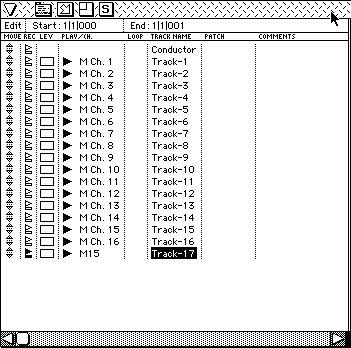
The Track-17 data in the figure is ignored.
Also, for example, note-on data and control change (expression, pan, etc.) tracks may be split and output as the same MIDI channel for ease of editing. Since it changes, the expression effect will not be applied to the note data.
DP2
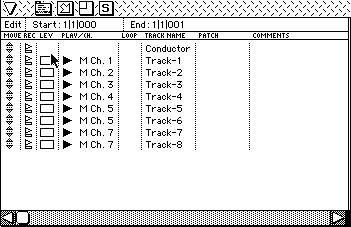
Since the MIDI event of Track-6 in the figure is treated as MIDI channel 6, it will not affect the MIDI event of Track-5.
Therefore, there are three points to note.
- Tracks of the same MIDI channel must be merged when outputting to SMF with a sequencer.
- The maximum number of tracks (excluding tempo tracks) is 16.
The handling when outputting with SMF is slightly different depending on each sequencer, and some sequencers automatically merge tracks of the same MIDI channel, and some sequencers insert empty tracks in the case of missing MIDI channels. Please check your sequencer once.
There is also a sequencer that automatically outputs SMF type 0 when a sequence with only one track is output by SMF. In that case, you need to deal with it by creating another dummy track. - If the MIDI channel number is important, you need to be aware of the final track number when creating the data. For example:
- 17th effect pan
- 71st effect volume
- 80th Q-sound localization
- The functionality of the 05h Sequence Volume command has changed.
- P1
- Pronunciation control number (0-7)
- P2
- Volume (0-255) The larger the value around 128, the louder the volume. Previously, 127 was the default and the volume could only be turned down, but in Ver-2.00 and later it can be louder than when sampled. However, be aware that setting an extremely large value may cause distortion. The default value is 128. Set 128 to return the sequence volume to the default setting.
- P3
- Fade rate (0-255) Specifies the time to reach the specified sequence volume from the current sequence volume as a rate (0 to 255). The larger the value, the slower the change, 255 is the longest, and 1 is the shortest. (If it is 0, only the sequence volume is set without fading.) Fade is performed from the current sequence volume toward the specified sequence volume. Fade-in or fade-out is determined by whether the specified sequence volume is larger or smaller than the current sequence volume.
Fade-in and fade-out by the sequence volume command are effective even during note-on.
Also, a bug in the sound driver prior to Version 1.31 that the real-time volume control during note-on by MIDI control change is not possible has been fixed.
- Addition / change of TempoConTRol If TempoConTRol is performed during the loop by control change No. 31, the tempo will return to the initial tempo when returning to the beginning of the loop. To prevent this, tempo processing now has three modes.
- Normal mode Performs the same tempo processing as before.
- Ignore mode The tempo at the start of the sequence remains the same, and even if the tempo changes during the sequence, the tempo does not change. The host will accept tempo change commands.
- Ratio mode Even if you change the tempo during a song, it will be affected by the tempo change by the host (a command different from the conventional tempo change).
As a result, the following host commands have been added.
| $ 14 tempo mode |
|---|
| P1: Management number | |
| P2: Tempo mode | 00: Normal |
| +: Ignoa |
| −: Ratio |
| $ 15 Tempo ratio set |
|---|
| P1: Management number | |
| P2: Ratio | (-32768 to +32767)
The effect is the same as changing the tempo. |
In addition, the work of the above tempo mode and tempo ratio is reset by the sequence start.
- The trouble with the control change No. 64 damper has been solved in Ver2.00. No more special data rework.
- The addition result of TL + VolBias must not be less than 0. If it is 0 or less, the driver returns an error number in Status and does not play the sequence.
- Do not use multiple versions of the sound driver in one game. It will cause confusion.
- About the limit of map data One map file can have a maximum of 128 maps, but the map information can only be stored in the system area of the sound driver up to 4096 bytes (1000h).
When performing "Create Binary Map File" from the File menu of the sound simulator, SndSim (Ver.2.10 or later) will alert you if the binary size of the map exceeds 4KByte (1000h). At this time, there is no sound even if the map is changed.
In such a case, divide the map file into multiple parts and deal with it. You can also view the size in the Make Binary File menu of Snd Simulator, so check the current size from time to time.
As a guide, if there are 500 or more blocks in the map, the size will exceed 4KByte (1000h). *** Reference *** Calculation method The size per block is 8 bytes. One byte is added as an end code for each map.
If the total number of blocks is 150 and there are 12 maps
150 × 8 + 12 × 1 + 1 = 1213 (<4096)
So it will be 1213 bytes.
| Sample frequency | Base Note | Fine Tune |
|---|
| 44100 | 60 | 00 |
| 40000 | 62 | 41 |
| 38000 | 63 | 55 |
| 36000 | 64 | 63 |
| 34000 | 65 | 63 |
| 32000 | 66 | 58 |
| 30000 | 67 | 44 |
| 28000 | 68 | 20 |
| 26000 | 69 | -18 |
| 24000 | 71 | 62 |
| 22050 | 72 | 0 |
| 22000 | 72 | -Five |
| 20000 | 74 | 40 |
| 18000 | 76 | 63 |
| 16000 | 78 78 | 58 |
| 14000 | 80 | 17 |
| 12000 | 83 | 59 |
| 11025 | 84 | 0 |
| 10000 | 86 | 40 |
| 9000 | 88 | 63 |
| 8000 | 90 | 58 |
| 7000 | 92 | 17 |
| 6000 | 95 | 60 |
| 5000 | 98 | 40 |
| 4000 | 102 | 56 |
This is the setting value of Base Note and Fine Tune when playing at the reference pitch with Base Note 60.
