The tone editor PAN position is currently (Ver2.06), from the left L16, L15, L14, L13, L12, L11, L10, L9, L8, L7, L6, L5, L4, L3, L2, L1, C, R1, R2, R3, R4, R5, R6, R7, R8, R9, R10, R11, R12, R13, R14, R15
It is lined up with, but correctly
L15, L14, L13, L12, L11, L10, L9, L8, L7, L6, L5, L4, L3, L2, L1, C, C, R1, R2, R3, R4, R5, R6, R7, R8, R9, R10, R11, R12, R13, R14, R15
is. It's just a display error, but you need to be careful. In addition, this bug will be fixed in the next version (Ver2.07).
About the mysterious parameters of TONE EDITOR When you open the waveform reading window, it looks like this.
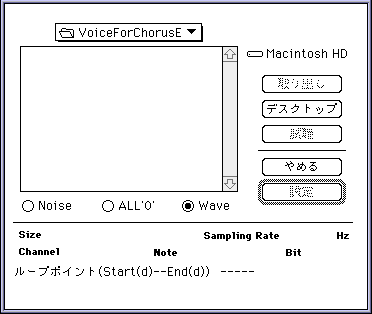
The meaning of the radio button above is
- ・ ALL '0'
- There is no sound.
- ・ NOISE
- My name is Shah. Please try it out.
When you open the EG window, it looks like this.
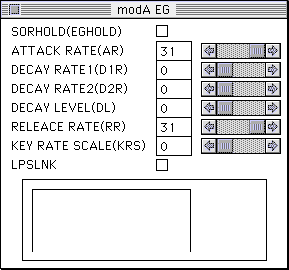
- ・ EGHOLD
- If checked, the AR value will be ignored and EG will start from the maximum volume.
- ・ KEY RATE SCALE
- The larger the value from 0-14, the stronger the effect of key scaling. Note that 15 does not have a key scaling effect.
- ・ LPSLNK
- If you do not check the abbreviation of LooP Start LiNK, the relationship of EG and the EG of the Loop Start point are irrelevant. If checked, the effect of EG changes depending on the position of Loop Start.
(See the Hardware Manual / SCSP User's Manual / EG Register for more information). When I open the LFO (hardware) window, it looks like this.
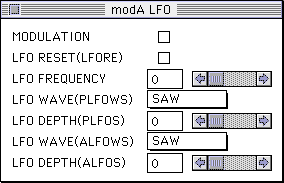
- ・ MODULATION
- The MIDI Control Change No. 1 modulation depth value allows you to turn the LFO on and off.
0 for off, 1-127 for on, no depth control. - ・ LFO RESET
- Each time you note on, the LFO waveform is reset and modulation starts from the reference pitch.
When you open the INVERT window, it looks like this.
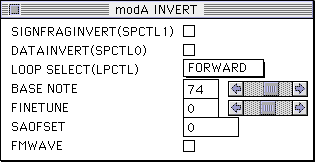
- ・ SAOFSET
- Abbreviation for Start Address OFfSET, which gives an offset to the value written in the Start Address of the PCM waveform. Used when using effects such as DSP chorus to shift the phase of the modulation waveform and make it undulate.
Currently, the sound driver does not refer to it, so it is meaningless to put anything in it. - ・ FM WAVE
- If checked, FM modulation is normally performed with a sine wave of 3 wavelengths, but with 1 wavelength. There is no benefit other than a slight reduction in data. You should think about it and not use it.
- ・ SPCTL1, SPCTL0
- Do not check it as it is not normally used.
When you open the TOTAL LEVEL window, it looks like this.
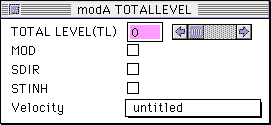
- ・ MOD
- Parameters used for DSP modulation waveforms Well, usually not used.
- ・ SDIR
- Abbreviation for Sound DI Lect
No EG or LFO is applied, and the PCM waveform sounds as it is. The volume remains at the maximum volume and does not change.
The effect of Sequence Volume from the SH2 side is also not accepted, so it is better not to check it. Please note that some tones created by Invision are checked, but you may have to remove them if you want to use Sequence Volume.
I also recently found out that it seems to be the cause of noise, so it is wise not to check it. - ・ STINH
- STackWrite INHibit Write protection on the stack. This parameter is not normally checked.
When you open the FM window, it looks like this.
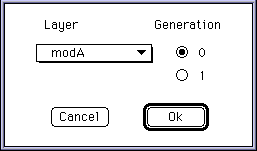
- ・ Generation
- It's 0 or 1, but don't worry. 0 is okay.
(For more information, see "Hardware Manual / SCSP User's Manual / Using FM Modulation Registers and FM Sound System ").

