 ★ SOUND Manual ★ SCSP / DSP Parameter Editor User's Manual
▲ Back | ■
SCSP / DSP Parameter Editor User's Manual 3. How to use pEdit
■ Data to be edited
- The data that pEdit edits is the contents of the coefficient (COEF) RAM and address constant (ADRS) RAM on the SCSP / DSP hardware.
■ Usage procedure
- 1. Loading an executable DSP program
- FileMenu --Open ... selects the executable file to edit. As a result, the DSP program is downloaded to SCSP / DSP, and two types of parameter edit windows , a Coefficient window for editing coefficients and an Address window for editing address constants, open on the screen.
- 2. Parameter editing
- There are two ways to edit parameters in the parameter edit window (page 7).
- Enter the value directly in the text box where the value of the parameter is displayed
- Operate the scroll bar with the mouse
- 3. Save the executable DSP program
- If you want to save the result of editing the parameters, you can save it as an executable file (extension ".EXC") by executing FileMenu --Save / Save As ....
■ Parameter edit window
- There are two types of parameter edit windows: the "Coefficient" window for editing coefficient data and the "Address" window for editing address constant data. Here, the contents are explained using the "Coefficient" window (shown below) as an example.
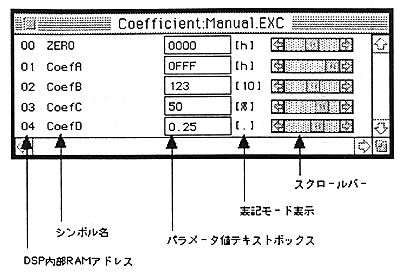
- DSP internal RAM address
- The address in the internal RAM on the DSP hardware that stores the data corresponding to each coefficient (COEF) / address constant (ADRS) symbol name.
- Symbol name
- SCSP / DSP assembler "dAsms" Displays the name used in the coefficient / address constant definition part on the source code.
- Parameter value text box
- This is the part that displays / inputs parameter values. On the SCSP / DSP assembler "dAsms" source code, display / input can be performed according to the notation mode specified for each data in the coefficient / address constant definition part. For the notation mode, the variable range of data in each notation mode, the data conversion method, the format that can be input, etc., refer to " SCSP / DSP Assembler User's Manual / 3. Source Code Configuration ".
- Notation mode display
- On the SCSP / DSP assembler "dAsms" source code, the notation mode specified for each data in the coefficient / address constant definition part is displayed.
- scroll bar
- Data can be changed by operating with the mouse.
■ Find function
- If you cannot quickly find the symbol name of the parameter you want to edit in the parameter edit window, you can use the Find command in the Edit menu to search for the symbol name of the coefficient or address constant.
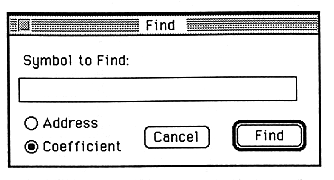
- When you execute the Find command, a window like the one shown above will appear. Enter the symbol name you want to search in the text box, set the "Address / Coefficient" radio button, and click the "Find" button to execute the search.
▲ Back | ■
★ SOUND Manual ★ SCSP / DSP Parameter Editor User's Manual
Copyright SEGA ENTERPRISES, LTD., 1997