★ SOUND Manual ★ Sound Simulator Manual
▲ Back | Forward ▼ Menu list
Sound simulator manual
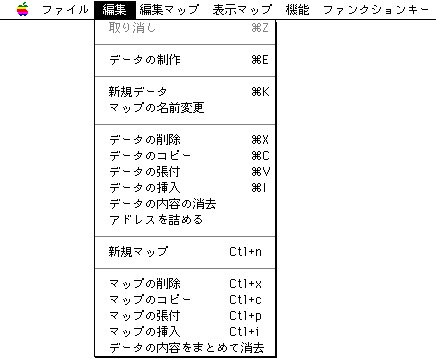
■ Edit menu
- When you open the Edit menu, the following display will appear.
cancel
- Disables the last change made.
Data production
- Select this to open the following dialog box.
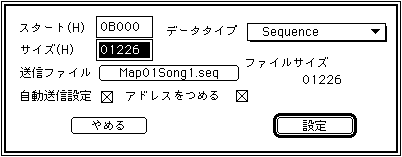
Change the map information data here. You can set the start address, area size, data type, forwarding file, and autoload specification. If you specify a transfer file, the size of the specified file is displayed in bytes, which can be used as a guide for determining or changing the area size.
This menu can be obtained by double-clicking the Edit Window. New data
- New data will be added on the current map. The data type is the default "BANK data" or the last data type selected in the Data Edit dialog box, with a size of 00000.
Rename map
- You can give a name to the area map for each area. You can set an easy-to-understand name that represents an area when there are many areas.
Delete data
- A confirmation menu will appear where you can choose to update the deleted address or keep the current address. The deleted data is stored and can be retrieved again by the insert operation immediately after.
Copy of data
- The currently selected data is stored. It can be taken out by the insertion operation immediately after.
Data pasting
- The currently stored data will be pasted.
Insert data
- The currently stored data will be inserted. The insertion position is immediately before the currently selected and highlighted data. If no data is selected, it will be added at the very end.
Erase data contents
- All currently selected data except the data type will be deleted.
Fill the address
- Fill in the vacant addresses due to deletion etc.
map~
- Make the same edits as above for the map, not for each data.
▲ Back | Forward ▼ Menu list
★ SOUND Manual ★ Sound Simulator Manual
Copyright SEGA ENTERPRISES, LTD., 1997