 ★ SOUND Manual ★ Sound Simulator Manual
▲ Back | Forward ▼
Sound simulator manual
Converter environment settings
- Select "Converter Preferences" from the Features menu to open the following dialog box.
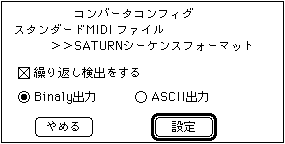
The meaning of each check box is as follows.- □ Repeat detection
- Set to perform repeated detection.
- ○ Binary output ○ ASCII output
- Select whether to output the final output file in ASCII format or binary format. If you output in ASCII format, you can easily check MIDI note information and control changes.
▲ Back | Forward ▼
★ SOUND Manual ★ Sound Simulator Manual
Copyright SEGA ENTERPRISES, LTD., 1997