 ★ SOUND Manual ★ Sound Simulator Manual
▲ Back | Forward ▼
Sound simulator manual
Creating a bank of sequences
- Select this to open the following dialog box.
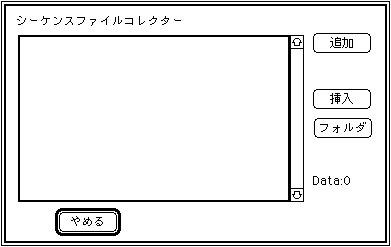
What is displayed here is a list of compressed file names converted by [Convert Standard MIDI File ], which is called a collect list. Nothing is displayed at first, and you can add / insert with [Add] or [Insert].
If you load the collect list with [File], [Collect file], and [Open collect file], you do not have to register with [Add] or [Insert] every time.
You can select multiple files and convert them all at once with Shift + mouse operation.- addition
- Select Add to open the following dialog box.
Now add the compressed file name to the collect list. Select the compressed file name you want to add and the compressed file name will be added to the end of the collect list. - Insert
- Select Insert to open the following dialog box.
Now insert the compressed file name into the collect list. Click where you want to insert it on the collect list, then select the compressed file name. The compressed file name selected here is inserted immediately before the compressed file name selected in the collect list. - folder
- As with the add button, the standard selection dialog is displayed. Enters all the conversion files that exist in the folder that contain the file selected here.
▲ Back | Forward ▼
★ SOUND Manual ★ Sound Simulator Manual
Copyright SEGA ENTERPRISES, LTD., 1997