 ★ SOUND Manual ★ Sound Simulator Manual
▲ Back | Forward ▼
Sound simulator manual
Memory dump
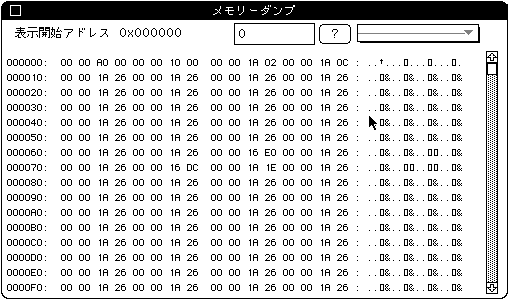
- Dumps 256 bytes of sound memory on the target. When this menu is selected, the following dialog is displayed. (Insert the dump PICT)
Edit text
- Specify the display address. After specifying, the next [? ]Push the button.
- Pop-up menu
- You can register the address you use regularly. The members of the popup are:
(Insert PICT for pop-up dump) - Display start address
- This menu displays a dialog for registering commonly used addresses.
(Please insert the address setting PICT)
- Each function is as follows.
- Pop-up menu
- Specify the table number to register. The set value and the table name (Symbol name) are displayed for the table that has already been set. The maximum number of addresses that can be registered is 15.
- scroll bar
- It is possible to display up to 0x100E30 every 0x20 bytes.
- Closed box
- Press the close box in the upper left to dismiss this dialog.
▲ Back | Forward ▼
★ SOUND Manual ★ Sound Simulator Manual
Copyright SEGA ENTERPRISES, LTD., 1997