SOUND ManualTone Editor User's Manual /
BackForward
Tone Editor User's Manual

6. About each window


In SatToneEd, four large windows are made up of a "maybe tree" structure. I will introduce each window from the root part.

● Project window
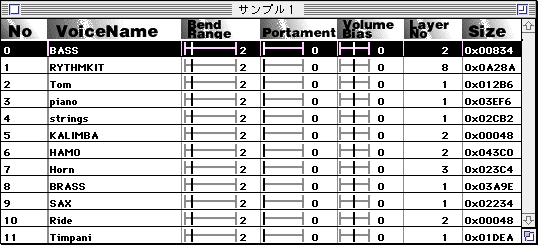
Information on each bank is displayed in the window that is the apex of the tree structure. You can open the voice window by double-clicking on each bank.

● Voice window
Shows the contents of one bank.
By clicking the voice you want to edit the parameters, it will be selected and the edit dialog will be displayed.

To select multiple voices, hold down the shift button and click another voice to select all the voices in the middle. However, only the very first voice is subject to parameter editing.

● Layer window
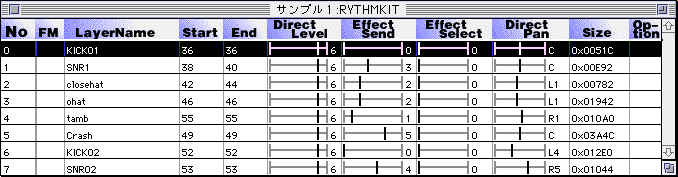
The layer window can be divided into PCM and FM depending on the voice settings.
PCM layer window
Although there are differences in the displayed contents, the handling is exactly the same as the voice.

● FM layer window
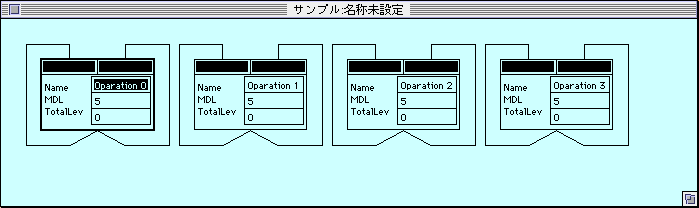
You can edit the FM algorithm graphically. Data cannot be selected at the same time in this window.

To connect, click the black rectangle above each block and drag it to another block to connect. If you end the drag at a place other than the block, it will automatically connect to you.

When calling the layer parameter window described later, you can call it by double-clicking the character part of each block.
● Layer parameter window
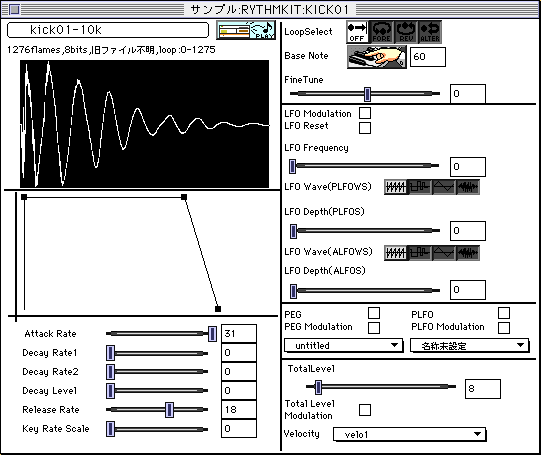
Set more detailed parameters for the layer. This content is the same for PCM and FM.

BackForward
SOUND ManualTone Editor User's Manual /
Copyright SEGA ENTERPRISES, LTD., 1997