Return to previous page | Return to menu
3> Warning messages and sequences
Be sure to prepare the following warning message for each process of initialization check, existence / capacity check, load, and save. Use the main terms shown in the reference glossary, and be especially careful not to use "prohibited phrases" in the message .
<Warning message (1)>
When the main unit RAM or cartridge RAM is not initialized .
= Expression in the main unit BOOT ROM =
- Erase everything (initialize)
- "Erase all records on the main unit. Are you sure? (Initialize)"
- "I erased all the records on the main unit. (Initialized.)"
- "Could not initialize."
= Recommended example =
- "The main RAM is not ready for backup yet. (It has not been initialized.)"
- "Erase all records in the main RAM. (Initialize) Are you sure? Yes No"
- "I erased all the records in the main unit RAM. (Initialized)"
- "Could not erase all records in the main RAM. (Failed to initialize)"
- "Erase all records on the saved data management screen of the Sega Saturn main unit. (Initialize)"
- "If you press the reset button while holding down the L button or R button, you will proceed to the saved data management screen of the Sega Saturn main unit."
* The word "initialization" is always treated as parentheses, and it is prohibited to use it alone.
* "Main unit (RAM)" ← → "Cartridge (RAM)"
<Warning message (2)>
When the capacity to save newly cannot be secured . There is no way to save it except at the expense of existing records, so we need to tell that. At the same time, it is necessary to provide information on the capacity used in this game.
= Recommended example =
- "There is not enough space to save the new record. If you start the game as it is, you will not be able to save the new record unless you erase the previous record."
- "*** free space is required to store new records."
- "On the Sega Saturn main unit's saved data management screen, erase the record of another game or copy it to the cartridge RAM and restart the game. If you press the reset button while holding down the L button or R button, Go to the saved data management screen. "
* Not required if it is judged that there is no problem even if the record is updated due to the nature of the game.
<Warning message (3)>
There is no game data and no free space. In other words, when the save function cannot be used at all .
Even in this case, the game must be playable at the user's discretion (of course, the save function cannot be used). At the same time, it is necessary to provide information on the capacity used in this game.
= Recommended example =
- "If you start the game as it is, you will not be able to save the record. Do you want to start the game? Yes No"
- "You need *** free space to keep a record of this game."
- "On the Sega Saturn main unit's saved data management screen, erase the record of another game or copy it to the cartridge RAM and restart the game."
- "If you press the reset button while holding down the L button or R button, you will proceed to the saved data management screen of the Sega Saturn main unit."
<Continue non-selectable processing>
If you cannot continue because there is no game record, that is, the initial state immediately after purchase. It is necessary to take measures such as making it impossible to select the continue item or skipping the game data selection screen (loading screen) itself.
<Warning message (4)>
Warning for abnormalities during loading, such as when reading fails or the data content is corrupted. Tell them that they couldn't be loaded or that the record isn't available.
= Recommended example =
- "The record could not be read correctly."
- "Failed to load."
- "You cannot start the game with this record."
- "This record is not available."
* Do not use expressions that may be confused with hardware failures, such as "broken".
<Warning message (5)>
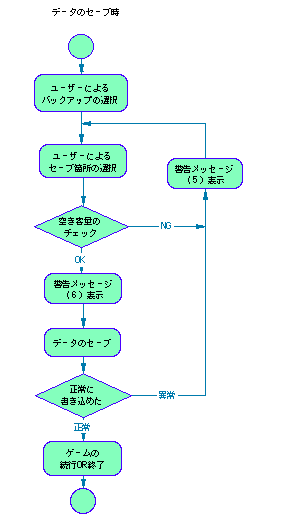
Warning for abnormalities during saving, such as when writing fails or when the capacity is full and saving cannot be performed. If the capacity is full, you must provide info on the capacity used in the game.
= Recommended example =
- "The record could not be saved correctly. Please try again."
- "You need *** free space to keep a record of this game."
- "On the Sega Saturn main unit's saved data management screen, erase the record of another game or copy it to the cartridge RAM and restart the game."
- "If you press the reset button while holding down the L button or R button, you will proceed to the saved data management screen of the Sega Saturn main unit."
<Warning message (6)>
A warning that prompts you not to turn off the power of the main unit while saving . It is desirable to display it at an appropriate place in the game sequence or specify it in the instruction manual.
= Recommended example =
- "The game record is being saved. If you turn off the power, the record may not be saved correctly."
= Expression in the main unit BOOT ROM =
No. Name Comment Usage amount Free space on the main unit (no unit) Select and delete
- "Erase the record on the main unit. Select the record you want to erase and press the C button. (Click the B button to finish)"
- "Erase ... from the main unit. Are you sure? Yes No"
- "... I erased the record from the main unit."
- "... I couldn't erase the record from the main unit."
Copy to cartridge
- "Copy the record of the main unit to the cartridge. Select the record you want to copy and press the C button. (Cancel with the B button)"
- "Are you sure you want to copy ... to the cartridge?"
- "I copied ... to the cartridge."
- "The record on the main unit could not be copied to the cartridge."
- "The cartridge has a record with the same name. Do you want to erase and copy the record on the cartridge?"
- "There is not enough free space on the cartridge to copy."
- Record editing screen
- Record of
- Name of record
- Comment Date Usage Free space
- Switch Erase Copy Sort Date End
- Main unit cartridge expansion memory
- Number of records
- Erase ~ records.
- Is it OK? YES NO
- Copy ~ records.
- There is a record with the same name.
- Do you want to copy it?
- Could not copy.
- ~ Is full.
- ~ Records could not be copied.
- I have copied ~ records.
- Copy to
- cancel
- File name order
- new order
- Newest order for each game
Figure Separate Volume 1-2. Initialization Check / Existence / Capacity Check Processing Sequence
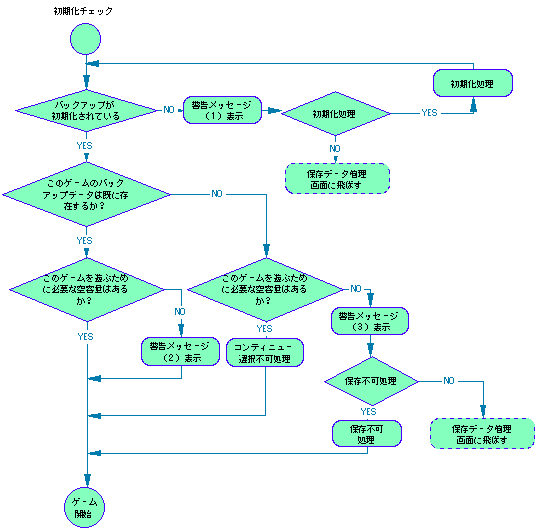
Figure Separate Volume 1-3. Load Processing Sequence
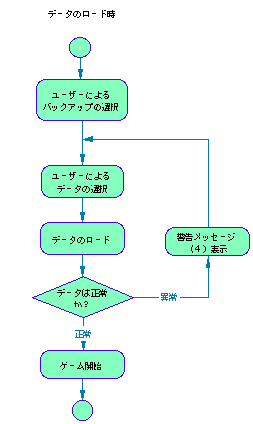
Figure Separate Volume 1-4. Save Processing Sequence
Return to previous page | Return to menu