 ★ Graphic Tools Guide ★ MAP / SCREEN Editor User's Manual
▲ Back | Forward ▼
MAP / SCREEN Editor User's Manual
■ Edit menu
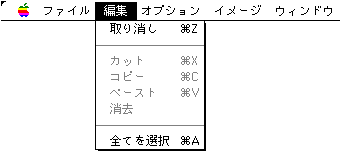
- Edit in each window. The basic operation conforms to the operation system of general Macintosh applications. Functions may differ between "Character Edit (Screen Editor)" and "Map Edit (Map Editor)".
- ● Cancellation
- Cancels the previous edit operation. Also, try the "undo" operation again.
- ● Cut
- ◆ When editing characters
- Saves the selected character image and pattern name array to the clipboard. The characters in the selection will be erased with the # 0 code.
- ◆ When editing a map
- Saves the selected pattern name array to the clipboard. The pattern name of the selection is filled with # 0 characters.
- ● Copy
- ◆ When editing characters
- Saves the selected character image and pattern name array to the clipboard. The characters in the selection remain the same.
- ◆ When editing a map
- Saves the selected pattern name array to the clipboard. The pattern name of the selection remains the same.
- ● Paste
- ◆ When editing characters
- Paste the character image stored on the clipboard into the character window.
- ◆ When editing a map
- Paste the pattern name array stored on the clipboard into the map window.
- ● Erase
- ◆ When editing characters
- Erases the selected characters with # 0 code.
- ◆ When editing a map
- Fill the pattern name of the selection with # 0 characters.
- ● Select all
- Makes everything in the window a selection.
- * Character images saved in the clipboard when editing characters can be copied and pasted with other applications as PICT data. However, in that case, the palette information may be destroyed, so be careful.
- * Of course, the pattern name array saved in the clipboard when editing a character can be pasted into the map window.
▲ Back | Forward ▼
★ Graphic Tools Guide ★ MAP / SCREEN Editor User's Manual
Copyright SEGA ENTERPRISES, LTD., 1997