 ★ Graphic Tools Guide ★ MAP / SCREEN Editor User's Manual
▲ Back | Forward ▼
MAP / SCREEN Editor User's Manual
■ Option menu
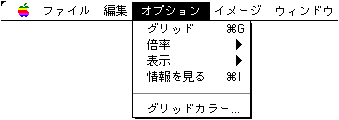
- ● Grid
- Displays a per-character grid in each edit window. The map window also displays a page-by-page grid.
- ● Magnification
- Specify the display magnification (x1, x2, x4) of each edit window. The map window can also be reduced (1/2, 1/4).
- ● Display
- Specify the data type to be composited and displayed in each edit window.
- ◆ Attributes
- The attribute number is displayed.
- ◆ Special priority
- A blue checkerboard pattern is displayed on the character with the special priority flag.
The special priority display can only be displayed in the map window.- ◆ Special color calculation
- A red checkerboard pattern is displayed for characters with the special color calculation flag.
The special color calculation display can be displayed only in the map window. - ● See information ...
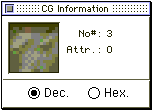
- The information window is displayed during "Character edit" and "Map edit".
- ◆ Character window information
- ◆ Map window information
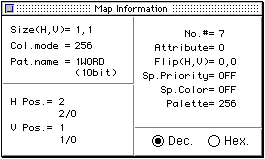
- In both information windows, you can select the display format from decimal or hexadecimal.
- ◆ Dec.
- Displays information in decimal.
- ◆ Hex.
- Displays information in hexadecimal.
- ● Grid color
- Sets the display color of the grid. The attribute number is also displayed in the color set here.
Different colors can be set for both character map windows. The image window uses the display color set in the character window.
▲ Back | Forward ▼
★ Graphic Tools Guide ★ MAP / SCREEN Editor User's Manual
Copyright SEGA ENTERPRISES, LTD., 1997