 ★ Graphic Tools Guide ★ MAP / SCREEN Editor User's Manual
▲ Back | Forward ▼
MAP / SCREEN Editor User's Manual
■ Image menu
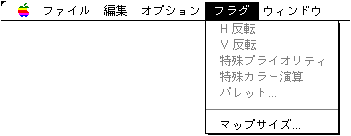
- Available when the character window is active. Edit character data directly.
- ● Mirror image
- Inverts the character image of the selection.
- ◆ Horizontal inversion
- Flip the image horizontally.
- ◆ Vertical inversion
- Flip the image vertically.
- ● Rotation
- Rotates the character image in the selection.
- ◆ + 90 °
- Rotate the image 90 degrees counterclockwise.
- ◆ -90 °
- Rotate the image 90 degrees clockwise.
- ● Attributes ...
- Set attribute data for characters in the specified range. "Screen Editor" cannot use this function.
- ● Display palette ...
- Specify the palette used to display the character window. The information set here has no particular effect on the output file. The aim is to improve editing efficiency based on intuitive visual effects.
- ● Sort ...
- The character data in the specified range is merged and rearranged according to the conditions. The result is reflected in the pattern name data in the map window.
It is mainly used for the purpose of packing character data into a certain amount of data.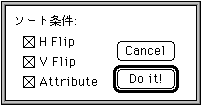
- ◆ H Flip
- Images that are flipped horizontally are also merged. Set the horizontal flip flag for the map window.
- ◆ V Flip
- Vertically inverted images are also merged. Set the vertical inversion flag for the map window.
- ◆ Attribute
- Attribute data is also merged.
"Screen Editor" cannot use this function. - ● Offset ...
- Specified number of offsets Moves the entire character data. The result of the move is reflected in the pattern name data of the map window.
It is mainly used when some rules / restrictions occur later and it is necessary to move to the character map data that has already been edited. - ● Usage check
- Delete characters that do not exist in the current map data with # 0 code.
It is mainly used for the purpose of eliminating unnecessary data from difficult-to-identify character data and complicated map data. Use it effectively in combination with "Sort".
▲ Back | Forward ▼
★ Graphic Tools Guide ★ MAP / SCREEN Editor User's Manual
Copyright SEGA ENTERPRISES, LTD., 1997