 ★ Graphic Tools Guide ★ MAP / SCREEN Editor User's Manual
▲ Back | Forward ▼
MAP / SCREEN Editor User's Manual
■ Flag menu
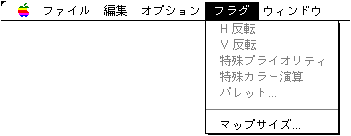
- Available when the map window is active. Set various flags of Sega Saturn VDP2.
- ● H inversion
- Set the H inversion flag for the pattern name in the specified range.
- ● V inversion
- Set the V inversion flag for the pattern name in the specified range.
- ● Special priority
- Sets a special priority flag for the specified range of pattern names.
- ● Special color calculation
- Set the special color calculation flag for the pattern name in the specified range.
- ● Palette ...
- Changes the palette of pattern names in the specified range.
Please note that the settable range changes depending on the "color mode" and "pattern name size" of the edit file. - ● Map size
- Change the editing area of the map window. Enter the map size on a page-by-page basis.
Note that if the changed size is smaller than the map size currently being edited, the editing area will be cut off.
▲ Back | Forward ▼
★ Graphic Tools Guide ★ MAP / SCREEN Editor User's Manual
Copyright SEGA ENTERPRISES, LTD., 1997