 ★ Graphic Tools Guide ★ MAP / SCREEN Editor User's Manual
▲ Back | Forward ▼
MAP / SCREEN Editor User's Manual
■ Window menu
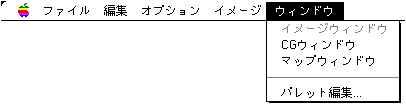
- ● Image window
- Shows or activates the image window.
- ● CG window
- Shows or activates the character window.
- ● Map window
- Shows or activates the map window.
- ● Palette editing ...
- Display the palette edit window and edit the color palette data.
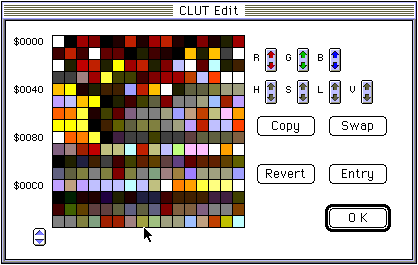
- ◆ R
- Changes the red intensity of the selected color.
- ◆ G
- Changes the green intensity of the selected color.
- ◆ B
- Changes the blue intensity of the selected color.
- ◆ H
- Changes the hue of the color in the selection.
- ◆ S
- Changes the color saturation of the selection.
- ◆ L
- Changes the lightness of the color of the selection.
- ◆ V
- Changes the color intensity of the selection.
- ◆ Copy
- Overwrites and copies the color table of the selected range to the position starting from the specified palette.
- ◆ Swap
- Exchanges the color table of the selected range with the color table at the position starting from the specified palette.
- ◆ Entry
- The edited result is reflected in the character window and map window.
- ◆ Revert
- Edit again. It returns to the state of the previous "Entry".
▲ Back | Forward ▼
★ Graphic Tools Guide ★ MAP / SCREEN Editor User's Manual
Copyright SEGA ENTERPRISES, LTD., 1997