 ★ Graphic Tools Guide ★ MAP / SCREEN Editor User's Manual
▲ Back | Forward ▼
MAP / SCREEN Editor User's Manual 3. Basic operation
■ Before starting editing work
- Some items in the setting information in "Map Editor / Screen Editor" cannot be changed as the editing work progresses.
When creating a new map, make sure to check the setting information confirmed at startup before proceeding.
* For details on the color mode and pattern name table, refer to the material related to VDP2 in the hardware manual. ■ Character registration procedure
- Select "Import" from the file menu to load the image file for character registration and open the image window.
Next, specify the range on the image window with the rectangle selection tool / selection tool and copy and paste it into the CG window to register it as a character.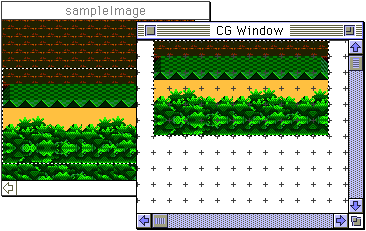
- It is also possible to paste the image data copied on other applications directly into the CG window.
▲ Back | Forward ▼
★ Graphic Tools Guide ★ MAP / SCREEN Editor User's Manual
Copyright SEGA ENTERPRISES, LTD., 1997