 ★ Graphic Tools Guide ★ SpriteEditor User's Manual
▲ Back | Forward ▼
SpriteEditor User's Manual 2. About the menu

● File menu
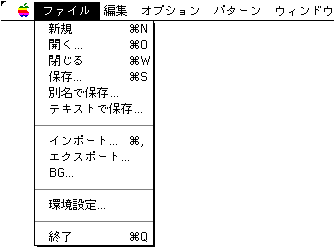
- New (
 + N)
+ N)
Allocate a new registration area. - open...( + O)
Open the file saved by this tool. - close( + W)
Closes the current window you are editing. - keep...( + S)
Save the data you are editing. - Save as ...
Saves the data being edited with a different name. - import...
Load the graphic data file for sprite registration.
As a special function, if you load a file with animation settings in SegaPainter, the auto import confirmation dialog will be displayed.
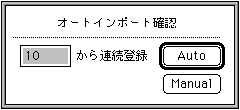
By specifying the registration start position here and selecting "Auto", sprites are automatically registered according to the object area in the file. - export...
Save the already registered sprites individually in DGT2 format. - BG ...
Load the image data for background display. - Environmental setting...
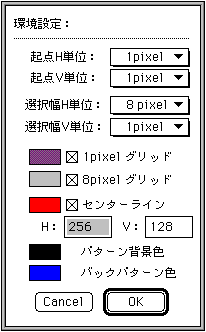
- Starting point H unit, starting point V unit Corrects the starting point position of the selection range that cuts sprite data to the specified pixel unit.
- Selection width H unit, Selection width V unit Corrects the width of the area from the starting position of the selection range that cuts sprite data in the specified pixel unit.
- 1pixel grid, 8pixel grid Set the grid of each unit displayed when "Grid display" is selected from the option menu.
- Center line Set the line for displaying the origin position in the pattern edit window.
- Pattern background color Specifies the background color of the pattern edit window.
- Back pattern color Specify the color used for the silhouette of the previous pattern displayed when "Back pattern" is selected from the option menu.
- end...( + Q)
Close "SpriteEditor".
● Edit menu
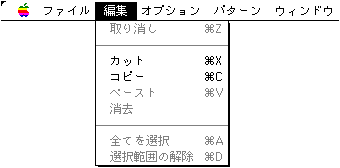
- cancel( + Z)
- cut( + X)
- copy( + C)
- paste( + V)
- erase
- Select all ( + A)
- Cancel selection ( + D)
● Option menu
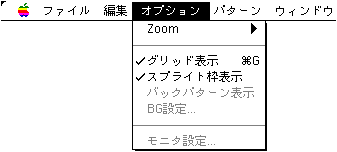
- Zoom ( +1, +2, +4, +8)
Set the display magnification for the import and pattern edit windows - Grid display ( + G)
Set whether to display the grid for the import and pattern edit windows. - Sprite frame display Set whether to display the sprite frame for the import and pattern edit windows.
- Back pattern display Select whether to display the previous pattern in the pattern edit window.
- BG setting
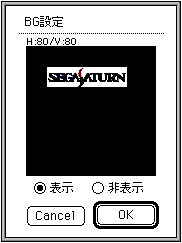
Make settings for the background image that has been loaded in advance.
Specify whether to display the background image and the display position for the pattern edit window. - Monitor settings
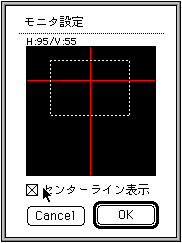
Make settings for the display image output to the target side.
Specify the monitor display position on the pattern edit window and specify whether to display the center line on the monitor.
● Pattern menu
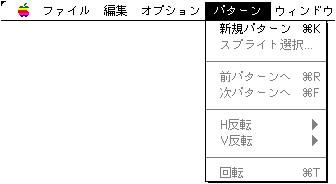
- New pattern added ( + K)
Add a new pattern registration area. - Sprite selection ...
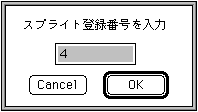
Selects the specified sprite in the pattern. - To the previous pattern ( + F)
Moves the pattern to be edited one step forward. - To the next pattern ( + R)
Moves the pattern to be edited one step forward. - H inversion
- Flip left and right based on the pattern origin for the sprite selected in the pattern edit window based on the origin.
- For each sprite, the sprite selected in the pattern edit window is flipped horizontally while maintaining its placement coordinates.
- V inversion
- Inverts the sprite selected in the pattern edit window based on the origin upside down based on the pattern origin.
- For each sprite, the sprite selected in the pattern edit window is flipped upside down while maintaining its placement coordinates.
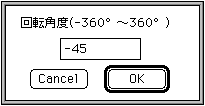
- rotate( + T)
Specifies the addition / subtraction value of the rotation angle for the sprite selected in the pattern edit window.
● Window menu
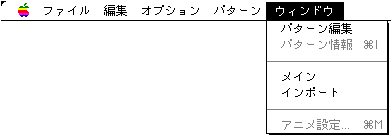
- Pattern editing Opens the pattern editing window.
- Pattern information ( + I)
Opens the pattern information window. - Main Makes the main window current.
- Import Makes the import window current.
- Anime setting ( + M)
Open the animation settings window.
▲ Back | Forward ▼
★ Graphic Tools Guide ★ SpriteEditor User's Manual
Copyright SEGA ENTERPRISES, LTD ,. 1997