 ★ Graphic Tools Guide ★ SpriteEditor User's Manual
▲ Back | Forward ▼
SpriteEditor User's Manual 3. About each window
● Main window
- Displays a list of information on sprites and patterns that have already been registered.
It is mainly used for editing sprites and pattern selection.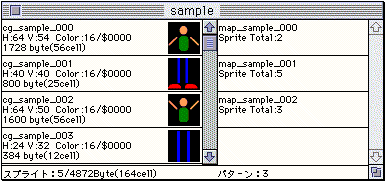
● Pattern edit window
- This window is for editing the placement of sprites.
Each time a pattern is selected on the main window, the display switches to the corresponding pattern.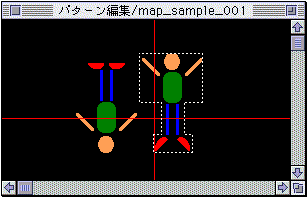
● Pattern information window
- Information such as offset coordinates, inversion state, rotation center point coordinates, and rotation angle is displayed for each sprite registered in the pattern.
You can also change the registration order (= display priority) and call the rotation center setting function on this window.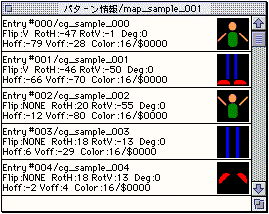
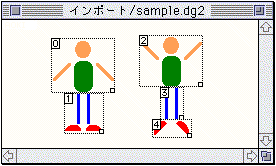
● Import window
- A window for cutting out sprites from graphic data.
● Sprite setting dialog (collective / individual)
- It is displayed by double-clicking the sprite item (collective) of the window or the sprite item (individual) of the pattern information window.
Moves the center point and changes the palette address for rotating sprites.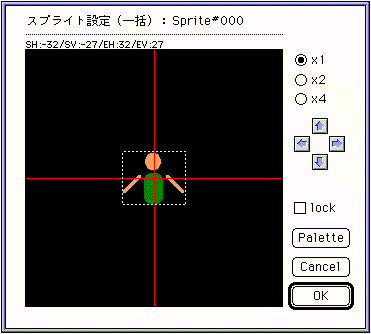
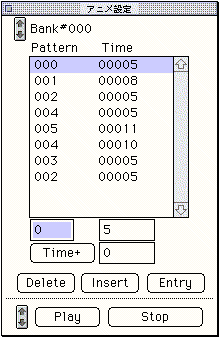
● Animation setting window
- This is a window for creating data for animation using patterns. It is not displayed when the target is not connected.
▲ Back | Forward ▼
★ Graphic Tools Guide ★ SpriteEditor User's Manual
Copyright SEGA ENTERPRISES, LTD ,. 1997