★ Graphic Tools Guide ★ 3D Editor User's Manual
▲ Back | Forward ▼
3D Editor User's Manual 3. 3. window
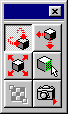
■ Toolbox
- It will be displayed above the work window. Use the "Toolbox" to select basic operations such as rotating and moving objects and selecting polygons that are performed on the main window.
- ● Model rotation
- 【drag】
- Rotate the entire model 3 axes in the direction of mouse movement. The center of rotation is the center point of the entire model.
- [Shift + drag]
- Rotate the entire model by one axis in the direction of mouse rotation. The axis of rotation is the axis of sight.
- ● Model movement
- 【drag】
- Move the entire model parallel to the projection plane (XY plane).
- [Shift + drag]
- Lateral movement of the mouse moves the entire model left and right (XY plane).
Vertical movement of the mouse moves the entire model back and forth (XZ plane).
- ● Model scale
- 【drag】
- Enlarge / reduce the entire model. The center of scaling is the center point of the entire model.
Moving the mouse upwards shrinks the entire model.
Moving the mouse down expands the entire model.
- ● Polygon selection
- [Click (drag)]
- Select the polygon at the click (drag) position. The selected polygons will be meshed.
If you start dragging from a position where there are no polygons, a marquee (dotted rectangular frame) corresponding to the movement of the mouse will be displayed. In this case, the polygon that contains all the vertices inside the marquee is selected after the drag is completed. - [Control + click (drag)]
- Deselect the polygon. The basic operation is the same as when selecting a polygon.
- [Shift + click (drag)]
- The entire model is selected, including the polygon at the click (drag) position. It is mainly used when you want to select any hierarchy of objects that have a hierarchical structure.
- ● Movement of cutout texture
- [Drag inside]
- Move the texture to be cut out.
- [Drag control point]
- Change the size of the texture to be cut out.
- ● Camera settings
- Select the default camera or custom camera.
▲ Back | Forward ▼
★ Graphic Tools Guide ★ 3D Editor User's Manual
Copyright SEGA ENTERPRISES, LTD ,. 1997