HARDWARE ManualSCSP User's Manual
BackForward
SCSP User's Manual / 4.2 Sound Source Register

■ Interrupt control register

SCSP has a built-in interrupt controller that includes a function to control the interrupt signal to the main CPU and a function to control the interrupt signal to the sound CPU.

Figure 4.55 Sound interrupt signal connection diagram
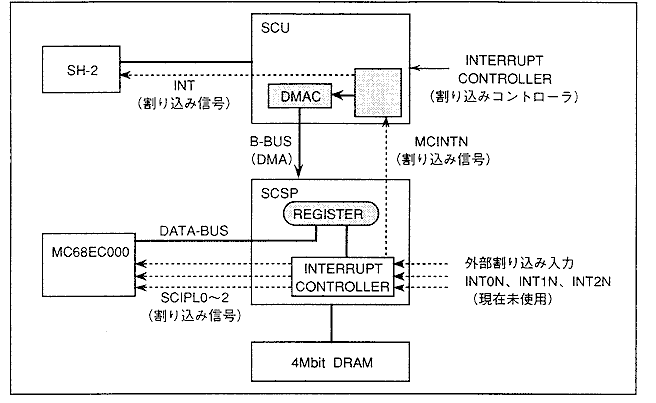
The interrupt signal system of the sound block is connected to each CPU centering on the SCSP interrupt controller. The interrupt signal to the sound CPU is an auto vector interrupt from level 1 to 7. For interrupts to the main CPU, level settings and vector settings cannot be set from the sound CPU side.
The interrupt to the main CPU can be used not only as an interrupt function but also as a trigger for starting the DMA transfer of the SCU. With this function, the timing of DMA transfer of a huge amount of data such as waveform data can be controlled by the sound CPU. When using this function, make sure that the main side (SCU, etc.) is set in advance so that DMA transfer is started by a sound interrupt (for details, refer to the SCU user's manual). please).

The registers are explained below.
There are two types of interrupts: the part that manages interrupts for the main (register named MC ~) and the part that manages interrupts for the sound CPU (register named SC ~).

SCIPD [10: 0]; Sound-Cpu Interrupt PenDing
A register (interrupt flag) that monitors interrupts to the sound CPU. When an interrupt request occurs, the flag of the corresponding interrupt request is set to "1B", so you can know which interrupt is occurring by reading the "SCIPD" register on the CPU. It also monitors interrupt requests sequentially regardless of the interrupt enable register ("SCIEB") setting. The interrupt reset register ("SCIRE") allows you to reset the corresponding flag. Only bit 5 is readable and writable, all others are read-only. Writing "1B" to bit 5 interrupts the sound CPU. However, writing "0B" is invalid.

SCIEB [10: 0] (R / W); Sound-Cpu Interrupt EnaBle
This is an interrupt enable register for the sound CPU. Writing "1B" allows hardware interrupts for the corresponding bit. Whether or not an interrupt has occurred can also be determined by reading "SCIPD" regardless of the "SCIEB" setting. Interrupts are disabled with the set of "0B".

SCIRE [10: 0] (W); Sound-Cpu Interrupt REset
This is the interrupt request reset flag for the sound CPU. Writing "1B" resets the hardware interrupt request for the corresponding bit (for the bit in which the interrupt is occurring, writing "1B" to the "SCIRE" corresponding to that bit " SCIPD "also changes from" 1B "to" 0B ").

MCIPD [10: 0] (R); Main Cpu Interrupy PenDing
A register (interrupt flag) that monitors interrupts to the main CPU. When an interrupt request occurs, the flag of the corresponding interrupt request changes to "1B", so you can know which interrupt is occurring by reading the "MCIPD" register on the CPU. It also monitors interrupt requests sequentially regardless of the interrupt enable register ("MCIEB") setting. The interrupt reset register ("MCIRE") allows you to reset the corresponding flag. Only bit 5 is readable and writable, all others are read-only. Writing "1B" to bit 5 interrupts the main CPU. However, writing "0B" is invalid.

MCIEB [10: 0] (R); Main Cpu Interrupy EnaBle
This is an interrupt enable register for the main CPU. Writing "1B" allows hardware interrupts for the corresponding bit. Whether or not an interrupt has occurred can be determined by reading "MCIPD" regardless of the "MCIEB" setting. Interrupts are disabled with the set of "0B".

MCIRE [10: 0] (R); Main Cpu Interrupt REset
This is the interrupt request reset flag for the main CPU. A set of "1" resets the hardware interrupt request for the corresponding bit ("MCIPD" by writing "1B" to the "MCIRE" corresponding to that bit for the bit in which the interrupt is occurring. Also changes from "1B" to "0B").

Figure 4.56 Interrupt register bit support
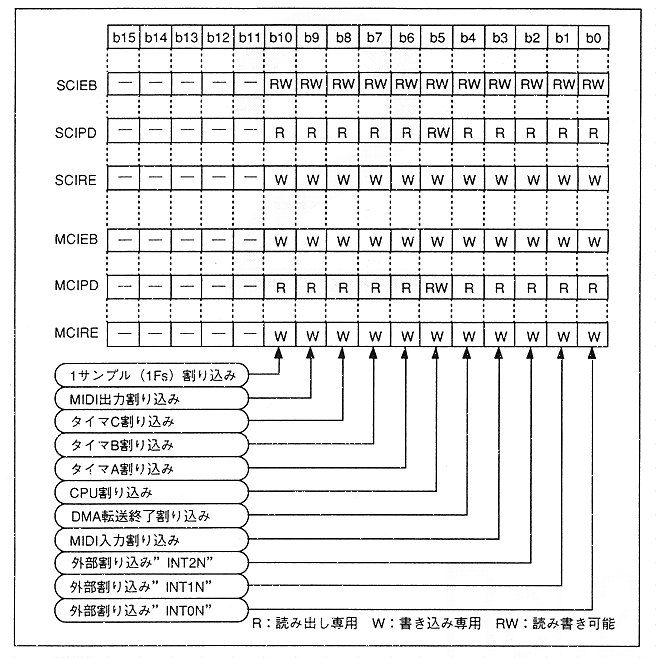
Table 4.31 Interrupt register bit factors
bit Interrupt factor
0 Supports interrupt input of external interrupt input "INT0N"
1 Supports interrupt input of external interrupt input "INT1N"
2 Supports interrupt input of external interrupt input "INT2N"
3 Supports MIDI input interrupt An interrupt is generated when data is fetched from the empty FIFO buffer memory on the MIDI-IN side. It reads all the data from the FIFO buffer and is automatically cleared when the buffer is free.
Four Supports DMA transfer end interrupt An interrupt is generated when the DMA transfer using the SCSP built-in DMA is completed (when all the data transfer of the block (length (quantity)) set in "DLG" is completed).
Five Supports CPU manual interrupt You can interrupt the sound CPU or interrupt the main by writing to the CPU (main and sound). Writing "1B" will cause an interrupt ("0B" is invalid).
6 Supports timer A interrupt
7 Supports timer B interrupt
8 Supports timer C interrupt
9 Supports MIDI output interrupt An interrupt request is generated when the memory of the FIFO buffer on the MIDI-OUT side is empty. When data is written to the MIDI-OUT buffer memory (register) and it is no longer free, the interrupt is automatically released.
Ten Supports interrupts for each sample (1 sample = 22.68 μsec = 1 / 44.1K time interval).
11 to 15 invalid

* About SCILV0, 1, 2
A register that sets the level of auto vector interrupts for the sound CPU. Each register is divided by bit for each interrupt factor, so when setting it, you need to look at Figure 4.58 vertically.
In addition, the timer B, C, MIDI output interrupt, and interrupt level for each sample are set collectively in the bit 7 string.
The level is set with a 3-bit code, but each bit is assigned to the SCILV0, 1 and 2 registers.

Figure 4.57 Correspondence between 3-bit code and register

The 3-bit code that sets the level looks like Figure 4.57. For example, if you set it to 101B, the interrupt level will be 5. At "000B", it is a level 0 interrupt, so no interrupt is applied.
However, the format of the actual register is as shown in Fig. 4.58, so be careful when setting it.

Figure 4.58 Interrupt level setting register format
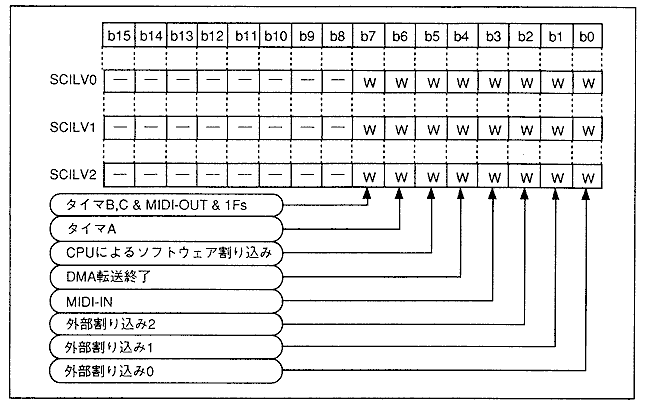
SCILV0 [7: 0] (W); Sound-Cpu Interrupt LeVel bit0
Specifies bit 0 of the interrupt level code to the sound CPU defined for bit support.

SCILV1 [7: 0] (W); Sound-Cpu Interrupt LeVel bit1
Specifies bit 1 of the interrupt level code to the sound CPU defined for bit support.

SCILV2 [7: 0] (W); Sound-Cpu Interrupt LeVel bit2
Specifies bit 2 of the interrupt level code to the sound CPU defined for bit support.

An interrupt setting example is shown below.

Interrupt setting example
Condition: When the main CPU is also interrupted by the timer A interrupt and the sound CPU is interrupted at level 6.

Procedure: Assuming that no interrupt is currently applied, set the timer after completing all interrupt settings.

1 : Set the interrupt level of the sound CPU to 6.
Level 6 is a 3-bit code "110B". Also, since the bit that manages the timer A interrupt is bit 6,

Bit 6 of "SCILV0" to "0B"
("00H" in bytes at address 100425H, or "0000H" in words at address 100424H)

Bit 6 of "SCILV0" to "1B"
("40H" in bytes at address 100427H, or "0040H" in words at address 100426H)

Bit 6 of "SCILV0" to "1B"
("40H" in bytes at address 100429H, or "0040H" in words at address 100428H)

To set. This completes the interrupt level setting.

2 : Set the parameters in the "MCIEB" and "SCIEB" registers so that the main and sound CPUs are interrupted.
So that timer A interrupts the main CPU

Write "1B" to bit 6 of the "MCIEB" register.
("40H" in bytes at address 10042BH, or "0040H" in words at address 10024AH)

Also, the sound CPU will be interrupted as well.
Write "1B" to bit 6 of "SCIEB".
("40H" in bytes at address 100421FH, or "0040H" in words at address 10041EH)

Furthermore, by setting a parameter in the timer, counting starts immediately after that, and if an overflow occurs, an interrupt is applied.

3 : Use the reset registers of the main and sound CPUs to cancel the interrupt.


BackForward
HARDWARE ManualSCSP User's Manual
Copyright SEGA ENTERPRISES, LTD., 1997