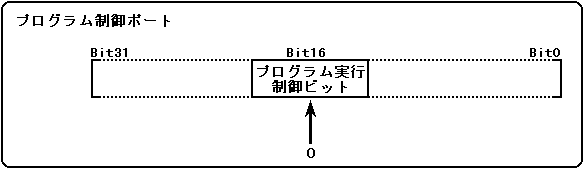
Figures 2.15 to 2.17 show the control method from the CPU step by step. Figure 2.15 Loading the DSP program Step1
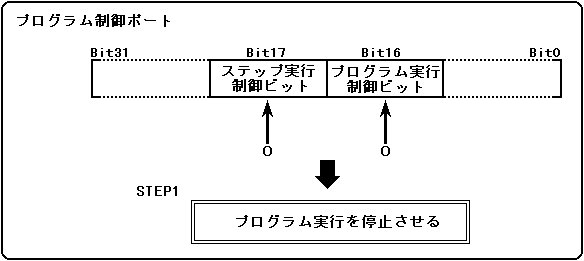
Figure 2.16 Loading the DSP program Step2
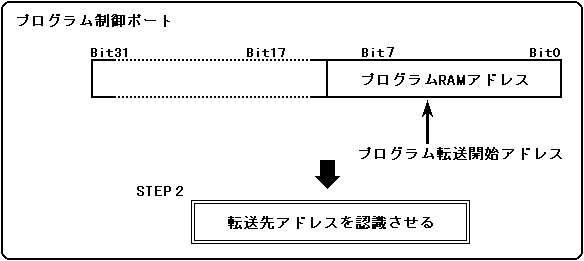
Figure 2.17 Loading the DSP program Step3
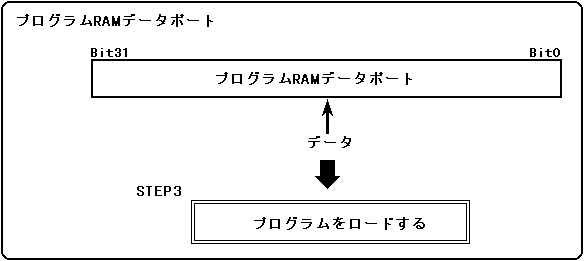
● DSP data access
To access the DSP data, you can use the DSP DMA instructions, or you can access the DSP data RAM area from the main CPU. Data can be accessed by controlling from the main CPU in the following order.- Set bit16 and bit17 of the program control port to 0.
- Write the access start address to the data RAM address port. It cannot be set unless the DSP is stopped.
- Data RAM Sequentially access data in longword units through the data port.
Figures 2.18 to 2.20 show the control method from the CPU step by step. Figure 2.18 DSP data access step1
Figure 2.19 DSP data access step2
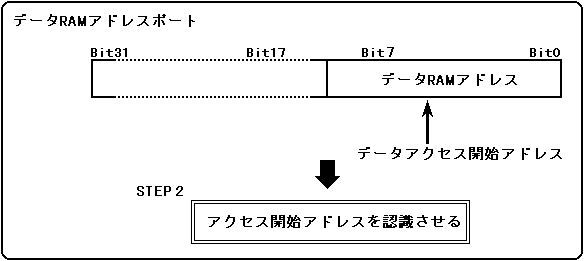
Figure 2.20 DSP data access step3
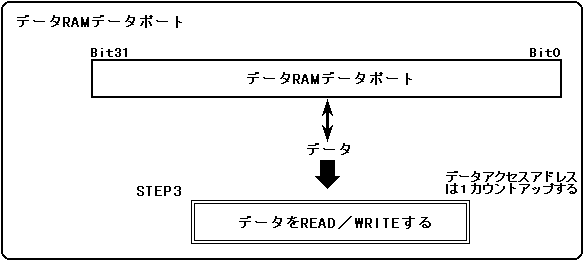
● Start execution of DSP program
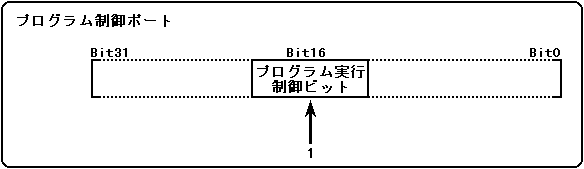
To start executing a DSP program, write 1 to bit16 of the program control port (see Figure 2.21). When the DSP recognizes that it has been written, it starts execution from the address stored in the program RAM address of the program control port. Therefore, the execution start address must be set before writing 1 to bit16 of the program control port. Figure 2.21 Control to start execution of DSP program from CPU
● Forced stop of DSP program
To forcibly stop the execution of the DSP program, write 0 to bit16 of the program control port, which is the opposite of starting execution. Figure 2.22 shows the forced stop control. Figure 2.22 Forced stop control of DSP program from CPU