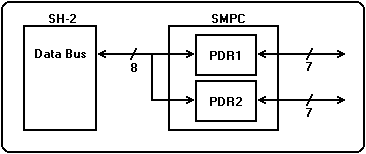
Figure 3.21 shows a block diagram of SH-2 direct mode. The SH-2 can directly access the peripheral through the two I / O port data registers (PDR1, PDR2) in the SMPC.
Figure 3.21 SH-2 direct mode block diagram
● Features
This mode is an effective method in the following cases.
When controlling peripherals that require faster access than accessible in SMPC control mode
When data output is required for peripherals
When you need access to a peripheral that requires an external latch
When you need access to peripherals that SMPC does not support
If none of the above features apply Do not use "SH-2 Direct Mode".
Currently (April 1997), the only peripheral that must use "SH-2 Direct Mode" is " Virtual Gun ".
● Settings for using SH-2 direct mode
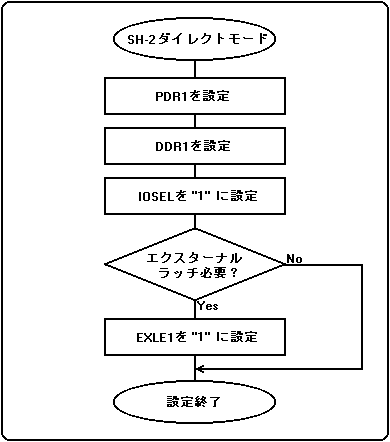
Figure 3.22 shows an example configuration for using SH-2 direct mode. Figure 3.22 shows an example configuration for port 1. The mode setting can be set independently for each port.
Figure 3.22 SH-2 direct mode setting example
When using both SH-2 direct mode and SMPC control mode (example: port 1 = SH-2 direct mode, port 2 = SMPC control mode) 0 bytes are used for the port used in SH-2 direct mode when the INTBACK command is issued. Please use in mode.