HARDWARE ManualVDP1 User's ManualChapter 7 Commands
BackForward
VDP1 User's Manual / Chapter 7 Commands

■ 7.2 User clipping coordinate setting command

User clipping can be set freely by software. When the command selection bit is 1000B This is the user clipping coordinate setting command.
The table contents of the user clipping coordinate setting command are as follows.

 bit
 15
 14
 13
 12
 11
 Ten
 9
 8
 7
 6
 5
 4
 3
 2
 1
 0
CMDCTRL
+00
0 JP 0 0 0 0 0 0 0 0 1 0 0 0
CMDLINK
+02
LINK designation / 8H 0 0
+04
+06
+08
+ 0A
CMDXA
+ 0C
0 0 0 0 0 0 Upper left X coordinate (XA)
CMDYA
+ 0E
0 0 0 0 0 0 0 Upper left Y coordinate (YA)
+10
+12
CMDXC
+14
0 0 0 0 0 0 Lower right X coordinate (XC)
CMDYC
+16
0 0 0 0 0 0 0 Lower right Y coordinate (YC)
+18
+ 1A
+ 1C
【note】
Is ignored (don't care)

The user clipping coordinate setting command is defined as follows.

● User clipping

User clipping can be selected by software, and you can choose to enable user clipping for each part, clip user clipping outside the setting area, or clip inside.

The user clipping coordinates are the user clipping enabled bits (Clip bit, command table start address + 04H bit 10), and you can select whether to enable or disable them. When disabled, user clipping coordinates are disabled and the part is clipped only in system clipping coordinates. When enabled, user clipping coordinates are enabled and the part is clipped at system clipping coordinates and user clipping coordinates.

When user clipping is enabled, the clipping mode bits (Cmod bit, command table start address + 40H bit 9) allow the user clipping to choose between inner drawing mode and outer drawing mode. In the inner drawing mode, only the inside of the user clipping coordinate setting area is drawn for the part, and in the outer drawing mode, the outside is drawn.

System clipping is handled regardless of user clipping.

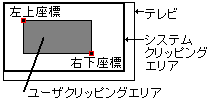
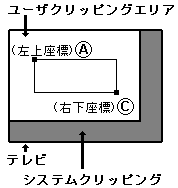
Clipping coordinates are set with a rectangle. The specification method is the upper left coordinates (XA, YA) and the lower right coordinates (XC, YC), and the values of these two point coordinates are defined in the command table.

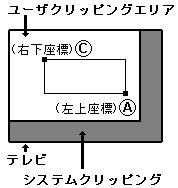
Since the clipping coordinates are not checked, set XA ≤ XC and YA ≤ YC in advance. Operation is not guaranteed if XC <XA or YC <YA is set.

Set the user clipping coordinates inside the system clipping coordinate setting area (including online). Operation is not guaranteed if the user clipping coordinates are set outside the system clipping settings area.

Points on the clipping line are treated as inside the clipping area. It is drawn in the inner drawing mode and not drawn in the outer drawing mode.

You can set two or more user clipping commands in the same frame. The clipping coordinate set command rewrites the internal clipping coordinate register. Subsequent parts that have been rewritten will be drawn with reference to that value.

The value of the user clipping coordinates is undefined after the power is turned on or after reset, so it must be set before drawing starts.

Figure 7.2 User Clipping Settings
(a) User clipping settings
Set so that XA ≤ XC and YA ≤ YC.
(b) Wrong user clipping settings
Operation is not guaranteed when XC <XA, YA <YC is set.
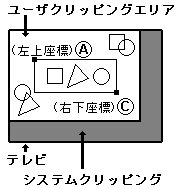
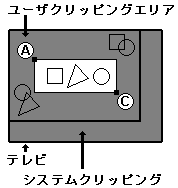
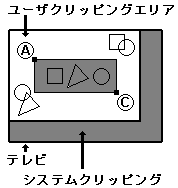
Figure 7.3 User clipping
(a) User clipping disabled
Because user clipping is disabled
The inside of the system clipping area is drawn.
(b) Inner drawing mode
When user clipping is enabled and in inner drawing mode
The inside of the user clipping area is drawn.
(c) Outer drawing mode
When user clipping is enabled and in outer drawing mode
The area between the outside of the system clipping area is drawn.
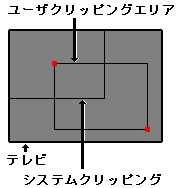
(c) Setting prohibited
Be sure to set the user clipping area inside the system clipping area.
Operation is not guaranteed when set to the outside.

BackForward
HARDWARE ManualVDP1 User's ManualChapter 7 Commands
Copyright SEGA ENTERPRISES, LTD., 1997