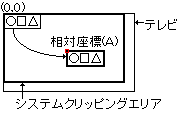
The relative coordinate setting command uses the coordinates specified by the drawing command as the relative coordinate values, and adds the values specified by the relative coordinate command to obtain the drawing coordinates. When the command selection bit is 1010B This is the relative coordinate setting command. The contents of the command table are as follows:
bit
15
14
13
12
11
Ten
9
8
7
6
5
4
3
2
1
0
CMDCTRL +00
0
JP
0
0
0
0
0
0
0
0
1
0
1
0
CMDLINK +02
LINK designation / 8H
0
0
+04
+06
+08
+ 0A
CMDXA + 0C
Sign extension
Relative coordinates (XA)
CMDYA + 0E
Sign extension
Relative coordinates (YA)
+10
+12
+14
+16
+18
+ 1A
+ 1C
【note】
Is ignored (don't care)
The relative coordinate setting command is defined as follows.
Setting the end bit to 0B and the command selection bit to 1010B results in a relative coordinate setting command.
Specify the jump format. When the jump format is assign or call, divide the address of the command table to be processed next by 8H and set it to CMDLINK.
Define the relative coordinates in CMDXA and CMDYA.
● Relative coordinates
Set the relative coordinates in the relative coordinates register. The coordinates specified by the drawing command are added to the relative coordinate values to become the drawing coordinates. The part is drawn in the framebuffer based on the drawing coordinates.
When the relative coordinates are (0,0), the part is drawn with the coordinates specified by the drawing command with the upper left corner of the screen as (0,0). To set the center of the screen to (0,0), specify the relative coordinates as (160,112).
Relative coordinates are held in the register until they are reset, so if you want to move the coordinates of several parts together and draw them, set them before those drawing commands.
Coordinate comparison in clipping is processed by adding this relative coordinate to the drawing specified coordinate of the part.
Also, since relative coordinates are not added to the clipping coordinates, the clipping area does not move.
The value of the relative coordinate register becomes undefined after the power is turned on or after reset, so be sure to set it before starting drawing.