 ★ HARDWARE Manual ★ VDP2 User's Manual ★ Chapter 8 Window
 Figure 8.7.1 Window processing ・ 1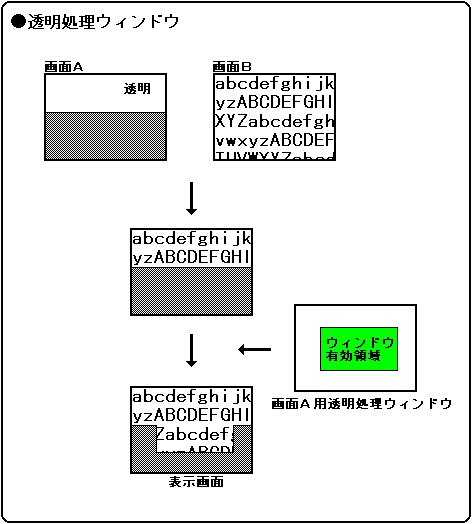
Figure 8.7.2 Window processing ・ 2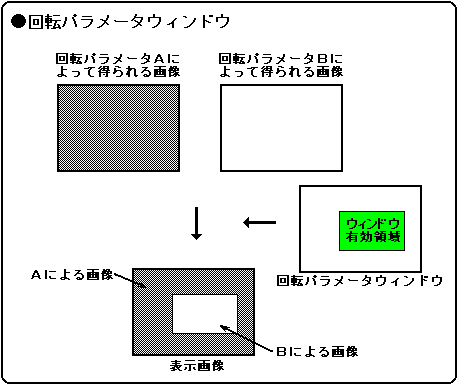
Figure 8.7.3 Window processing ・ 3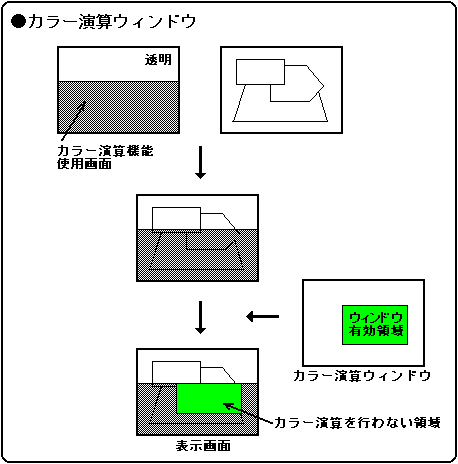
15 | 14 | 13 | 12 | 11 | Ten | 09 09 | 08 08 |
N1LOG | --- | N1SWE | N1SWA | N1W1E | N1W1A | N1W0E | N1W0A |
|---|
07 07 | 06 06 | 05 05 | 04 | 03 03 | 02 02 | 01 01 | 00 |
N0LOG | --- | N0SWE | N0SWA | N0W1E | N0W1A | N0W0E | N0W0A |
|---|
15 | 14 | 13 | 12 | 11 | Ten | 09 09 | 08 08 |
N3LOG | --- | N3SWE | N3SWA | N3W1E | N3W1A | N3W0E | N3W0A |
|---|
07 07 | 06 06 | 05 05 | 04 | 03 03 | 02 02 | 01 01 | 00 |
N2LOG | --- | N2SWE | N2SWA | N2W1E | N2W1A | N2W0E | N2W0A |
|---|
15 | 14 | 13 | 12 | 11 | Ten | 09 09 | 08 08 |
SPLOG | --- | SPSWE | SPSWA | SPW1E | SPW1A | SPW0E | SPW0A |
|---|
07 07 | 06 06 | 05 05 | 04 | 03 03 | 02 02 | 01 01 | 00 |
R0LOG | --- | R0SWE | R0SWA | R0W1E | R0W1A | R0W0E | R0W0A |
|---|
15 | 14 | 13 | 12 | 11 | Ten | 09 09 | 08 08 |
CCLOG | --- | CCSWE | CCSWA | CCW1E | CCW1A | CCW0E | CCW0A |
|---|
07 07 | 06 06 | 05 05 | 04 | 03 03 | 02 02 | 01 01 | 00 |
RPLOG | --- | RPSWE | RPSWA | RPW1E | RPW1A | RPW0E | RPW0A |
|---|
| N0LOG | 1800D0H | Bit 7 | For NBG0 (or RBG1) of the transparent processing window |
| N1LOG | 1800D0H | Bit 15 | For NBG1 (or EXBG) of transparent processing window |
| N2LOG | 1800D2H | Bit 7 | For NBG2 of transparent processing window |
| N3LOG | 1800D2H | Bit 15 | For NBG3 of transparent processing window |
| R0LOG | 1800D4H | Bit 7 | For RBG0 of transparent processing window |
| SPLOG | 1800D4H | Bit 15 | For sprites in transparent processing windows |
| RPLOG | 1800D6H | Bit 7 | For rotation parameter window |
| CCLOG | 1800D6H | Bit 15 | For color calculation window |
| xxLOG | Overlay logic |
|---|---|
| 0 | OR |
| 1 | AND |
| N0W0E | 1800D0H | Bit 1 | For NBG0 (or RBG1) of the transparent processing window |
| N1W0E | 1800D0H | Bit 9 | For NBG1 (or EXBG) of transparent processing window |
| N2W0E | 1800D2H | Bit 1 | For NBG2 of transparent processing window |
| N3W0E | 1800D2H | Bit 9 | For NBG3 of transparent processing window |
| R0W0E | 1800D4H | Bit 1 | For RBG0 of transparent processing window |
| SPW0E | 1800D4H | Bit 9 | For sprites in transparent processing windows |
| RPW0E | 1800D6H | Bit 1 | For rotation parameter window |
| CCW0E | 1800D6H | Bit 9 | For color calculation window |
| xxW0E | process |
|---|---|
| 0 | Do not use W0 window |
| 1 | Use W0 window |
| N0W1E | 1800D0H | Bit 3 | For NBG0 (or RBG1) of the transparent processing window |
| N1W1E | 1800D0H | Bit 11 | For NBG1 (or EXBG) of transparent processing window |
| N2W1E | 1800D2H | Bit 3 | For NBG2 of transparent processing window |
| N3W1E | 1800D2H | Bit 11 | For NBG3 of transparent processing window |
| R0W1E | 1800D4H | Bit 3 | For RBG0 of transparent processing window |
| SPW1E | 1800D4H | Bit 11 | For sprites in transparent processing windows |
| RPW1E | 1800D6H | Bit 3 | For rotation parameter window |
| CCW1E | 1800D6H | Bit 11 | For color calculation window |
| xxW1E | process |
|---|---|
| 0 | Do not use W1 window |
| 1 | Use W1 window |
| N0SWE | 1800D0H | Bit 5 | For NBG0 (or RBG1) of the transparent processing window |
| N1SWE | 1800D0H | Bit 13 | For NBG1 (or EXBG) of transparent processing window |
| N2SWE | 1800D2H | Bit 5 | For NBG2 of transparent processing window |
| N3SWE | 1800D2H | Bit 13 | For NBG3 of transparent processing window |
| R0SWE | 1800D4H | Bit 5 | For RBG0 of transparent processing window |
| SPSWE | 1800D4H | Bit 13 | For sprites in transparent processing windows |
| CCSWE | 1800D6H | Bit 13 | For color calculation window |
| xxSWE | process |
|---|---|
| 0 | Do not use SW window |
| 1 | Use SW window |
| N0W0A | 1800D0H | Bit 0 | For NBG0 (or RBG1) of the transparent processing window |
| N1W0A | 1800D0H | Bit 8 | For NBG1 (or EXBG) of transparent processing window |
| N2W0A | 1800D2H | Bit 0 | For NBG2 of transparent processing window |
| N3W0A | 1800D2H | Bit 8 | For NBG3 of transparent processing window |
| R0W0A | 1800D4H | Bit 0 | For RBG0 of transparent processing window |
| SPW0A | 1800D4H | Bit 8 | For sprites in transparent processing windows |
| RPW0A | 1800D6H | Bit 0 | For rotation parameter window |
| CCW0A | 1800D6H | Bit 8 | For color calculation window |
| xxW0A | process |
|---|---|
| 0 | Enable the inside of the W0 window |
| 1 | Enable outside the W0 window |
| N0W1A | 1800D0H | Bit 2 | For NBG0 (or RBG1) of the transparent processing window |
| N1W1A | 1800D0H | Bit 10 | For NBG1 (or EXBG) of transparent processing window |
| N2W1A | 1800D2H | Bit 2 | For NBG2 of transparent processing window |
| N3W1A | 1800D2H | Bit 10 | For NBG3 of transparent processing window |
| R0W1A | 1800D4H | Bit 2 | For RBG0 of transparent processing window |
| SPW1A | 1800D4H | Bit 10 | For sprites in transparent processing windows |
| RPW1A | 1800D6H | Bit 2 | For rotation parameter window |
| CCW1A | 1800D6H | Bit 10 | For color calculation window |
| xxW1A | process |
|---|---|
| 0 | Enable the inside of the W1 window |
| 1 | Enable the outside of the W1 window |
| N0SWA | 1800D0H | Bit 4 | For NBG0 (or RBG1) of the transparent processing window |
| N1SWA | 1800D0H | Bit 12 | For NBG1 (or EXBG) of transparent processing window |
| N2SWA | 1800D2H | Bit 4 | For NBG2 of transparent processing window |
| N3SWA | 1800D2H | Bit 12 | For NBG3 of transparent processing window |
| R0SWA | 1800D4H | Bit 4 | For RBG0 of transparent processing window |
| SPSWA | 1800D4H | Bit 12 | For sprites in transparent processing windows |
| CCSWA | 1800D6H | Bit 12 | For color calculation window |
| xxSWA | process |
|---|---|
| 0 | Enable the inside of the SW window |
| 1 | Enable the outside of the SW window |
★ HARDWARE Manual ★ VDP2 User's Manual ★ Chapter 8 Window