HARDWARE ManualVDP2 User's ManualChapter 12 Color Calculation
BackForward
VDP2 User's Manual / Chapter 12 Color Calculation

● Normal color calculation

There are two types of modes for performing color calculations on the top image and the second image.

  1. The top image and the second image are added according to the value of the color calculation ratio.
  2. The top image and the second image are added as they are.

When the color calculation mode that adds according to the value of the color calculation ratio is used, the value of the color calculation ratio of each screen is set in the register. The color calculation ratio of the sprite can be specified for each character from a maximum of eight register values, and the color calculation ratio of the scroll screen is specified in the register that has one for each side. For the color calculation ratio of sprites, refer to " ● Color calculation ratio register " in "9.2 Priority and Color Calculation".

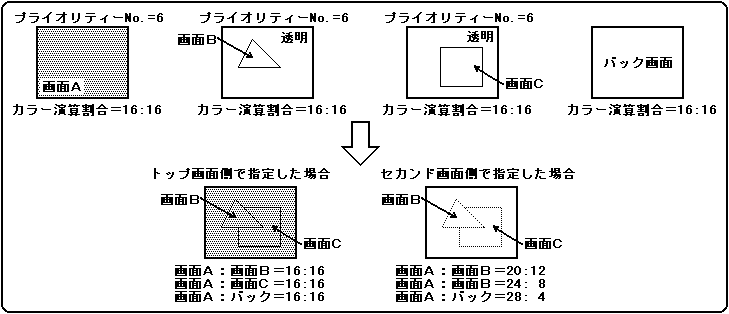
The color calculation ratio of each screen can be specified with 5 bits, and a total of 32 stages of top image: second image = 31: 1 to 0:32 can be specified. There are two types.

  1. Specify on the top image side
  2. Specify on the second image side

When specifying on the top image side, the value of the color calculation ratio of the sprite or scroll screen that became the top image is used regardless of the screen of the second image. Also, when specifying on the second image side, the color calculation ratio can be changed depending on the screen of the second image, and the value of the color calculation ratio on the line color screen and back screen as well as the sprite and scroll screens is used.

When using the color calculation mode that adds the values as they are, the color data of the top image can be gradually rewritten from 00H to the original color to produce the effect that the top image fades in on the second image. increase. However, please note that at the same time, the color of the addition result will be brighter than it should be. If the addition result exceeds FFH, it will be FFH. The color calculation ratio mode is shown in Figure 12.2.

Figure 12.2 Color calculation ratio mode
Color calculation can be performed without limitation when the TV screen mode is normal mode, but there are restrictions due to the color RAM mode and the color format of the second image when the TV screen mode is high resolution mode or dedicated monitor mode. Table 12.1 shows the restrictions on the color calculation function.

Table 12.1 Color calculation function in high resolution mode or dedicated monitor mode
 Color RAM mode
 Second image color format
 Color calculation function
Mode 0 Palette format or RGB format ○ Can be used
Mode 1 Palette format × Cannot be used
RGB format ○ Can be used
Mode 2 Palette format × Cannot be used
RGB format ○ Can be used


BackForward
HARDWARE ManualVDP2 User's ManualChapter 12 Color Calculation
Copyright SEGA ENTERPRISES, LTD., 1997