PROGRAMMER'S GUIDEAddendum Light Once
BackForward
Postscript Write-once system user's manual

6. Subcommand


(1) Keyword and parameter notation
Keywords and parameters are written in the following fonts.

(2) List of subcommands
Table 6.1 List of subcommands

function keyword number
Operating environment settings 1.0
Specifying the working directory work 1.1
Specifying the write speed speed 1.2
Specification of test mode (with confirmation of write execution) test 1.3 1.3
Test mode specification 2 (without confirmation of write execution) testgo 1.4
Designation of display language (English) english 1.5

function keyword number
Editing disc contents 2.0
Creating a master disk master 2.1
Creating a full-page postscript disc debug 2.2
Add file add 2.3
Delete file delete 2.4
File replacement replace replace 2.5
Write system area system 2.6
Sector type specification scttype 2.7 2.7
Specifying the reference directory chdir 2.8
Creating a raw write-once disc raw 2.9

function keyword number
On-the-fly writing 3.0
Perform on-the-fly writes otf 3.1 3.1
On the fly write file deletion rmv 3.2

6.1 Operating environment settings


List
 Title

Subcommand specifications

 Subcommand

Specifying the working directory

 Keyword

work

 No

1.1

Form
work = dosdir
Parameters
dosdir: working directory
Shortened form
w
function
Addition Specify the directory to create the image file.
remarks
The default value is the current directory.
It can also be specified by the environment variable "ADDCDW". The order of priority is as follows.

  1. The directory specified by this subcommand.

  2. The directory specified by the environment variable ADDCDW.

  3. Current directory.

-Example-
work = d: \ tmp

List
 Title

Subcommand specifications

 Subcommand

Specifying the write speed

 Keyword

speed

 No

1.2

Form
speed = speedpara
Parameters
speedpara: Access speed
Shortened form
s
function
Specify the access speed. 1, 2, 4 can be specified. (Standard speed, 2x speed, 4x speed)
remarks
The default value for access speed is 4.
-Example-
speed = 2

List
 Title

Subcommand specifications

 Subcommand

Specifying the test mode

 Keyword

test

 No

1.3 1.3

Form
test
Parameters
none
Shortened form
t
function
Specifies writing in test mode. (There is confirmation of writing execution)
remarks

  1. If the writing in the test mode is completed normally, the writing process is started after confirming whether the writing is actually performed on the CD-R disc.

-Example-
test

List
 Title

Subcommand specifications

 Subcommand

Specifying the test mode 2

 Keyword

testgo

 No

1.4

Form
testgo
Parameters
none
Shortened form
tg
function
Specifies writing in test mode. (No confirmation of write execution)
remarks

  1. When writing is successful in test mode, the CD-R disc is immediately written.

-Example-
testgo

List
 Title

Subcommand specifications

 Subcommand

Designation of display language (English)

 Keyword

english

 No

1.5

Form
english
Parameters
none
Shortened form
e
function
Display the message in English.
remarks
If this subcommand is omitted, the language mode of DOS is determined and either Japanese or English messages are displayed.
-Example-
english

6.2 Editing disc contents


List
 Title

Subcommand specifications

 Subcommand

Creating a master disk

 Keyword

master

 No

2.1

Form
master = dospath
Parameters
dospath: pathname of the disk image file (excluding the extension)
Shortened form
m
function
Creates a master disk based on the specified disk image file.
remarks

  1. If the keyword is omitted in the command line specification, it is regarded as this subcommand.

  2. When this subcommand is specified, other subcommands related to editing the contents of the disc cannot be specified.

  3. When using a new disk, one of this subcommand, debug subcommand, and raw subcommand must be specified.

-Example-
master = c: \ newdisc

List
 Title

Subcommand specifications

 Subcommand

Creating a full-page postscript disc

 Keyword

debug

 No

2.2

Form
debug = dospath
Parameters
dospath: Path name of the disk image file (excluding the extension)
Shortened form
d
function
Create a debug disk by adding the entire surface based on the specified disk image file.
remarks

  1. When this subcommand is specified, other subcommands related to editing the contents of the disc cannot be specified.

  2. When using a new disk, one of this subcommand, master subcommand, and raw subcommand must be specified.

-Example-
debug = c: \ newdisc

List
 Title

Subcommand specifications

 Subcommand

Add file

 Keyword

add

 No

2.3

Form
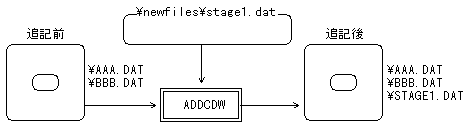
add = discpath, dospath
Parameters
discpath: pathname of additional files on disk
dospath: pathname of additional files on DOS
Shortened form
a
function
Adds the specified DOS file to disk.
-Example-
add = \ stage1.dat, \ newfiles \ stage1.dat

List
 Title

Subcommand specifications

 Subcommand

Delete file

 Keyword

delete

 No

2.4

Form
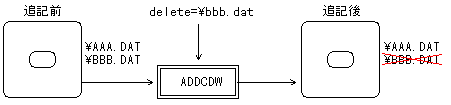
delete = discpath
Parameters
discpath: pathname of the deleted file on disk
Shortened form
del
function
Deletes the files on the specified disk from the directory entry.
-Example-
delete = \ bbb.dat

List
 Title

Subcommand specifications

 Subcommand

File replacement

 Keyword

replace replace

 No

2.5

Form
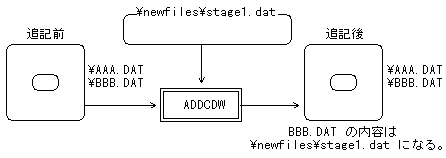
replace = discpath, dospath
Parameters
discpath: pathname of the replacement file on disk
dospath: pathname of replacement file on DOS
Shortened form
rep
function
Replaces the file on the specified disk with the file on DOS.
remarks

  1. If the original file is interleaved, it cannot be replaced.

-Example-
replace = \ bbb.dat, \ newfiles \ stage1.dat

List
 Title

Subcommand specifications

 Subcommand

Write system area

 Keyword

system

 No

2.6

Form
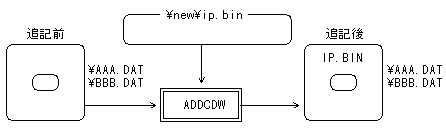
system = dospath
Parameters
dospath: pathname of the file on DOS to write to the system area
Shortened form
sy
function
Writes the specified file to the system area of the disk.
remarks

  1. If this command is omitted, the contents of the system area will not be changed.

-Example-
system = \ new \ ip.bin

List
 Title

Subcommand specifications

 Subcommand

Sector type specification

 Keyword

scttype

 No

2.7 2.7

Form
scttype = sectortype
Parameters
sectortype: sector type
Shortened form
sc
function
Specify the sector type of the file to be edited.
This is valid for files to be added / replaced.
Sector type Contents
MODE1 Mode1 sector (2048 bytes) …… Default value
FORM1 Mode2Form1 sector (2048 bytes)
FORM2 Mode2Form2 sector (2324 bytes)
FORM1V Mode2Form1 sector (Video file)
FORM1A Mode2Form1 sector (Audio file)
FORM1D Mode2Form2 sector (Data file)
FORM1V Mode2Form2 sector (Video file)
FORM1SUBH Mode2Form1 sector (file with subheader)
FORM2SUBH Mode2Form2 sector (file with subheader)
CDDA2 2-channel CD-DA (without pre-emphasis)
CDDA2PE 2-channel CD-DA (with pre-emphasis)
CDDA4 4-channel CD-DA (without pre-emphasis)
CDDA4PE 4-channel CD-DA (with pre-emphasis)
remarks

  1. The specified sector type remains valid until the next change with the scttype subcommand.

  2. b) It is a special case that there are 4 channels of CD-DA and pre-emphasis, and usually CDDA2 (2-channel CD-DA, no pre-emphasis) is specified.

  3. FORM1SUBH and FORM2SUBH are specified when the source file has a subheader.
    The contents of the subheader of the source file are written to the disk as they are.

-Example-

┌── Subcommand file ──┐

  scttype = FORM1 Add = \ prog.bin, prog.bin file PROG.BIN of Mode2 Form1 sector is created in the root directory.

  scttype = FORM2                  

  Add = \ music \ bbb.snd, bbb.snd files AAA.SND, BBB.SND of Mode2 Form2 sector are created in add = \ music \ aaa.snd, aaa.snd \ MUSIC directory.

└──────────────┘


List
 Title

Subcommand specifications

 Subcommand

Specifying the reference directory

 Keyword

chdir

 No

2.8

Form
chdir = discdir
Parameters
discdir: Reference directory name on disk
Shortened form
cd
function
Specify the reference directory on the disk.
remarks

  1. In another subcommand, specify the reference directory when the relative path of the file on the disk is specified.

  2. The initial value is the root directory.

-Example-

┌── Subcommand file ──┐

  add = prog.bin, prog.bin PROG.BIN is created in the root directory.

  chdir = music

  AAA.SND and BBB.SND are created in the add = aaa.snd, aaa.snd \ MUSIC directory.

  add = bbb.snd, bbb.snd

└──────────────┘


List
 Title

Subcommand specifications

 Subcommand

Creating a raw write-once disc

 Keyword

raw

 No

2.9

Form
raw = dospath
Parameters
dospath: pathname of the disk image file (excluding the extension)
Shortened form
r
function
Add all the data based on the specified disk image file. However, it does not check or update the volume descriptor set, path table, or directory.
This makes it possible to write data outside the ISO9660 standard, but be aware that the information indicating the position of the frame address will not be updated.
remarks

  1. When this subcommand is specified, other subcommands related to editing the contents of the disc cannot be specified.

  2. When using a new disk, one of this subcommand, master subcommand, and debug subcommand must be specified.

  3. When writing with this subcommand, the data after track 2 is shifted back by 2 sectors with respect to the DSK file.

  4. This subcommand is used only for special purposes and is not used for general CD creation work.

-Example-
raw = c: \ newdisc

6.3 On-the-fly writing


List
 Title

Subcommand specifications

 Subcommand

Perform on-the-fly writes

 Keyword

otf

 No

3.1 3.1

Form
otf = sctpath
Parameters
sctpath: Path name of sector information file (excluding extension)
Shortened form
o o
function
Creates a debug disk by on-the-fly writing based on the specified sector information file.
remarks

  1. In order to perform on-the-fly writing, it is necessary to create a sector information file for on-the-fly writing using the CD builder XBLD.

  2. When writing on the fly, writing is automatically performed in debug mode. Since it is written in debug mode, it can be added to a CD-R disc.

  3. Not compatible with writing in master mode.

  4. Not compatible with disks containing secondary volume descriptors and boot record descriptors.

  5. It does not support discs that are submode controlled by the "Trigger" and "Eors" commands of the CD builder.


List
 Title

Subcommand specifications

 Subcommand

On the fly write file deletion

 Keyword

rmv

 No

3.2

Form
rmv
Parameters
none
Shortened form
none
function
Delete the file for on-the-fly writing.
Used with the otf subcommand to delete related files after on-the-fly writing.
remarks

  1. Files deleted by the rmv subcommand

Interleaved intermediate file :
An interleaved intermediate file created for on-the-fly writing.
(File extension is "oti")

BackForward
PROGRAMMER'S GUIDEAddendum Light Once
Copyright SEGA ENTERPRISES, LTD ,. 1997