PROGRAMMER'S GUIDEAddendum Light Once
BackForward
Postscript Write-once system user's manual

Appendix A. Related tool "ADDGEN"


A.1 Overview

ADDGEN is a tool that automatically generates ADDCDW subcommand files.
Modifying both the VCDBUILD script file (hereinafter abbreviated as script file) and the ADDCDW subcommand file to update the files on the CD-R disk is troublesome and prone to inconsistencies.
To solve this problem, simply modify the script file and it will automatically generate the corresponding ADDCDW subcommand file.

A.2 Function

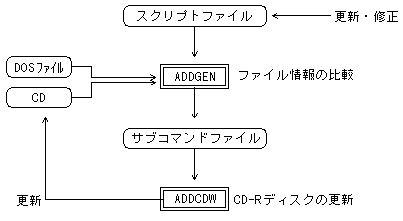
Compares the script file with the CD-R disc and outputs the ADDCDW subcommand file for adding / deleting / replacing the changed file. That is, check what kind of update processing should be performed on the CD using ADDCDW to make it the same as the file structure described in the script file.
The date and time of the file on the DOS and the file on the CD-R disk are compared, and if the file on the DOS is newer, it is determined that the file has been changed.

Figure A.1 ADDGEN data flow
A.3 How to start

Enter the following command from the DOS prompt.

C:> addgen script file name [subcommand file name] [option]

(1) Script file name
The name of the script file that describes the contents of the updated CD-ROM.
If you omit the extension, it is considered that ".scr" is omitted.

(2) Subcommand file name
The name of the subcommand file for ADDCDW to be output.
If omitted, a subcommand file with the extension of the script file name ".cdw" is output.

(3) Option

-c :
Compares the contents of a file on DOS with a file on a CD-R disk and replaces the file if there is a change. Necessary when you want to update to an old file with the date and time.
However, date and time are compared for interleaved files, MPEG streams, and CDDA files.

-e :
Display the message in English. If omitted, the language mode of DOS is determined and either Japanese or English messages are displayed.

A.4 Operation details

Compares the script file with the last session on the CD-R disc and outputs a subcommand file. Output each subcommand in the following cases.

(1) Full-page addition subcommand
  1. When the CD-R disc set in the CD-R drive is new.
  2. When updating the directory structure.
  3. When updating an interleaved file.

(2) File addition subcommand
  1. If there is a file in the script file that is not on the CD-R disc.

(3) File deletion subcommand
  1. If the file on the CD-R disk is not in the script file.

(4) File replacement subcommand
  1. If the files have been modified by comparing the files as specified by the option.

A.5 Error level

It returns the following error levels to DOS, depending on the result of the execution.

(1) Error level: 0
It ended normally. The subcommand file is output and ADDCDW can be executed.

(2) Error level: 1
It is necessary to add the entire surface, but the disk image file and TOC file have not been created.
If the subcommand file is output and VCDBUILD, VCDMKTOC is executed, ADDCDW can be executed.

(3) Error level: 2
Processing cannot continue. See the error message for details.

A.6 Restrictions

  1. The number of files that can be described in the script file should be less than or equal to the number displayed in "MAX FILE" at startup.


BackForward
PROGRAMMER'S GUIDEAddendum Light Once
Copyright SEGA ENTERPRISES, LTD ,. 1997