PROGRAMMER'S GUIDECD communication I / F (CD part)
BackForward
CD Communication Interface User's Manual

CD block file system


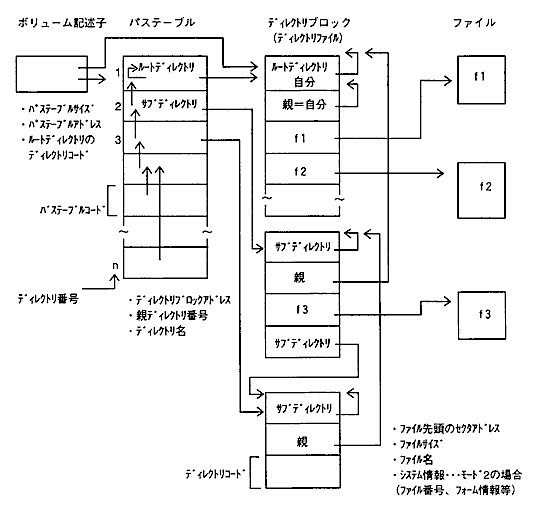
6.1 File management on CD-ROM (ISO9660)

The CD block file system supports ISO9660 compliant logical formats.

Figure 6.1 File management data structure on CD-ROM (ISO9660)
6.2 Features of the CD block file system

The CD block file system (hereinafter abbreviated as file system) has the following functions. (Available only for GAME-CD)

(1) Move directory (CDC_ChgDir) and retain file information (CDC_ReadDir)
Moves to the specified directory and keeps the file information in that directory in the file information table inside the CD block.

(2) Acquisition of retained file information (CDC_GetFileScope, CDC_TgetFileInfo)
Gets the range of file information that is held and retrieves the contents of the file information table.

(3) Reading the file (CDC_ReadFile)
Based on the retained file information, the sector data of the file is read into the CD buffer. The host can retrieve the read sector data by data transfer.

(4) Cancel file access (CDC_AbortFile)
Stops moving directories, retaining file information, and reading files. When you stop file access, the CD block pauses the CD drive.

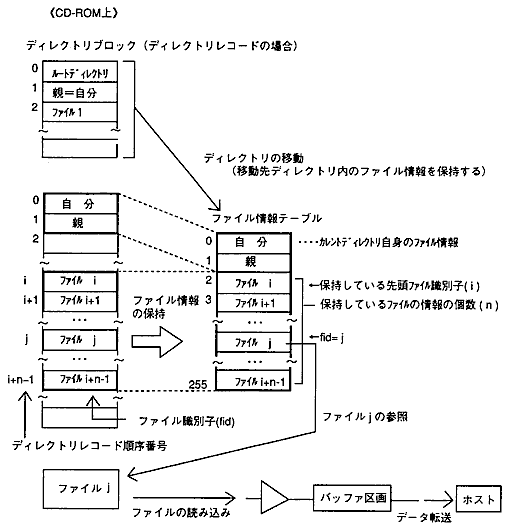
Figure 6.2 Structure of the CD block file system
6.2.1 File information retention method

The CD block prepares a file information table for 256 files and holds the file information to be accessed.
The first two of this table always hold information about the current directory (yourself) and the parent directory. Up to 254 general file information can be stored. (The number cannot be specified.)

(1) Move directory
When the directory is moved, the directory record is read, and the file information (12 bytes) is extracted and stored in the table. The range to be retained is from the beginning of the directory block.

(2) Retaining file information (specifying the range to be retained)
You can specify a file identifier to retain file information from any location in the current directory. Again, the first two tables hold information about you and your parents.

6.2.2 File access procedure

(1) Move to the root directory
To use the file system, you must first perform a move to the root directory to create a file information table. The same applies when the file information is cleared, such as when starting up or replacing the disk.
If the disc is not in ISO9660 format (standard identifier is “CD001”), the table will not be created and the file system cannot be used. To check the result of creating the table, try getting the retained file information range. If it cannot be created, it will be REJECT.

(2) Retention of file information
The file system can only access the files and directories in the file information table. File information must be retained before you can read files, move directories, or retrieve retained file information. If the target file information is not retained, it will be REJECT.

(3) Reading the file
Read the file by specifying the file identifier and offset (in sector units). The selector of the reading destination is specified by the aperture number.

(4) Extraction of sector data
The file read into the buffer partition is transferred and retrieved by fetching sector data (CDC_GetSctData, etc.). Data can be retrieved even during reading, and there is no need to wait for the completion of reading.
When the CD buffer is full in the middle of the file, it will be paused, and when there is free space, it will be unpaused and the rest of the file will be read.

(5) End of file reading
When the file has finished reading, the EFLS flag in the interrupt cause register is set to 1. To stop reading the file, perform Stop File Access. (The same applies during file access by moving directories and retaining file information.)

6.2.3 File system notes

(1) Designation of work selector
When reading file information, the CD block requires a working selector. Specify one selector when moving a directory or retaining file information. At this time, at least one free sector is required. After the processing is completed, the used sectors will be erased.

(2) Selector setting
When accessing a file, the file system configures the selector as follows:

  1. Connection status of the specified aperture
    • Aperture input connector: Connects to a CD device.
    • True output connector: Connects to the buffer partition of the same number.
    • False output connector: Disconnect from other selectors.

  2. Aperture conditions
    Table 6.1 Aperture conditions to be set
     motion
     Aperture conditions
     Move directory
     -Set the aperture frame address range.
    -Enable the frame address range in aperture mode.
     Retention of file information
     Read file
     -Set the aperture frame address range (FAD range).
    -Set the file number (FN) of the aperture subheader condition.
    -Enable FAD range and FN selection in aperture mode.

  3. Clear the sectors of the buffer partition before accessing the buffer partition file connected to the aperture.

(3) CD playback range and drive command
When accessing a file, the playback range is the default value (from the beginning to the end of the disc).
Drive commands (CD playback, pause, etc.) are executed as they are even when the file system is operating. Please note that it is possible to interfere with the operation of the file system.
The settings (ECC count, retry count, etc.) by initializing the CD block (CDC_CdInit) are also valid when accessing the file.
Automatic pause / release when the buffer is full works as usual.

(4) Termination and cancellation of file access
When you terminate or discontinue file access, the EFLS flag goes to 1. File access is also stopped when the tray is opened.
If you are moving a directory or holding file information, the file information table will be discarded (initialized) when file access is stopped, leaving no information entered.

(5) In case of multi-session
The file system references the volume descriptor for the last session.


BackForward
PROGRAMMER'S GUIDECD communication I / F (CD part)
Copyright SEGA ENTERPRISES, LTD., 1997