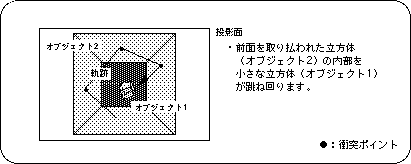
/ * ------------------------------------------------ ---------------------- * /
/ * Cube Action * /
/ * ------------------------------------------------ ---------------------- * /
#include "sgl.h"

#define REFLECT_EXTENT to FIXED (85.0)
#define XSPD toFIXED (1.5)
#define YSPD to FIXED (2.0)
#define ZSPD to FIXED (3.0)

extern PDATA PD_PLANE1, PD_PLANE2;

void ss_main (void)
{
	static ANGLE ang1 [XYZ], ang2 [XYZ];
	static FIXED pos1 [XYZ], pos2 [XYZ], delta [XYZ], light [XYZ];

	slInitSystem (TV_320x224, NULL, 1);
	slPrint ("demo A", slLocate (9,2));

	ang1 [X] = ang1 [Y] = ang1 [Z] = DEGtoANG (0.0);
	ang2 [X] = ang2 [Y] = ang2 [Z] = DEGtoANG (0.0);
	pos1 [X] = pos2 [X] = toFIXED (0.0);
	pos1 [Y] = pos2 [Y] = toFIXED (0.0);
	pos1 [Z] = pos2 [Z] = toFIXED (100.0);
	delta [X] = XSPD, delta [Y] = YSPD, delta [Z] = ZSPD;
	light [X] = slSin (DEGtoANG (30.0));
	light [Y] = slCos (DEGtoANG (30.0));
	light [Z] = slSin (DEGtoANG (-30.0));

	while (-1) {
		slLight (light);
		slPushMatrix ();
		{
			slTranslate (pos1 [X], pos1 [Y], pos1 [Z] + toFIXED (270.0));

			pos1 [X] + = delta [X];
			pos1 [Y] + = delta [Y];
			pos1 [Z] + = delta [Z];

			if (pos1 [X]> REFLECT_EXTENT) {
				delta [X] = -XSPD, pos1 [X]-= XSPD;
			} else if (pos1 [X] <-REFLECT_EXTENT) {
				delta [X] = XSPD, pos1 [X] + = XSPD;
			}
			if (pos1 [Y]> REFLECT_EXTENT) {
				delta [Y] = -YSPD, pos1 [Y]-= YSPD;
			} else if (pos1 [Y] <-REFLECT_EXTENT) {
				delta [Y] = YSPD, pos1 [Y] + = YSPD;
			}
			if (pos1 [Z]> REFLECT_EXTENT) {
				delta [Z] = -ZSPD, pos1 [Z]-= ZSPD;
			} else if (pos1 [Z] <-REFLECT_EXTENT) {
				delta [Z] = ZSPD, pos1 [Z] + = ZSPD;
			}

			slRotX (ang1 [X]);
			slRotY (ang1 [Y]);
			slRotZ (ang1 [Z]);
			ang1 [X] + = DEGtoANG (3.0);
			ang1 [Y] + = DEGtoANG (5.0);
			ang1 [Z] + = DEGtoANG (3.0);
			slPutPolygon (& PD_PLANE1);
		}
		slPopMatrix ();

		slPushMatrix ();
		{
			slTranslate (pos2 [X], pos2 [Y], pos2 [Z] + toFIXED (170.0));
			slRotY (ang2 [Y]);
			slRotX (ang2 [X]);
			slRotZ (ang2 [Z]);
			slPutPolygon (& PD_PLANE2);
		}
		slPopMatrix ();

		slSynch ();
	}
}
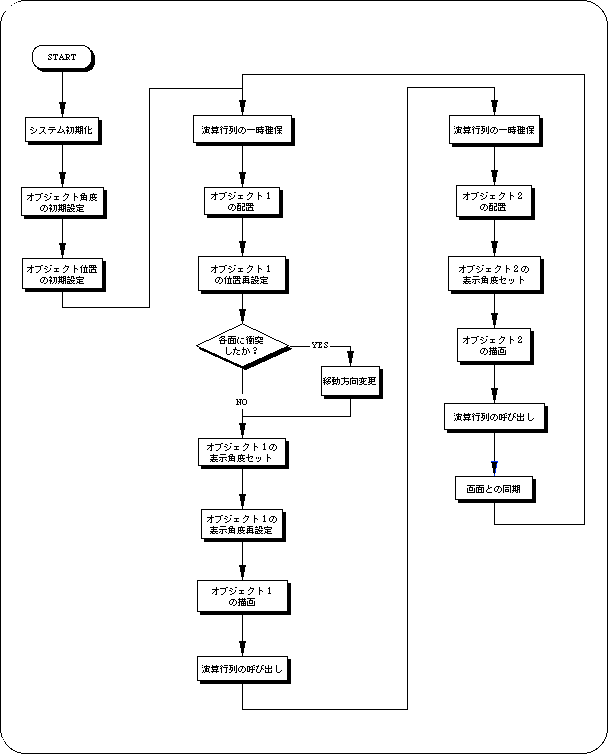
Flow A-1 sample_1_6: Flowchart of demo program A
 From the next chapter, we will explain the contents in more detail, including the hierarchical matrix.
In particular, the idea of hierarchical structure using stacks is an important factor in 3D graphics, so please read it carefully or refer to specialized books to understand it.