 ★ SGL User's Manual ★ PROGRAMMER'S STRUCT
 This chapter describes the basic idea of 3D graphics and the subroutines that realize it. In this chapter, we will mainly use a mathematical method called coordinate transformation. It may be difficult to read because it uses a lot of unusual methods such as determinant calculation, but it is the basis of 3D graphics, so please read and understand it many times.
The objects projected by 3D graphics are roughly defined by the following four.
By combining these four, 3D graphics can display images on a monitor. Therefore, in this chapter, we will explain the three in order, excluding the viewing transformation, and then add more detailed explanations.
<Fig. 4-1 Coordinate system used by Sega Saturn>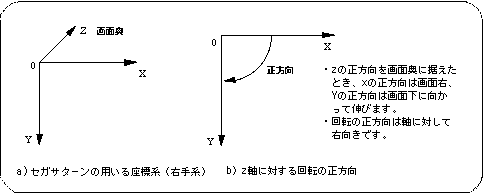
<Fig. 4-2 Screen coordinate system>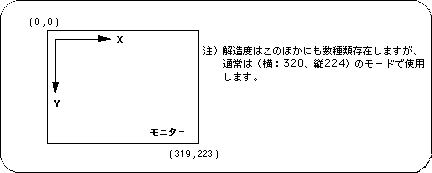
<Fig. 4-3 Concept of projection>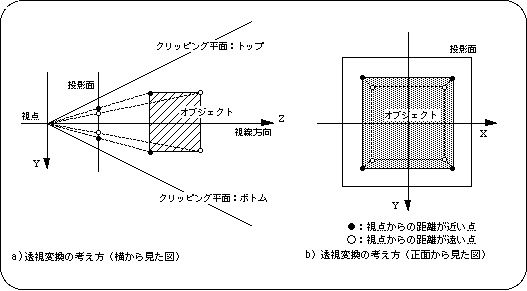
Figure 4-4 Projection plane in SGL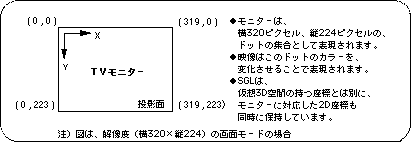
<Fig. 4-5 Angle of view image model>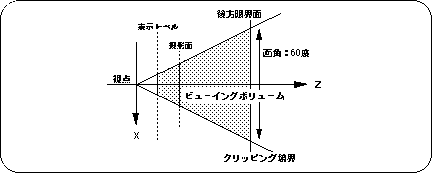
To change the perspective projection settings on SGL, use the function “slPerspective”.
<Fig. 4-6 Difference in image due to angle of view>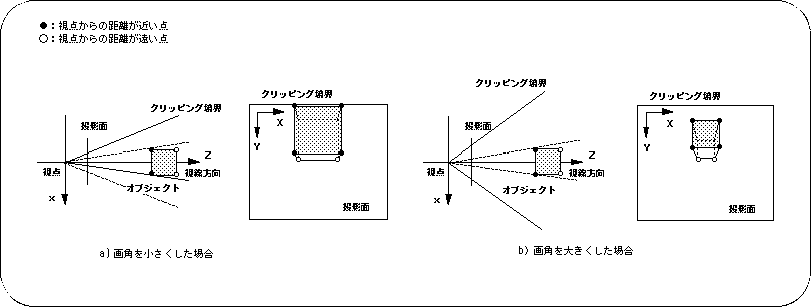
The display level is set by the function “slZdspLevel”.
The display level is determined by the position of the division point between the viewpoint and the projection plane.
| Display level | |||
|---|---|---|---|
| 1/2 | 1/4 | 1/8 | |
| Substituted value | 1 | 2 | 3 |
Figure 4-7 Display level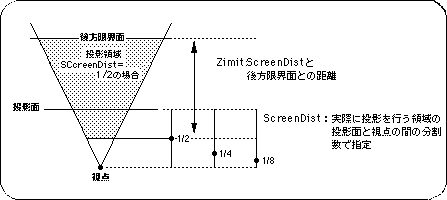
Listing 4-1 sample_4_2: Changes in video due to perspective
/ * ------------------------------------------------ ---------------------- * /
/ * Perspective Control * /
/ * ------------------------------------------------ ---------------------- * /
#include "sgl.h"

extern PDATA PD_CUBE;

void ss_main (void) {
	static ANGLE ang [XYZ];
	static ANGLE angper [XYZ];
	static FIXED pos [XYZ];
	static ANGLE tmp = DEGtoANG (90.0);
	static ANGLE adang = DEGtoANG (0.5);

	slInitSystem (TV_320x224, NULL, 1);
	slPrint ("Sample program 4.2", slLocate (6,2));

	ang [X] = DEGtoANG (30.0);
	ang [Y] = DEGtoANG (45.0);
	ang [Z] = DEGtoANG (0.0);
	pos [X] = toFIXED (50.0);
	pos [Y] = toFIXED (40.0);
	pos [Z] = toFIXED (20.0);

	slPrint ("Perspective:", slLocate (4,5));
	while (-1) {
		slPerspective (tmp);
		slPrintHex (slAng2Dec (tmp), slLocate (18,5));

		tmp + = adang;
		if (tmp> DEGtoANG (160.0))
			adang = DEGtoANG (-0.5);
		if (tmp <DEGtoANG (20.0))
			adang = DEGtoANG (0.5);

		slPushMatrix ();
		{
			FIXED dz;

			dz = slDivFX (slTan (tmp >> 1), toFIXED (170.0));
			slTranslate (pos [X], pos [Y], pos [Z] + dz);
			slRotX (ang [X]);
			slRotY (ang [Y]);
			slRotZ (ang [Z]);
			slPutPolygon (& PD_CUBE);
		}
		slPopMatrix ();

		slSynch ();
	}
}
Flow 4-1 sample_4_2: Flowchart of image change due to perspective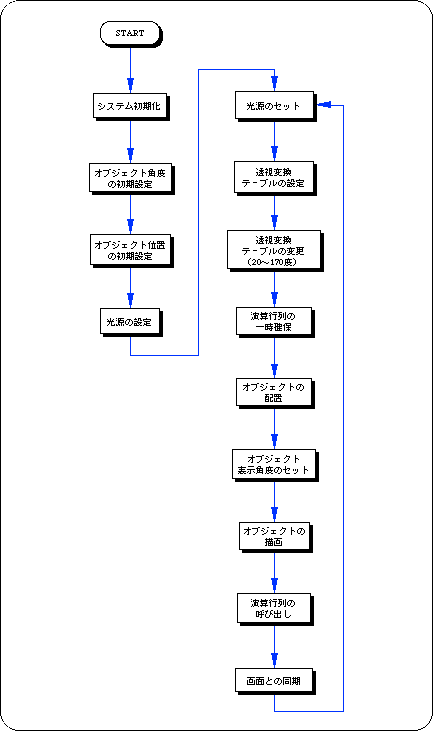
<Fig. 4-8 Various conversion operations for objects>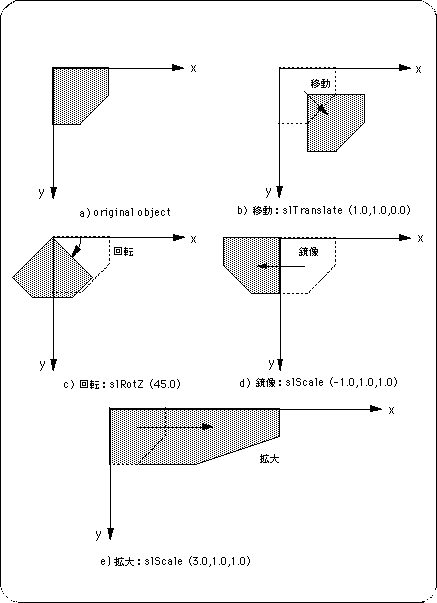
Note) Angles and variables are shown in degrees and floating for convenience.
List 4-2 below is a program that rotates the square polygon drawn in Listing 2-1 in Chapter 2 on the Y axis using the library function “slRotY” (single axis rotation). The rotation matrix is expressed by the following equation.
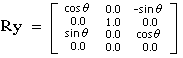
<List 4-2 sample_4_3_1: Square polygon single axis rotation routine>
/ * ------------------------------------------------ ---------------------- * /
/ * Rotation of 1 Polygon [Y axis] * /
/ * ------------------------------------------------ ---------------------- * /
#include "sgl.h"

extern PDATA PD_PLANE1;

void ss_main (void)
{
	static ANGLE ang [XYZ];
	static FIXED pos [XYZ];

	slInitSystem (TV_320x224, NULL, 1);
	slPrint ("Sample program 4.3.1", slLocate (9,2));

	ang [X] = ang [Y] = ang [Z] = DEGtoANG (0.0);
	pos [X] = toFIXED (0.0);
	pos [Y] = toFIXED (0.0);
	pos [Z] = toFIXED (220.0);

	while (-1) {
		slPushMatrix ();
		{
			slTranslate (pos [X], pos [Y], pos [Z]);
			slRotX (ang [X]);
			slRotY (ang [Y]);
			slRotZ (ang [Z]);
			ang [Y] + = DEGtoANG (5.0);
			slPutPolygon (& PD_PLANE1);
		}
		slPopMatrix ();

		slSynch ();
	}
}
Flow 4-2 sample_4_3_1: Square polygon single axis rotation routine flowchart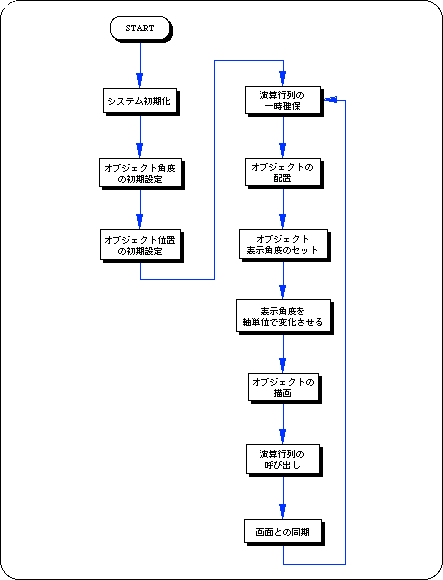
Listing 4-3 sample_4_3_2: Square polygon 2-axis rotation routine
/ * ------------------------------------------------ ---------------------- * /
/ * Rotation of 1 Polygon [X & Y axis] * /
/ * ------------------------------------------------ ---------------------- * /
#include "sgl.h"

extern PDATA PD_PLANE1;

void ss_main (void)
{
	static ANGLE ang [XYZ];
	static FIXED pos [XYZ];

	slInitSystem (TV_320x224, NULL, 1);
	slPrint ("Sample program 4.3.2", slLocate (9,2));

	ang [X] = ang [Y] = ang [Z] = DEGtoANG (0.0);
	pos [X] = toFIXED (0.0);
	pos [Y] = toFIXED (0.0);
	pos [Z] = toFIXED (220.0);

	while (-1) {
		slPushMatrix ();
		{
			slTranslate (pos [X], pos [Y], pos [Z]);
			slRotX (ang [X]);
			slRotY (ang [Y]);
			slRotZ (ang [Z]);
			ang [X] + = DEGtoANG (4.0);
			ang [Y] + = DEGtoANG (2.0);
			slPutPolygon (& PD_PLANE1);
		}
		slPopMatrix ();

		slSynch ();
	}
}
Listing 4-4 below uses the library function “slTranslate” to achieve movement parallel to the X-axis. The Sin value is used to control the movement parameters. The change in the angle value tmp controls the change in the X coordinate value.
The translation by “slTranslate” is expressed by the following equation.
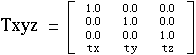
Listing 4-4 sample_4_3_3: Square polygon translation routine
/ * ------------------------------------------------ ---------------------- * /
/ * Parallel Translation of 1 Polygon [X axis] * /
/ * ------------------------------------------------ ---------------------- * /
#include "sgl.h"

#define POS_Z 50.0

extern PDATA PD_PLANE1;

void ss_main (void)
{
	static ANGLE ang [XYZ];
	static FIXED pos [XYZ];
	static ANGLE tmp = DEGtoANG (0.0);

	slInitSystem (TV_320x224, NULL, 1);
	slPrint ("Sample program 4.3.3", slLocate (9,2));

	ang [X] = ang [Y] = ang [Z] = DEGtoANG (0.0);
	pos [X] = toFIXED (0.0);
	pos [Y] = toFIXED (0.0);
	pos [Z] = toFIXED (220.0);

	while (-1) {
		slPushMatrix ();
		{
			slTranslate (pos [X], pos [Y], pos [Z]);
			slRotX (ang [X]);
			slRotY (ang [Y]);
			slRotZ (ang [Z]);
			tmp + = DEGtoANG (5.0);
			pos [X] = slMulFX (toFIXED (POS_Z), slSin (tmp));
			slPutPolygon (& PD_PLANE1);
		}
		slPopMatrix ();

		slSynch ();
	}
}
<Flow 4-3 sample_4_3_3: Square polygon translation flowchart>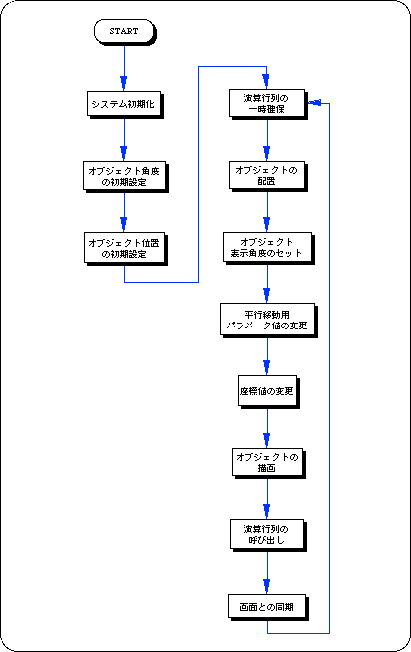
| Parameter range | |||||
|---|---|---|---|---|---|
| scale <0.0 | scale = 0.0 | 0.0 <scale <1.0 | scale = 1.0 | 1.0 <scale | |
| Conversion result | Mirror image | Disappearance | Shrink | 1x | expansion |
Note) "scale" refers to the scale parameter.
Listing 4-5 below shows the scaling programs. The scale ratio of the square polygon in the X-axis direction and the Y-axis direction is changed.
Listing 4-5 sample_4_3_4: Square polygon scaling routine
/ * ------------------------------------------------ ---------------------- * /
/ * Expansion & Reduction of 1 Polygon [X & Y axis] * /
/ * ------------------------------------------------ ---------------------- * /
#include "sgl.h"

extern PDATA PD_PLANE1;

void ss_main (void)
{
	static ANGLE ang [XYZ];
	static FIXED pos [XYZ];
	static FIXED sclx, scly, sclz, tmp = toFIXED (0.0);
	static Sint16 flag = 1;

	slInitSystem (TV_320x224, NULL, 1);
	slPrint ("Sample program 4.3.4", slLocate (9,2));

	ang [X] = ang [Y] = ang [Z] = DEGtoANG (0.0);
	pos [X] = toFIXED (0.0);
	pos [Y] = toFIXED (0.0);
	pos [Z] = toFIXED (220.0);
	sclx = scly = sclz = toFIXED (1.0);

	while (-1) {
		slPushMatrix ();
		{
			slTranslate (pos [X], pos [Y], pos [Z]);
			slRotX (ang [X]);
			slRotY (ang [Y]);
			slRotZ (ang [Z]);
			if (flag == 1) tmp + = toFIXED (0.1);
			else tmp-= toFIXED (0.1);
			if (tmp> toFIXED (1.0)) flag = 0;
			if (tmp <toFIXED (-1.0)) flag = 1;
			slScale (sclx + tmp, scly --tmp, sclz);
			slPutPolygon (& PD_PLANE1);
		}
		slPopMatrix ();

		slSynch ();
	}
}
<Flow 4-4 sample_4_3_4: Square polygon enlargement / reduction flowchart>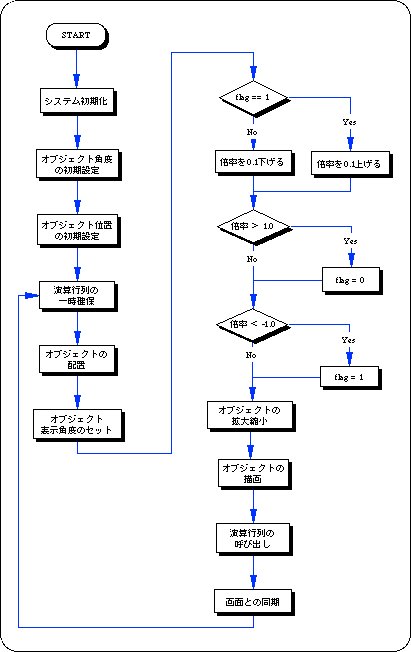
Substitute the sine value and cosine value to add rotation around the X axis.
Substitute the Sin value and Cos value as FIXED type values for the parameters, respectively.
Substitute the sine value and cosine value to add rotation around the Y axis. Substitute the Sin value and Cos value as FIXED type values for the parameters, respectively.
Substitute the sine value and cosine value to add rotation around the Z axis.
Substitute the Sin value and Cos value as FIXED type values for the parameters, respectively.
Add rotation around an arbitrary axis through the origin (axis units are specified as vector values).
Substitute the unit vector value (XYZ) representing the rotation axis and the rotation angle value for the parameters.
Substitute a vector value that represents the axis of rotation so that it is always a unit vector.
A unit vector is a vector whose magnitude is always 1.
<Fig. 4-9 Difference in results due to conversion order>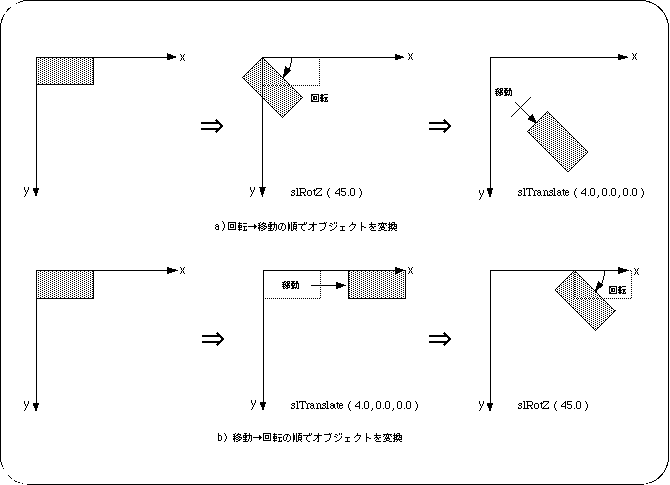
Note) Angles and variables are shown in degrees and floating for convenience.
<Fig. 4-10 2D clipping example>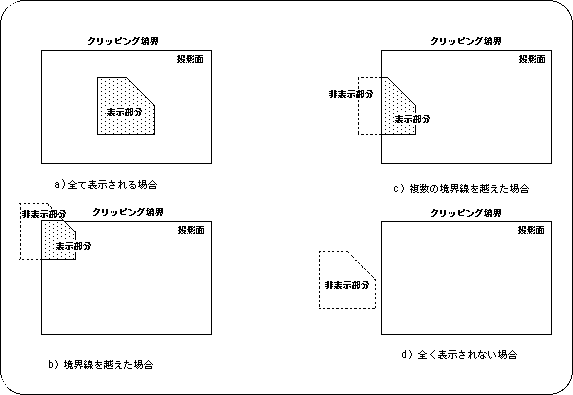
Note) When the projection plane closed by the clipping boundary is used as the display area
As shown in the figure above, the object to be clipped can be displayed / hidden inside or outside the clipping area. In the case of this example, if one object covers both clipping areas, part of the object (inside the area) will be displayed and part (outside the area) will not be displayed.
Note <BR> In some cases, due to problems with calculation speed and drawing speed, display / non-display may be switched depending on the ratio of one object included in the clipping area.
| Left side of field of view | : Clipping plane (determined by angle of view) |
| Right side of field of view | : Clipping plane (determined by angle of view) |
| Top of field of view | : Clipping plane (determined by angle of view and screen mode) |
| Underside of the field of view | : Clipping plane (determined by angle of view and screen mode) |
| Front of field of view | : Forward limit plane (determined by the function “slZdspLevel”) |
| The back of the field of view | : Rear limit plane (determined by the parameter "Zlimit" in the function "slWindow") |
Figure 4-11 Definition of display area by 3D clipping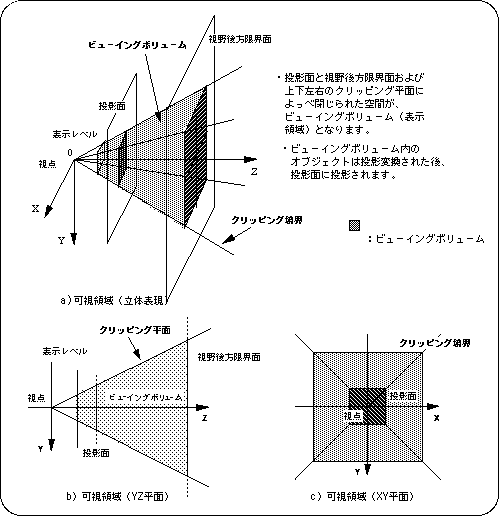
Figure 4-12 Example of 3D clipping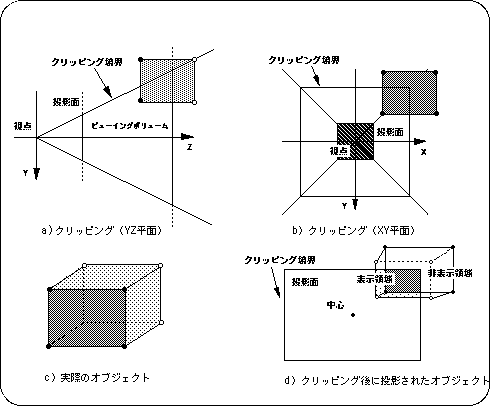
<Fig. 4-13 Window concept>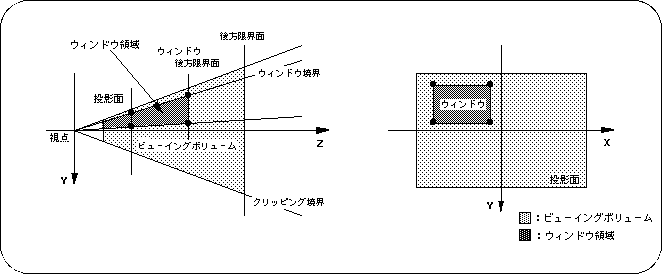
Figure 4-14 Meaning of parameters in “slWindow”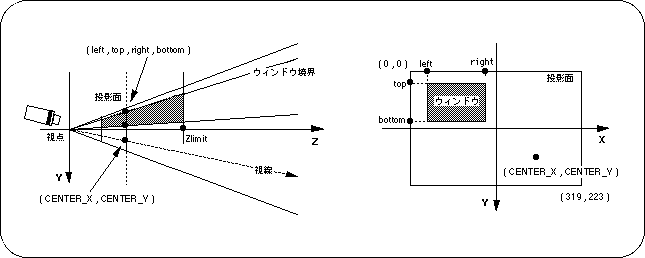
Note) left, top, right, bottom, CENTER_X, CENTER_Y indicate the XY coordinate values for the monitor.
Figure 4-15 Differences in images due to CENTER_X and CENTER_Y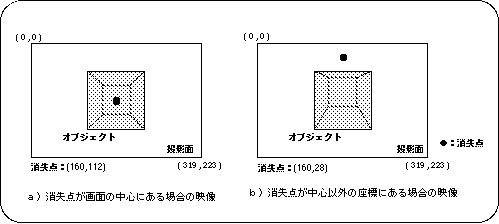
Note) Conditions such as objects and viewpoints are the same for both a) and b).
● In screen mode (horizontal 320 x vertical 240)slWindow (0,0,319,223,0x7FFF,160,112); | | | | | Vanishing point coordinate value: center of screen | Zlimit Window range indication coordinate value
Figure 4-17 Example of object display using a window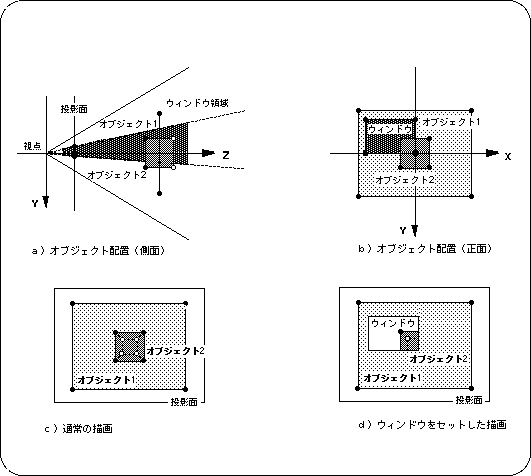
Note 1) Object 1 is displayed outside the window Note 2) Object 2 is displayed inside the window
/ * Omitted * /

ATTR attribute_PLANE [] = {
	ATTRIBUTE (Single_Plane, SORT_MIN, No_Texture, C_RGB (16,16,16), No_Gouraud, MESHoff | Window_Out, sprPolygon, No_Option),
	ATTRIBUTE (Single_Plane, SORT_MIN, No_Texture, C_RGB (00,31,31), No_Gouraud, MESHoff | Window_Out, sprPolygon, No_Option),
};

ATTR attribute_CUBE [] = {
	ATTRIBUTE (Single_Plane, SORT_MIN, No_Texture, C_RGB (31,31,31), No_Gouraud, MESHoff | Window_In, sprPolygon, No_Option),
	ATTRIBUTE (Single_Plane, SORT_MIN, No_Texture, C_RGB (31,00,00), No_Gouraud, MESHoff | Window_In, sprPolygon, No_Option),
	ATTRIBUTE (Single_Plane, SORT_MIN, No_Texture, C_RGB (00,31,00), No_Gouraud, MESHoff | Window_In, sprPolygon, No_Option),
	ATTRIBUTE (Single_Plane, SORT_MIN, No_Texture, C_RGB (00,00,31), No_Gouraud, MESHoff | Window_In, sprPolygon, No_Option),
	ATTRIBUTE (Single_Plane, SORT_MIN, No_Texture, C_RGB (31,31,00), No_Gouraud, MESHoff | Window_In, sprPolygon, No_Option),
	ATTRIBUTE (Single_Plane, SORT_MIN, No_Texture, C_RGB (00,31,31), No_Gouraud, MESHoff | Window_In, sprPolygon, No_Option),
};

/ * Omitted * /
Only one window setting works at a time. Also, when the function "slWindow" is called, the priority is separated from the polygons (sprites) before it and those after that, and in this case, the later one is always given priority.
		: / * Wind 1 (default) * /
	slPutPolygon ( object1 );
		::
	slPutPolygon ( object2 );
		::
slWindow (.....); ←
		: / * Wind 2 * /
	slPutPolygon ( object3 );
		::
slWindow (.....); ← Error: / * Window 2 remains * /
	slPutPolygon ( object4 );
		::
	slPutPolygon ( object5 );
		::
Functional type | Function name | Parameters | function |
|---|---|---|---|
| void | slPerspective | ANGLE angp | Settings of perspective conversion table |
| void | slRotX | ANGLE angx | Rotation of polygon data around the X axis |
| void | slRotY | ANGLE angy | Rotation of polygon data around the Y axis |
| void | slRotZ | ANGLE angz | Rotation of polygon data around the Z axis |
| void | slRotXSC | FIXED sn, FIXED cs | Rotation around the X axis by specifying Sin and Cos |
| void | slRotYSC | FIXED sn, FIXED cs | Rotation around the Y axis by specifying Sin and Cos |
| void | slRotZSC | FIXED sn, FIXED cs | Rotation around the Z axis by specifying Sin and Cos |
| void | slRotAX | FIXED vx, vy, cz, ANGLE a | Rotation around an arbitrary axis passing through the origin (axis unit: vector) |
| void | slScale | FIXED sx, sy, sz | Enlargement / reduction of polygon data |
| void | slWindow | lft, top, rgt, btm, Zlimit, CNTX, CNTY | Wind setting |
| void | slZdspLevel | level | Specifying the display level of the viewing volume |
★ SGL User's Manual ★ PROGRAMMER'S STRUCT