 ★ SGL User's Manual ★ PROGRAMMER'S STRUCT
 This chapter describes the matrix that is the basis for building 3D graphics.
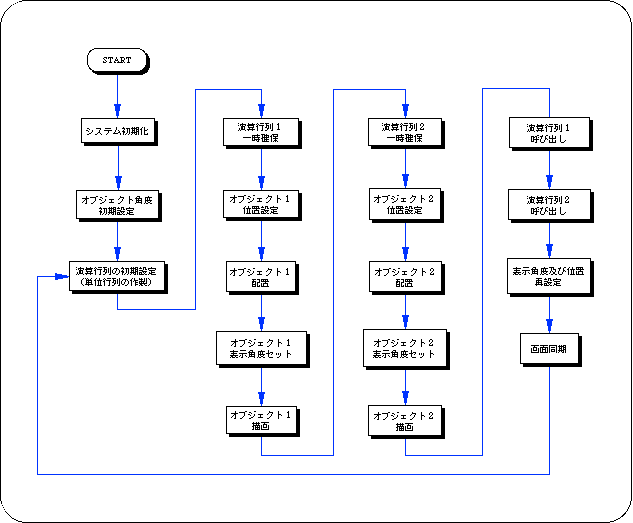
In the first half, we will explain matrix operations and their concepts, and in the second half, we will explain the construction of objects using a hierarchical structure using a stack matrix.
In particular, the hierarchical structure of the matrix is an important element in 3D graphics representation by Sega Saturn, so please read and understand it carefully.
A matrix is a group of numbers in n rows and m columns, which is different from normal numerical operations, but it is also possible to perform four arithmetic operations between matrices (for details, refer to specialized books).
The figure below is an example of multiplication between 2-row x 2-column matrices.
In the case of SGL, a 4-row x 3-column matrix is used as the matrix variable to accurately represent the 3D space (to realize XYZ coordinate values and various conversion operations).
<Fig. 5-1 General concept of matrix and calculation example>
The modeling transformation explained in "Chapter 4 Coordinate Transformation " is also a new polygon vertex data string created by multiplying the polygon vertex data string represented as a matrix by various transformation matrices (rotation, movement, scale, etc.). is.
<Fig. 5-2 Stack image model>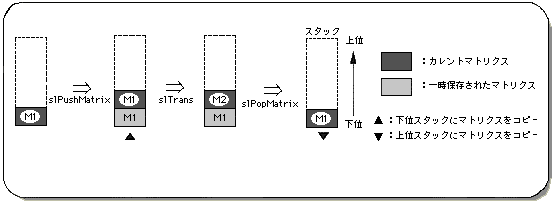
<Fig. 5-3 Image model of hierarchical structure>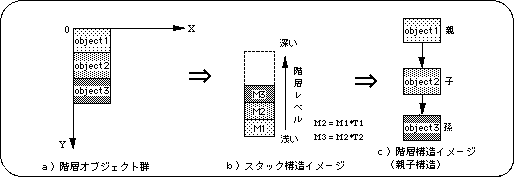
<Fig. 5-4 Example of moving objects without using a hierarchical structure>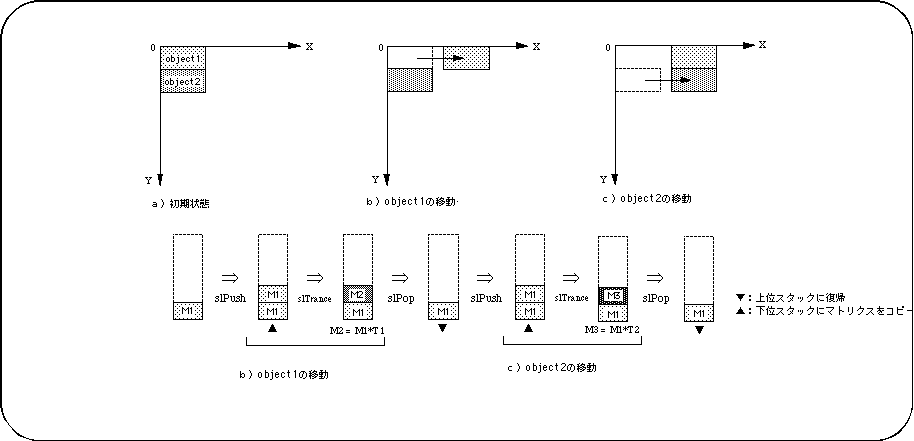
<Fig. 5-5 Example of object conversion using a hierarchical structure>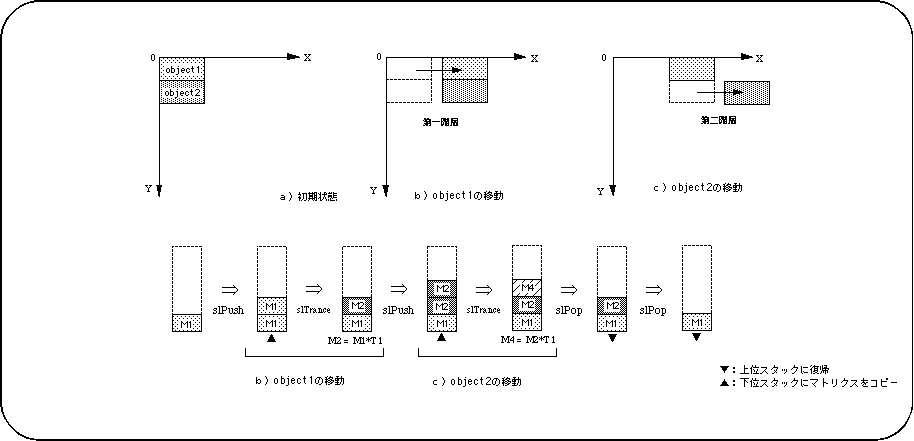
/ * ------------------------------------------------ ---------------------- * /
/ * Double Cube Circle Action * /
/ * ------------------------------------------------ ---------------------- * /
#include "sgl.h"

#define DISTANCE_R1 40
#define DISTANCE_R2 40

extern PDATA PD_CUBE;

static void set_star (ANGLE ang [XYZ], FIXED pos [XYZ])
{
	slTranslate (pos [X], pos [Y], pos [Z]);
	slRotX (ang [X]);
	slRotY (ang [Y]);
	slRotZ (ang [Z]);
}

void ss_main (void)
{
	static ANGLE ang1 [XYZ], ang2 [XYZ];
	static FIXED pos1 [XYZ], pos2 [XYZ];
	static ANGLE tmp = DEGtoANG (0.0);

	slInitSystem (TV_320x224, NULL, 1);
	slPrint ("Sample program 5.2", slLocate (6,2));

	ang1 [X] = ang2 [X] = DEGtoANG (30.0);
	ang1 [Y] = ang2 [Y] = DEGtoANG (45.0);
	ang1 [Z] = ang2 [Z] = DEGtoANG (0.0);

	pos2 [X] = toFIXED (DISTANCE_R2);
	pos2 [Y] = toFIXED (0.0);
	pos2 [Z] = toFIXED (0.0);
	while (-1) {
		slUnitMatrix (CURRENT);

		slPushMatrix ();
		{
			pos1 [X] = DISTANCE_R1 * slSin (tmp);
			pos1 [Y] = toFIXED (30.0);
			pos1 [Z] = toFIXED (220.0) + DISTANCE_R1 * slCos (tmp);
			set_star (ang1, pos1);
			slPutPolygon (& PD_CUBE);

			slPushMatrix ();
			{
				set_star (ang2, pos2);
				slPutPolygon (& PD_CUBE);
			}
			slPopMatrix ();
		}
		slPopMatrix ();

		ang1 [Y] + = DEGtoANG (1.0);
		ang2 [Y]-= DEGtoANG (1.0);
		tmp + = DEGtoANG (1.0);

		slSynch ();
	}
}
Functional type | Function name | Parameters | function |
|---|---|---|---|
| void | slLoadMatrix | MATRIX mtpr | Copy the specified matrix to the current matrix |
| Bool | slPushMatrix | void | Temporary securing of matrix |
| Bool | slPushUintMatrix | void | Temporarily reserve the identity matrix on the stack |
| void | slGetMatrix | MATRIX mtpr | Copy the current matrix to the specified matrix |
| void | slInitMatrix | void | Initialization of matrix variables and buffers |
| void | slMultiMatrix | MATRIX mptr | Multiply the current matrix by the specified matrix |
| Bool | slPopMatrix | void | Restoration of temporarily saved matrix |
| void | slUintMatrix | MATRIX mptr | Make the specified matrix an identity matrix |
★ SGL User's Manual ★ PROGRAMMER'S STRUCT