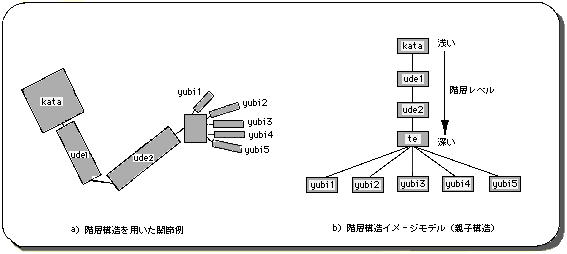
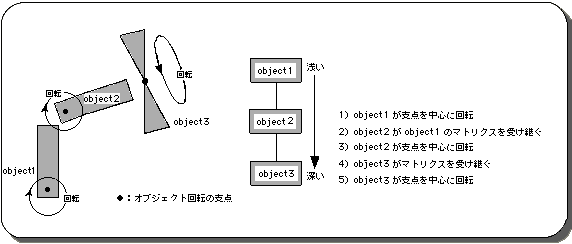
List B-1 demo_B: Animation using hierarchical structure
/ * ------------------------------------------------ ---------------------- * /
/ * Matrix Animation * /
/ * ------------------------------------------------ ---------------------- * /
#include "sgl.h"

extern PDATA PD_PLANE1, PD_PLANE2, PD_PLANE3;

static void set_poly (ANGLE ang [XYZ], FIXED pos [XYZ])
{
	slTranslate (pos [X], pos [Y], pos [Z]);
	slRotX (ang [X]);
	slRotY (ang [Y]);
	slRotZ (ang [Z]);
}

void ss_main (void)
{
	static ANGLE ang1 [XYZ], ang2 [XYZ], ang3 [XYZ];
	static FIXED pos1 [XYZ], pos2 [XYZ], pos3 [XYZ];
	static ANGLE tang, aang;

	slInitSystem (TV_320x224, NULL, 1);
	slPrint ("demo B", slLocate (6,2));

	ang1 [X] = ang1 [Y] = ang1 [Z] = DEGtoANG (0.0);
	ang2 [X] = ang2 [Y] = ang2 [Z] = DEGtoANG (0.0);
	ang3 [X] = ang3 [Y] = ang3 [Z] = DEGtoANG (0.0);
	pos1 [X] = toFIXED (0.0);
	pos1 [Y] = toFIXED (40.0);
	pos1 [Z] = toFIXED (170.0);
	pos2 [X] = toFIXED (0.0);
	pos2 [Y] = toFIXED (-40.0);
	pos2 [Z] = toFIXED (0.0);
	pos3 [X] = toFIXED (0.0);
	pos3 [Y] = toFIXED (-40.0);
	pos3 [Z] = toFIXED (0.0);
	tang = DEGtoANG (0.0);
	aang = DEGtoANG (2.0);

	while (-1) {
		slUnitMatrix (CURRENT);
		ang1 [Z] = ang2 [Z] = tang;
		tang + = aang;
		if (tang <DEGtoANG (-90.0)) {
			aang = DEGtoANG (2.0);
		} else if (tang> DEGtoANG (90.0)) {
			aang = -DEGtoANG (2.0);
		}

		slPushMatrix ();
		{
			set_poly (ang1, pos1);
			slPutPolygon (& PD_PLANE1);

			slPushMatrix ();
			{
				set_poly (ang2, pos2);
				slPutPolygon (& PD_PLANE2);

				slPushMatrix ();
				{
					set_poly (ang3, pos3);
					ang3 [Y] + = DEGtoANG (5.0);
					slPutPolygon (& PD_PLANE3);
				}
				slPopMatrix ();
			}
			slPopMatrix ();
		}
		slPopMatrix ();

		slSynch ();
	}
}
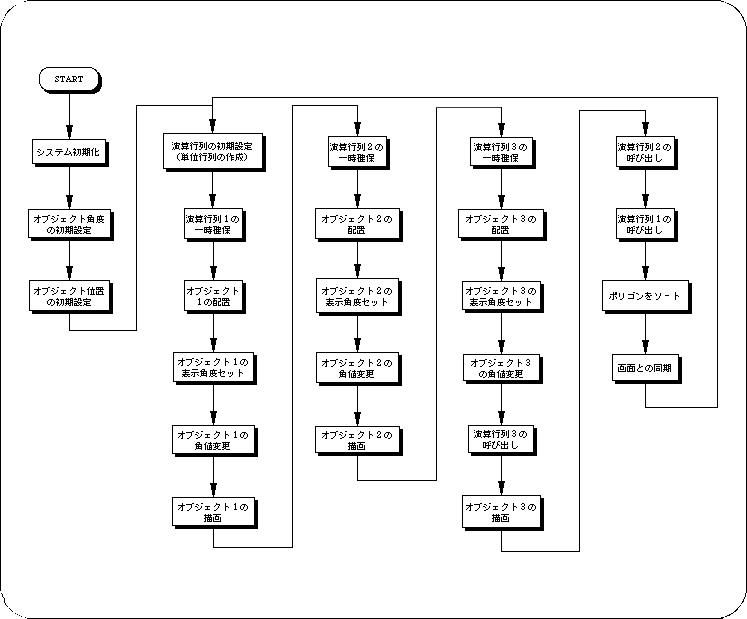
Flow B-1 demo_B: Hierarchical flowchart
 From the next chapter, we will explain the background scrolling, drawing of letters and numbers, input / output control, etc., which are indispensable for game development, focusing on the surface attributes of polygons (priority, color, texture, etc.).