 ★ SGL User's Manual ★ PROGRAMMER'S STRUCT
 This chapter describes the definition of a camera and how to operate it.
A camera defines where and how to look around a space in 3D space, and is also called a viewing transformation. The camera consists of three elements: viewpoint, line of sight, and angle angle. By changing these three elements, you can freely draw in space on the projection surface.
However, even in the case of 2), the method of 1) is used internally, and it seems that the camera is moving freely in the space.
If you want to make more detailed camera settings (not explained here), please use method 1). From the viewpoint of processing speed, 1) can change the viewpoint and line of sight more efficiently.
Figure 6-1 Image model of camera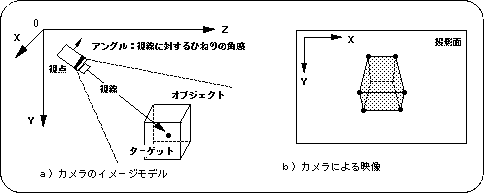
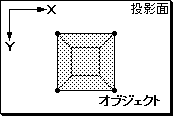 | 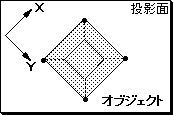 |
| a) When the upper part of the camera is aligned with the Y axis | b) When the upper part of the camera is tilted by -45 degrees with respect to the Y axis (-45 degrees by rotating the Z axis) |
/ * ------------------------------------------------ ---------------------- * /
/ * Camera Action * /
/ * ------------------------------------------------ ---------------------- * /
#include "sgl.h"

#define POS_Z 100.0

typedef struct cam {
	FIXED pos [XYZ];
	FIXED target [XYZ];
	ANGLE ang [XYZ];
} CAMERA;

extern PDATA PD_CUBE;

static FIXED cubepos [] [3] = {
	POStoFIXED (20, 0, 270),
	POStoFIXED (-70, 0, 270),
	POStoFIXED (40, 0, 350),
	POStoFIXED (-60, 0, 370)
};

void dispCube (FIXED pos [XYZ])
{
	slPushMatrix ();
	{
		slTranslate (pos [X], pos [Y], pos [Z]);
		slPutPolygon (& PD_CUBE);
	}
	slPopMatrix ();
}

void ss_main (void)
{
	static ANGLE ang [XYZ];
	static CAMERA cmbuf;
	static ANGLE tmp = DEGtoANG (0.0);

	slInitSystem (TV_320x224, NULL, 1);
	slPrint ("Sample program 6.3", slLocate (9,2));

	cmbuf.ang [X] = cmbuf.ang [Y] = cmbuf.ang [Z] = DEGtoANG (0.0);
	cmbuf.target [X] = cmbuf.target [Y] = toFIXED (0.0);
	cmbuf.target [Z] = toFIXED (320.0);
	cmbuf.pos [X] = toFIXED (0.0);
	cmbuf.pos [Y] = toFIXED (-20.0);
	cmbuf.pos [Z] = toFIXED (0.0);

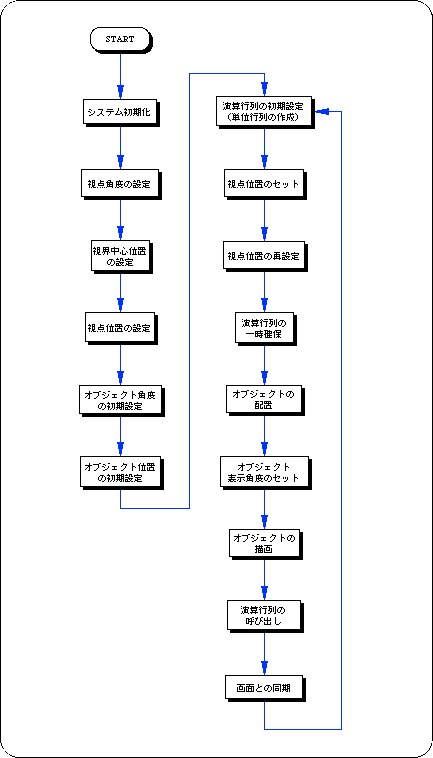
	while (-1) {
		slUnitMatrix (CURRENT);
		slLookAt (cmbuf.pos, cmbuf.target, cmbuf.ang [Z]);
		tmp + = DEGtoANG (2.0);
		cmbuf.pos [X] = POS_Z * slCos (tmp);
		cmbuf.pos [Z] = POS_Z * slSin (tmp);

		dispCube (cubepos [0]);
		dispCube (cubepos [1]);
		dispCube (cubepos [2]);
		dispCube (cubepos [3]);

		slSynch ();
	}
}
Functional type | Function name | Parameters | function |
|---|---|---|---|
| void | slLookAt | FIXED * camera, * target, ANGLE angz | Multiply the line-of-sight matrix by the current matrix |
★ SGL User's Manual ★ PROGRAMMER'S STRUCT