 ★ SGL User's Manual ★ PROGRAMMER'S STRUCT
In this chapter, we will explain the concept of polygons, which is the basic concept of 3D graphics, and how to set polygons in SGL.
Figure 2-1 Example of general polygon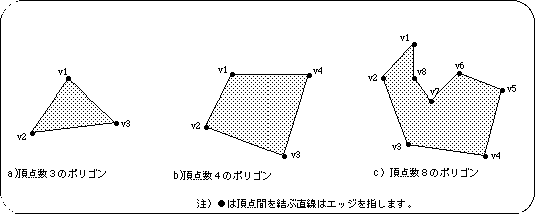
Figure 2-2 Example of polygons at Sega Saturn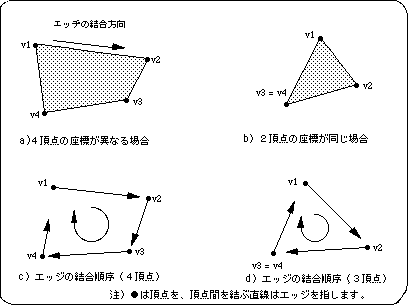
/ * ------------------------------------------------ ---------------------- * /
/ * Draw 1 Polygon * /
/ * ------------------------------------------------ ---------------------- * /
#include "sgl.h"

extern PDATA PD_PLANE1;

void ss_main (void)
{
	static ANGLE ang [XYZ];
	static FIXED pos [XYZ];

	slInitSystem (TV_320x224, NULL, 1);

	ang [X] = ang [Y] = ang [Z] = DEGtoANG (0.0);
	pos [X] = toFIXED (0.0);
	pos [Y] = toFIXED (0.0);
	pos [Z] = toFIXED (220.0);

	slPrint ("Sample program 2.2", slLocate (9,2));

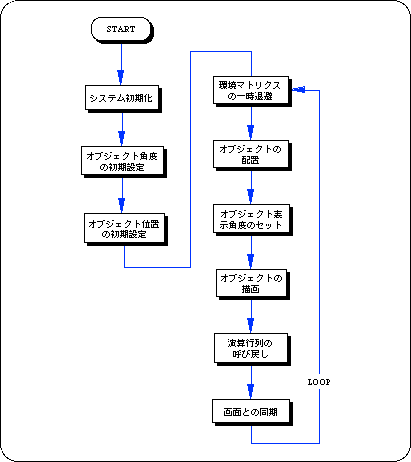
	while (-1) {
		slPushMatrix ();
		{
			slTranslate (pos [X], pos [Y], pos [Z]);
			slRotX (ang [X]);
			slRotY (ang [Y]);
			slRotZ (ang [Z]);
			slPutPolygon (& PD_PLANE1);
		}
		slPopMatrix ();

		slSynch ();
	}
}
#include "sgl.h"

POINT point_PLANE1 [] = {
        POStoFIXED (-10.0, -10.0, 0.0),
        POStoFIXED (10.0, -10.0, 0.0),
        POStoFIXED (10.0, 10.0, 0.0),
        POStoFIXED (-10.0, 10.0, 0.0),
};

POLYGON polygon_PLANE1 [] = {
        NORMAL (0.0, 1.0, 0.0), VERTICES (0, 1, 2, 3),
};

ATTR attribute_PLANE1 [] = {
        ATTRIBUTE (Dual_Plane, SORT_CEN, No_Texture, C_RGB (31, 31, 31), No_Gouraud, MESHoff, sprPolygon, No_Option),
};

PDATA PD_PLANE1 = {
        point_PLANE1, sizeof (point_PLANE1) / sizeof (POINT),
        polygon_PLANE1, sizeof (polygon_PLANE1) / sizeof (POLYGON),
        attribute_PLANE1
};
Figure 2-3 Drawing model by “polygon.c”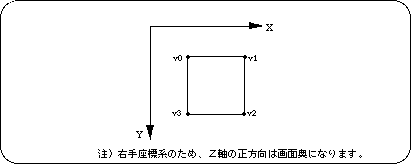
 | ● Numbers for vertex identification are automatically assigned in the order of "0,1,2,3,4, ~ n" from the top according to the order of the vertex list. | ● For each polygon surface, select any 4 points from the vertex list by vertex number to create a list of polygon surfaces. When using a light source, etc., also set a normal vector for each surface. | ● Determine the attributes of polygon faces in order from the top according to the order of the face list. In addition to polygon color, attributes include surface treatment methods. | ● Calculate the number of vertices from the vertex list and the number of faces from the face list, and add them to the list. Pass this as a polygon parameter to the drawing function. |
[Creation of vertex list: POINT point_ <label name> []]
Variable name: POS2FIXED (vertical_x, vertex_y, vertex_z),
Represents the coordinates of each vertex. Floating-point numerical values can be assigned to coordinate values by using the macro "POStoFIXED" (POS2FIXED is a macro supported by SGL).
Create a list of polygon faces and normal vectors based on the vertex list.
Variable name: NORMAL (vector_x, vector_y, vector_z),
Define a normal vector for each face. A normal vector is used to represent the orientation of a polygonal surface, and is a unit vector that extends perpendicular to the polygonal surface.
Each parameter is an XYZ value that represents the direction of the radiation vector, and the normal vector must always be specified as a unit vector.
Variable name: VERTICES (v1, v2, v3, v4),
Create a list of which vertices in the vertex list are used to form the polygon face. The number of vertices selected is always four. However, only when the 3rd and 4th vertex numbers are the same, a polygon with a triangular appearance can be expressed.
Also, there is no relationship between the vertex numbers and the order in which the edges are joined. The edges are always joined clockwise from the first vertex selected by the list.
Set the surface attributes of the polygon for each face according to the order of the face list.
For details on the settings, refer to the chapter "Chapter 7: Polygon Face Attributes".
Sets the surface attributes of polygons. For each parameter, set a total of 8 items such as front / back judgment, Z sort, texture, color, gourd processing, drawing mode, sprite inversion processing, and other functions.
(For details, refer to the chapter "Chapter 7: Polygon surface attributes")
Create a data structure to pass to the library function “slPutPolygon” with each setting of polygon data as a parameter.
Create a data string to actually pass to “slPutPolygon”.
Here, the number of vertices and the number of polygon faces are newly calculated from the information such as the vertex list and added to the parameter data string.
● Polygon data structure ●

PDATA PD_PLANE1 = {
	point_PLANE1, / * Vertex list * /
	sizeof (point_PLANE1) / sizeof (POINT), / * Number of vertices * /
	polygon_PLANE1, / * Face list * /
	sizeof (polygon_PLANE1) / sizeof (POLYGON), / * number of faces * /
	attribute_PLANE1 / * Attribute list * /
};
Listing 2-3 below is an example of creating cubic polygon data.
#include "sgl.h"

POINT point_PLANE1 [] = {/ * Create vertex list * /
	POStoFIXED (-15.0, -15.0, -15.0), / * Vertex coordinates (XYZ array) * /
	POStoFIXED (-15.0, -15.0, 15.0),
	POStoFIXED (-15.0, 15.0, -15.0),
	POStoFIXED (-15.0, 15.0, 15.0),
	POStoFIXED (15.0, -15.0, -15.0),
	POStoFIXED (15.0, -15.0, 15.0),
	POStoFIXED (15.0, 15.0, -15.0),
	POStoFIXED (15.0, 15.0, 15.0),
};

POLYGON polygon_PLANE1 [] = {/ * Create surface list * /
	NORMAL (-1.0, 0.0, 0.0), / * Normal vector setting * /
	VERTICES (0, 1, 3, 2), / * Vertex number selected on one side * /
	NORMAL (0.0, 0.0, 1.0),
	VERTICES (1, 5, 7, 3),
	NORMAL (1.0, 0.0, 0.0),
	VERTICES (5, 4, 6, 7),
	NORMAL (0.0, 0.0, -1.0),
	VERTICES (4, 0, 2, 6),
	NORMAL (0.0, -1.0, 0.0),
	VERTICES (4, 5, 1, 0),
	NORMAL (0.0, 1.0, 0.0),
	VERTICES (2, 3, 7, 6),
};

ATTR attribute_PLANE1 [] = {/ * Create surface attribute list * /
	ATTRIBUTE (Dual_Plane, SORT_CEN, No_Texture, C_RGB (31,31,00), No_Gouraud, MESHoff, sprPolygon, UseLight),
	ATTRIBUTE (Dual_Plane, SORT_CEN, No_Texture, C_RGB (31,00,00), No_Gouraud, MESHoff, sprPolygon, UseLight),
	ATTRIBUTE (Dual_Plane, SORT_CEN, No_Texture, C_RGB (00,31,00), No_Gouraud, MESHoff, sprPolygon, UseLight),
	ATTRIBUTE (Dual_Plane, SORT_CEN, No_Texture, C_RGB (00,00,31), No_Gouraud, MESHoff, sprPolygon, UseLight),
	ATTRIBUTE (Dual_Plane, SORT_CEN, No_Texture, C_RGB (31,00,31), No_Gouraud, MESHoff, sprPolygon, UseLight),
	ATTRIBUTE (Dual_Plane, SORT_CEN, No_Texture, C_RGB (00,31,31), No_Gouraud, MESHoff, sprPolygon, UseLight),
};

PDATA PD_PLANE1 = {/ * Create data string for drawing function * /
	point_PLANE1,
	sizeof (point_PLANE1) / sizeof (POINT), / * Calculation of the number of vertices * /
	polygon_PLANE1,
	sizeof (polygon_PLANE1) / sizeof (POLYGON), / * Calculation of the number of polygon faces * /
	attribute_PLANE1
};
Figure 2-6 Drawing model with the parameters in Listing 2-3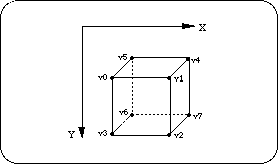
Note) Since it is a left-handed coordinate system, the Z-axis positive direction is at the back of the screen.
| Functional type | Function name | Parameters | function |
|---|---|---|---|
| void | slPutPolygon | PDATA * pat | Drawing polygons (setting parameters) |
★ SGL User's Manual ★ PROGRAMMER'S STRUCT