 ★ SGL User's Manual ★ PROGRAMMER'S STRUCT
This chapter explains how to set the light source in SGL. By using a light source, objects displayed in 3D graphics are shaded, making it possible to draw more realistic images.
However, it takes an enormous amount of time to calculate all of these as light source information and draw them accurately. Therefore, in SGL, only the light source direction is selected from these light source information and reflected in the polygon drawing.
Also, regarding the direction of light, light is usually defined as radiation from a certain point, which is also too time-consuming to calculate. Therefore, assuming that the light source position is infinity, the direction of the light is treated as if it is always emitted from the same direction regardless of the coordinate position of the object.
<Fig. 3-1 Light source image model>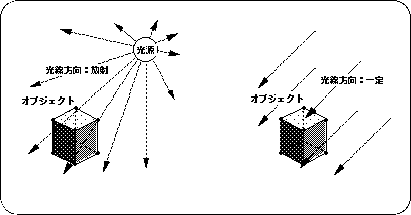
Light source changes on the surface of an object are determined by the direction of the rays and the orientation of the normal vector on each polygonal surface. The image below shows this image.
Figure 3-2 Shadow image model Shadow of polygonal surface by light source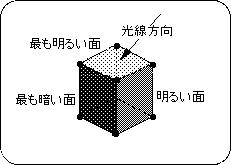
[Void slLight (VECTOR light);]
The polygon surface determines the polygon color from the angle of incidence of light on the surface.
The closer the angle of incidence is to vertical, the brighter it is, and the closer it is to horizontal, the darker it is. Also, the negative vertical direction is the darkest.
[Bool slPushUnitMatrix (void)]
[Void slUnitMatrix (MATRIX mtptr)]
For details on the current matrix and matrix functions, refer to " Chapter 5 Matrix".
Listing 3-1 below shows the changes in the shadows on the cube polygon plane when the direction vector of the light source is changed one after another for a cube placed in space.
/ * ------------------------------------------------ ---------------------- * /
/ * Cube & A Light Source * /
/ * ------------------------------------------------ ---------------------- * /
#include "sgl.h"

extern PDATA PD_PLANE1;

void ss_main (void)
{
	static ANGLE ang [XYZ];
	static FIXED pos [XYZ];
	static FIXED light [XYZ];
	static ANGLE tmp = DEGtoANG (0.0);

	slInitSystem (TV_320x224, NULL, 1);

	ang [X] = DEGtoANG (30.0);
	ang [Y] = DEGtoANG (45.0);
	ang [Z] = DEGtoANG (0.0);
	pos [X] = toFIXED (0.0);
	pos [Y] = toFIXED (0.0);
	pos [Z] = toFIXED (190.0);

	light [X] = toFIXED (-1.0);
	light [Y] = toFIXED (0.0);
	light [Z] = toFIXED (0.0);

	slPrint ("Sample program 3.2", slLocate (9,2));

	while (-1) {
		slPushMatrix ();
		{
			slRotY (tmp);
			slRotX (DEGtoANG (15.0));
			slRotZ (DEGtoANG (15.0));
			slCalcPoint (toFIXED (0.0), toFIXED (0.0), toFIXED (1.0), light);
		}
		slPopMatrix ();
		slLight (light);
		tmp + = DEGtoANG (1.0);

		slPushMatrix ();
		{
			slTranslate (pos [X], pos [Y], pos [Z]);
			slRotX (ang [X]);
			slRotY (ang [Y]);
			slRotZ (ang [Z]);
			slPutPolygon (& PD_PLANE1);
		}
		slPopMatrix ();

		slSynch ();
	}
}
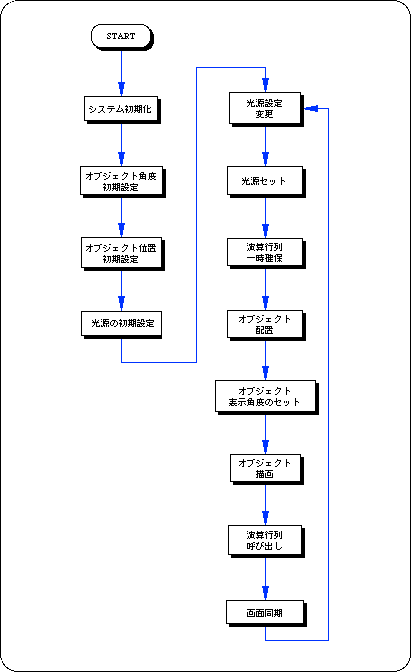
| Functional type | Function name | Parameters | function |
|---|---|---|---|
| void | slLight | VECTOR light | Light source vector settings |
| Bool | slPushUintMatrix | void | Secure the identity matrix on the stack |
| void | slUintMatrix | MATRIX mptrt | Make the specified matrix an identity matrix |
★ SGL User's Manual ★ PROGRAMMER'S STRUCT