SGL User's ManualPROGRAMMER'S STRUCT
BackForward

8-5. Scroll data storage in memory

Here, we will explain the types of scroll data and how to store the scroll data in their respective memories.

Scroll data type

In SGL, the data related to scrolling is roughly divided into the following three types according to the difference in the information they have.

1) Character pattern data : Information in dot units of character patterns (may be abbreviated as CG in the text)

2) Pattern name data : Information related to character pattern identification and placement (may be abbreviated as PN in the text)

3) Color palette data : Color data when using the color palette

This is referred to as the scroll screen configuration unit explained in "Section 8-2: Scroll configuration unit".

1) is information in dot units up to the character pattern 2) is information on the arrangement of character patterns after the page

It means that. The data of 1) and 2) are stored in a memory area called VRAM in the memory and accessed to be used for actual drawing.

3) is the color information in the palette format used for scrolling.
The palette format is a color setting method that uses any of 16 colors, 256 colors, and 2048 colors (1024 colors depending on the setting) as one palette for each character pattern.
The color palette is

RGB data of individual colors: Color identification number in the palette stored in the color RAM: Identification number for each palette used in the character pattern: Used in the pattern name data

It is composed of three data.
Color palette data is stored in a memory area called color RAM in the memory, and by accessing it, it is used for actual drawing.
Scroll data storage in VRAM

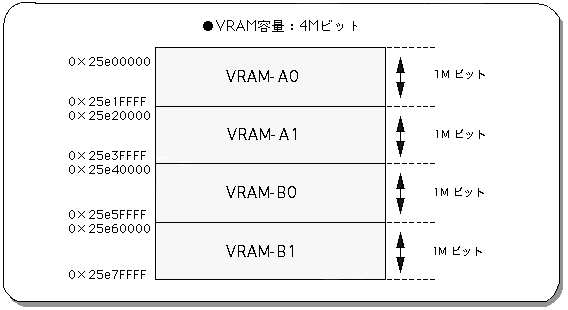
VRAM is a general term for data areas for storing graphic data such as scrolls. In SGL, VRAM is divided into four parts for use. The areas are called VRAM-A0, A1, B0, B1, respectively, and various data related to scrolling are stored in these four data areas called banks. Since the VRAM capacity of Sega Saturn is 4 Mbits, the VRAM capacity for each bank is 1 Mbit.
By accessing these four data areas and reading the scroll data, the actual drawing is performed. The figure below shows the address of VRAM.

Figure 8-5 VRAM address map

In SGL, scroll information is stored in these four VRAM banks, and the scroll surface is actually drawn on the screen by calling it as needed.
In the sample program, this data storage work is performed by two functions (registered in the program), "Cel2VRAM" and "Map2VRAM".
This function is not supported as a library function, so please use it as a reference only.

[Void Cel2VRAM (cel_adr, VRAM_adr, chara_size);]
Character pattern data is stored in VRAM.
Substitute the start address of the memory that currently stores the character pattern, the start address of the VRAM that stores the character pattern data, and the number of character patterns in the parameters.

[Void Map2VRAM (pat_adr, VRAM_adr, mapY, mapX, pal_off, map_off);]
Store pattern name data in VRAM.
The parameters include the start address of the memory that currently stores the pattern name table, the start address of the VRAM that stores the pattern name data, the vertical and horizontal size of the map in cell units, the offset value of the color palette to be used next, and finally. Substitute the offset value of the map data.

Precautions regarding data storage in VRAM 1

There are some restrictions on the storage of scroll data in the VRAM bank mentioned above due to hardware performance issues.
The details of the restrictions will not be described here, but at a minimum, please observe the following two conditions.

1) Priority of using VRAM bank by scroll type
Do not store the scroll data of the normal scroll screen and the rotary scroll screen in the same VRAM bank.

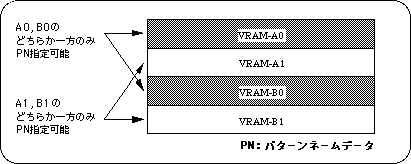
2) VRAM bank storage limit for pattern name data
All pattern name data can be stored in only one of VRAM_A0 and B0 and one of VRAM_A1 and B1 in the VRAM bank, up to a maximum of two banks.

Figure 8-6 VRAM bank storage limit for pattern name data

If these two conditions are not observed, scroll drawing will be affected as follows.

When 1) cannot be observed
Due to the VRAM bank usage priority, normal scroll screen data is ignored and only rotary scroll screen data is valid.

If 2) cannot be observed
If the pattern name data is stored in the VRAM bank with the same number at the end of the VRAM bank name, the scroll will not be drawn correctly or will not be drawn at all.

About PN storage restrictions

For details on PN storage restrictions, refer to "HARDWARE MANUAL vol.2: VDP2 User's Manual".

Precautions regarding data storage in VRAM 2

The notes on data storage that will be explained below are related to the initial settings of SGL.

In the default state, SGL already stores scroll data (including color data) for displaying character values called ASCII cells in memory.
Therefore, if you overwrite the ASCII scroll data stored in the default state with other scroll data, the character / numerical display functions supported by SGL cannot be used correctly.

ASCII scroll consists of 128 cells and 256 colors, and uses the normal scroll screen "NBG0".

ASCII scroll data is stored in the RAM area as follows.

Figure 8-7 ASCII scroll data storage area
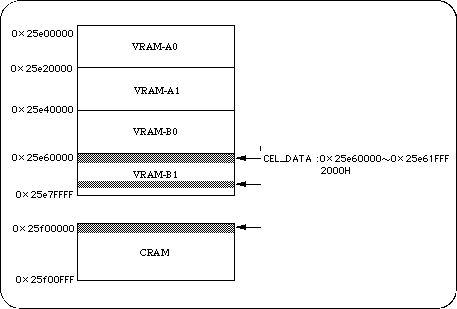
Character data: 2000H from address 0x25e60000
Map data: 1000H from address 0x25e76000
Palette data: 20H from address 0x25f00000

When using ASCII scroll, specify the offset when storing the scroll data, and do not write the scroll data to the above area.

Color RAM

Color RAM is used for all color control of palette-style sprites and scroll screens. Color data consists of 5 bits or 8 bits for each RGB color, depending on the color RAM mode. There are three color RAM modes in the following table.

Table 8-4 Color RAM mode

Color mode Color bit Data size Number of colors
Mode 0 RGB 5 bits each, 15 bits in total 1 word 1024 out of 32768 colors
Mode 1 RGB 5 bits each, 15 bits in total 1 word 1024 out of 32768 colors
Mode 2 RGB 8 bits each, 24 bits in total 2 words 1024 out of 16.77 million colors

note)
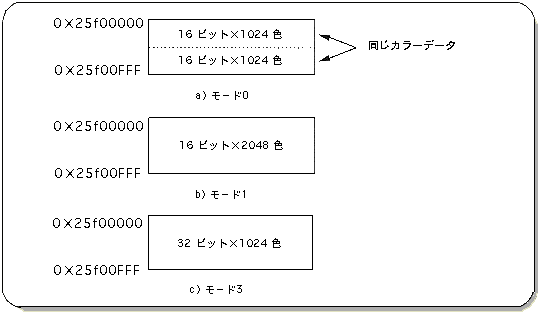
In mode 0, the color RAM is divided into two and the data is written in the first half, so that the same data is automatically written in the second half.

The color RAM mode is represented by the following image in the actual color RAM.

Figure 8-8 Color RAM address map
The color RAM mode is selected and used in the following cases.

Color RAM mode 0: Used when using the extended color calculation function.
Color RAM mode 1: Used when you want to use 2048 colors out of 32768 colors.
Color RAM mode 2: Used when you want to use 2048 colors out of 16.77 million colors.

As can be seen from Fig. 8-8, color RAM mode 0 divides the color RAM area into two banks and stores the same color data in each bank. Therefore, the number of colors that can be used is halved compared to color RAM mode 1, but the extended color calculation function can be used instead.
However, this SGL library function does not support the extended color calculation mode.

caution
If you want to use the extended color calculation mode, refer to "HARDWARE MANUAL vol.2".

The difference between mode 1 and mode 2 is the number of colors that can be used.
Mode 1 can use 2048 colors out of 32768 colors, and mode 2 can use 1024 colors out of 16.77 million colors.
Therefore, mode 1 can use a larger number of colors than mode 2, but since the data length constituting the color data is shorter than that of mode 2, the color stages that can be selected are roughly compared to mode 2. Become.
On the contrary, in mode 2, the maximum number of colors that can be used at one time is half that of mode 1, but since the data length that composes color data is longer than that of mode 1, it is possible to use deeper gradations.

Use the library function “slColRAMMode” to set the color RAM mode.

[Void slColRAMMode (Uint16 mode);]
Determines the color RAM mode.
Substitute the #define value in the table below for the parameter, which corresponds to the color RAM mode.

Table 8-5 “slColRAMMode” parameter assignment values
Color RAM mode
Mode 0 Mode 1 Mode 2
Price CRM16_1024 CRM16_2048 CRM_1024

note)
2048 colors can be used only when color RAM mode 1 is selected.

Color RAM initial settings

The color RAM at system initialization is set to mode 1.

Data storage in color RAM

In SGL, color information (color palette information) is stored in the color RAM and called up as needed to realize drawing of the scroll screen.
<In the sample program, this color data storage work is performed by a function (registered in the program) called "Pal2CRAM". This is not supported as a library function, so please use it as a reference only.

[Void Pal2CRAM (col_adr, CRAM_adr, col_no.);]
Color information (color palette information) is stored in the color RAM.
Substitute the start address in the memory where the color palette to be registered is currently stored, the start address of the color RAM that is the storage destination, and the color palette size for each parameter.


BackForward
SGL User's ManualPROGRAMMER'S STRUCT
Copyright SEGA ENTERPRISES, LTD., 1997