SGL User's ManualPROGRAMMER'S STRUCT
BackForward
8. Scroll

8-6. Scroll function setting

In this item, we will explain the scroll setting method in order from the character unit, and finally the map setting. In SGL, the scroll function (number of character colors, character size, etc.) is set at each stage of scroll setting.
The table below is a list of scroll functions.

Table 8-6 List of scroll functions
function Normal scroll Rotating scroll
NBG0 NBG1 NBG2 NBG3 RBG0
Number of character colors 16 colors
256 colors
2048 colors *
32768 colors
Choose from 16.77 million colors
16 colors
256 colors
2048 colors *
Select from 32768 colors
16 colors
Select from 256 colors
16 colors
Select from 256 colors
16 colors
256 colors
2048 colors *
32768 colors
Choose from 16.77 million colors
Character size Select from 1 horizontal x 1 vertical cell, 2 horizontal x 2 vertical cells
Pattern name data size Select from 1 word or 2 words
Plain size Select from 1 horizontal x 1 vertical page, 2 horizontal x 1 vertical page, 2 horizontal x 2 vertical pages
Number of planes Four Four Four Four 16
Scale function 1/4 times to 256 times none Arbitrary magnification
Rotation function none can be

note)
In *, 2048 colors are used when the color RAM mode is mode 1.
1024 colors for mode 0 or mode 2

About VRAM access restrictions

The list of functions listed in Table 8-6 is a display of functions for each scroll surface. When actually using these scroll planes in a program, the maximum performance of each scroll plane cannot always be used, and not all scroll planes can be drawn at the same time.
This is caused by the restriction of access to VRAM, and the number of scrolling screens and function settings that can be used at the same time are limited by this access restriction.
For details on access restrictions, refer to "HARDWARE MANUAL vol.2: VDP2 User's Manual".

In addition to the VRAM access specification restrictions, there are also scroll drawing restrictions that come from the character color number setting of the normal scroll screen "NBG0 to 3".
(Refer to the character pattern section)

Due to these two restrictions, the number of scroll faces that can be drawn at the same time and their functions are limited and determined.

Character pattern

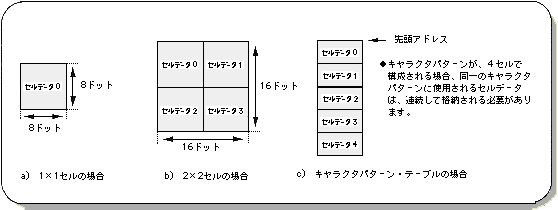
The character pattern is a square pattern composed of 1x1 cells or 2x2 cells, and stores information in dot units (information such as dot drawing color). In SGL, a set of character pattern information (data table) is stored in VRAM as character pattern data, and is accessed and used.
At this stage, SGL specifies the number of character colors for each scroll plane.
Also, when one character is composed of 4 cells, the cell data used for the same character pattern must be stored continuously in the character pattern table.

Figure 8-9 Character pattern image

Table 8-7 Number of character colors
 Color format
 Number of character colors
 Number of bits per dot
 Number of colors that can be used by the scroll surface
NBG0 NBG1 NBG2 NBG3 RBG0
Palette format 16 colors 4 bits
256 colors 8 bits
2048 colors 16 bit
(Use only the lower 11 bits)
× ×
RGB format 32768 colors 16 bit × ×
16.77 million colors 32 bit
(Uses MSB and lower 24 bits>
× × ×

note)
In color RAM modes 0 and 2, 2048 colors become 1024 colors.

To determine the number of character colors and character size in SGL, use the library functions "slCharNbg0 to 3" and "slCharRbg0".

[Void slCharNbg0 ~ 3 (Uint16 color_type, Uint16 char_size);]
[Void slCharRbg0 (Uint16 color_type, Uint16 char_size);]
Specify the number of character colors and character size for each scroll screen (for the scroll screen name at the end of slChar). Substitute the #define value according to the table below corresponding to the number of colors and character size for the parameter.
However, the number of colors that can be used is limited depending on the scroll screen (see "Table 8-6 Scroll Function List").

Table 8-8 Parameter assignment values for “slCharNbg0 to 3” and “slCharRbg0”
Number of character colors Character size
Palette format RGB format
16 colors 256 colors 2048 colors 32768 colors 16.77 million colors 1x1 2x2
 Substituted value
COL_TYPE_16 COL_TYPE_256 COL_TYPE_2048 COL_TYPE_32768 COL_TYPE_1M CHAR_SIZE_1x1 CHAR_SIZE_2x2

Note 1)
If the color RAM mode is 0 or 2, 2048 colors will be 1024 colors.

Note 2)
The values in the above table are defined in “sl_def.h” attached to the system.

Scroll limit by the number of character colors

Normal scroll screen Depending on the color number setting of NBG0 and NBG1, the number of scroll screens that can be output may be restricted.
The table below summarizes this.

Table 8-9 Limitation of scroll surface by the number of character colors
Number of colors of NBG0 and NBG1 Effective scroll surface
NBG0 NBG1 NBG0 NBG1 NBG2 NBG3
16.77 million colors * × × ×
2048 colors or 32678 colors * × ×
* 2048 colors or 32678 colors ×
2048 colors or 32678 colors 2048 colors or 32678 colors × ×

Note) * indicates the selection of 256 colors or less.

  • If NBG0 is set to 16.77 million colors, NBG1 to 3 cannot be displayed.
  • If you set NBG0 to 2048 or 32768 colors, you will not be able to see NBG2.
  • If you set NBG1 to 2048 or 32768 colors, NBG3 cannot be displayed.

    Scrolling restrictions due to VRAM access

    In addition to this, Sega Saturn has scroll restrictions due to VRAM access due to hardware performance.
    This applies along with the limit by the number of character colors on the normal scroll screen.
    In particular, when the reduction setting is made for the normal scroll surface and when the rotary scroll surface is used, the scroll surface that can be drawn is significantly limited as well as the number of character colors, so be careful.
    For details on access restrictions, refer to "HARDWARE MANUAL vol.2: VDP2 User's Manual".

    Pattern name data

    The pattern name data is obtained by extracting the following two pieces of information from the dot-by-dot data created as a character pattern and converting it into data.

    Character number: Start address of character pattern (VRAM)
                                  Character patterns are stored in units of 20H Palette number: Palette number of the color palette to be used (color RAM)
    

    The pattern name data is finally composed by adding the following two function control bits related to the character pattern in addition to the above two information.

    Special function bit (2 bits): Controls special color calculation and special priority Inversion function bit (2 bits): Controls up / down / left / right inversion of character pattern

    Pattern name data is classified into the three types shown in a), b), and c) in the figure below based on the difference in the amount of information contained.
    (For details, see the next section)
    The figure is an image model of pattern name data. From this figure, it can be seen that the special function bit and the inversion function bit may or may not be included depending on the type of the pattern name data.
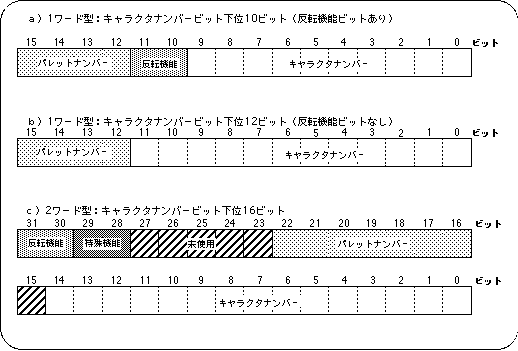
    Figure 8-10 Pattern name data image

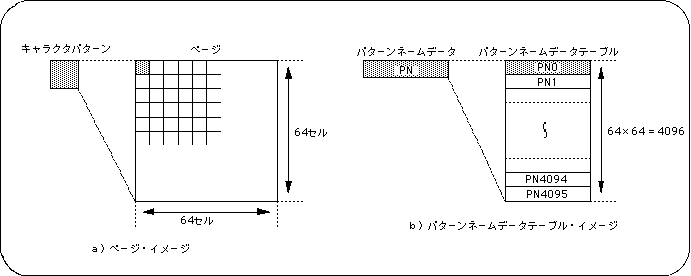
    The pattern name data is used when setting the page, and a pattern name data table is created with 64 x 64 minutes of continuous pattern name data as a set, and the layout information is passed to the plane or map.

    Data type of pattern name data

    There are two types of pattern name data, one-word type and two-word type.
    The 1-word type is further divided into two according to the number of information bits used for character identification (pattern identification bits are 10 or 12 bits).
    Each data type has its advantages and disadvantages, but SGL requires you to choose and use one of these three.

    Table 8-10 Pattern name data size
    Word size Number of character number bits remarks

    1 word
    Lower 10 bits Inversion function can be specified for each character
    Lower 12 bits There is no inversion function
    2 words Lower 15 bits Inversion function can be specified for each character

    1 word size is recommended for SGL.

    The 1-word pattern name data is divided into two types depending on the selection of "whether or not to introduce the inversion function bit (2 bits) in the pattern name data".

    As the name suggests, the character pattern inversion function is for controlling and executing the up / down / left / right inversion of the corresponding character pattern. In order to control this, it is necessary to secure 2 inversion function bits in the pattern name data.
    In the case of 2-word type pattern name data, the inversion function bit is always secured, but in the case of the 1-word type, there is no margin in the number of bits that can be used. Therefore, if the inversion function bit is secured, the number of character patterns that can be identified is It can be cut by 2 bits.
    Therefore, the 1-word pattern name data can be divided into two types depending on whether or not the inversion function is used, that is, the difference in the number of identifiable character patterns.

    The difference between the 1-word type and the 2-word type is the number of character patterns that can be simply processed. However, the memory area used by the 2-word type is simply doubled compared to the 1-word type, and while the 1-word type can specify an offset, the 2-word type must specify an absolute address. Therefore, considering the ease of use, SGL recommends 1-word type pattern name data.

    About auxiliary data

    If the pattern name data type is one word, you cannot specify all the required pattern name data. Therefore, the system supplements the pattern name data with the lower 10 bits of the pattern name control register. This is called auxiliary data.
    For details, refer to "HARDWARE MANUAL vol.2: VDP2 Manual".

    page

    The page is a square with a character pattern of 64 horizontal x 64 vertical cells. The actual data format is that the pattern name data of each character pattern, 64 horizontal cells x 64 vertical cells, is stored continuously in the memory as one table, and this is called the pattern name data table.
    The pattern name table created in the page setup is passed to a higher plane or map and rearranged.

    Figure 8-11 Page image

    To set the page in SGL, use the library functions "slPageNbg0 to 3" and "slPageRbg0" according to each scroll screen.

    [Void slPageNbg0 ~ 3 (void * cell_adr, void * col_adr, Uint16 data_type);]
    [Void slPageRbg0 (void * cell_adr, void * col_adr, Uint16 data_type);]
    Set the page (pattern name data table).
    For the parameters, substitute the start address of the character pattern to be used, the start address of the palette to be used (offset can be specified in the case of 1-word type), and the type specification of the pattern name data (see the table below for the parameter assignment values). ..

    Table 8-11 Parameter assignment values (data_type) of “slPageNbg0 to 3” and “slPageRbg0”
    Number of words Character number bit Substituted value
    1 word Lower 10 bits
     PNB_1WORD
    Lower 12 bits
     PNB_1WORD | CN_12BIT
    2 words Lower 16 bits PNB_2WORD

    Note) The values in the above table are defined in “sl_def.h” attached to the system.

    The following figure is a list of actual page setup examples and #defines used for page setup parameters.

    Figure 8-12 Parameter setting example of “slPageNbg0 to 3” and “slPageRbg0”

    slPageNbg0 (NBG0_CELL_ADR, 0, PNB_1WORD | CN_10BIT); ↑ ↑ ↑ ↑ ::: Character number bit specification :: Number of words specified: Palette start address (offset specification) Character pattern start address

    Listing 8-1 #define related to page setup parameters

    ● #define used for page setup parameters ●
    / * VRAM_BANK ADDRESS * /
    #define VDP2_VRAM_A0 0x25e00000
    #define VDP2_VRAM_A1 0x25e20000
    #define VDP2_VRAM_B0 0x25e40000
    #define VDP2_VRAM_B1 0x25e60000
    / * slPage * /
    #define PNB_2WORD 0
    #define PNB_1WORD 0x8000
    #define CN_10BIT 0
    #define CN_12BIT 0x4000
    / * others * /
    #define NBG_CELL_ADR VDP2_VRAM_B0
    

    note)
    These #defines are defined in “sl_def.h”.

    plane

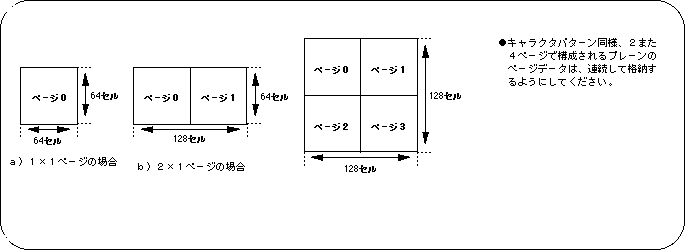
    A plane is a page arranged in one of the following sizes: horizontal 1 x vertical 1, horizontal 2 x vertical 1, horizontal 2 x vertical 2. When a plane is composed of multiple pages, the page data (pattern name data table) that makes up the plane must be stored consecutively in VRAM.
    The plain data is passed to a higher level map and rearranged.

    Figure 8-13 Plain image

    Note) All are displayed vertically and horizontally.

    To set the plane size in SGL, use the library functions "slPlaneNbg0-3" and "slPlaneRA, B".

    [Void slPlaneNbg0 ~ 3 (Uint16 plane_size);]
    [Void slPlaneRA, RB (Uint16 plane_size);] Sets the plane size of each scroll plane. Substitute the values in the table below corresponding to the plane size for the parameters.

    Table 8-12 Parameter assignment values (plane_size) for “slPlaneNbg0 to 3” and “slPlaneRA, RB”
    Plain size
    1 horizontal x 1 vertical 2 horizontal x 1 vertical Horizontal 2 x vertical 2
    Price PL_SIZE_1x1 PL_SIZE_2x1 PL_SIZE_2x2

    note)
    The values in the above table are defined in “sl_def.h” attached to the system.

    About the plane size specification limit by the reduction setting

    If you set the reduceable range up to 1/4 times on the normal scroll screens NBG0 and NBG1, do not set the plane size of the scroll screen to 2 x 2 pages. This is because the map size when the shrinkable range is multiplied by 1/4 is different from the usual one.
    You can use 1x1 and 2x1 pages without any problem.
    For details on the plane size specification limit, refer to "HARDWARE MANUAL vol.2: VDP2 User's Manual".

    map

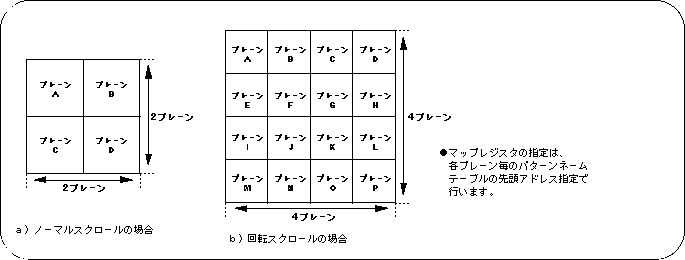
    A map is the largest unit of scrolling that SGL actually uses for scrolling. The map is represented by 2 horizontal x 2 vertical planes for the normal scroll screen and 4 horizontal x 4 vertical planes for the rotary scroll screen.
    By specifying the start address of each plane (actually, the start address where the pattern name data table that composes the plane is stored), the planes that make up the map can be arbitrarily (without having to be stored in VRAM continuously). You can decide. Therefore, it is possible to make all the planes that make up the map the same.
    The scroll movement / enlargement / reduction / rotation, which will be described later, is also moved / converted in map units.

    Figure 8-14 Map image

    The map size is determined by the type of scroll screen.
  • Normal scroll screen: 2 horizontal x 2 vertical planes, 4 planes in total
  • Rotation scroll screen: 4 horizontal x 4 vertical planes, 16 planes in total

    To register each plane that composes the map with SGL, use the library functions "slMapNbg0 to 3" and "sl1MapRA, RB".

    [Void slMapNbg0 ~ 3 (void * map_a, void * map_b, void * map_c, void * map_d);]
    Register plain data in the map of each normal scroll screen.
    Substitute the start address of each of the four planes to be registered for each parameter. The target scroll screen corresponds to the normal scroll screen name at the end of the function name.

    [Void sl1MapRA (void * map_a);]
    [Void sl1MapRB (void * map_a);]
    Register plain data in the map of the rotation scroll screen.
    Substitute the start address of the plane to be registered for each parameter. The function starts from the specified address
    Register one page of plain data in the map.
    The function "sl1MapRA" is used for map registration when rotation parameter A is used, and the function "sl1MapRB" is used for map registration when rotation parameter B is used.

     caution
     The rotation parameters will be described later.
    "Function settings specific to the rotary scroll screen"
    Please refer to.

    Reduction setting

    Of the five types of scroll screens of Sega Saturn, the rotary scroll screen "RBG0" and the normal scroll screen "NBG0, NBG1" can be enlarged or reduced with respect to scrolling. Of the three scroll planes that can be scaled up, the rotary scroll screen "RBG0" can always be scaled up or down at any magnification, but the normal scroll screen "NBG0, NBG1" is in the range of 1/4 to 256 times. You can only zoom in and out within.
    Furthermore, the normal scroll screen has three modes for scaling depending on the setting of the zoomable range. This is called the reduction setting. Therefore, when using the normal scroll screen "NBG0, NBG1", it is necessary to set the reduction setting. For details, refer to "HARDWARE MANUAL vol.2: VD P2 User Manual P129 to P130".

    Table 8-13 Scroll screen and scaling range
    Scroll type name Scale Scale range
    Normal scroll screen NBG0 1/4 to 256 times
    NBG1 1/4 to 256 times
    NBG2 ×
    NBG3 ×
    Rotating scroll RBG0 Arbitrary magnification

    note)
    The reduction range of NBG0,1 changes depending on the reduction setting.

    To set the reduction in SGL, use the library function "slZoomModeNbg0,1" corresponding to the normal scroll screen for setting the reduction.

    [Void slZoomModeNbg0,1 (Uint16 zoom_mode);]
    Determine the reduction setting for the normal scroll screen "NBG0, NBG1" that can be enlarged or reduced.
    The target scroll screen corresponds to the normal scroll screen name at the end of the function name.
    Substitute the values in the table below for the parameters, which correspond to the reduction setting mode.

    Table 8-14 Parameter assignment values for “slZoomModeNbg0,1” (zoom_mode)
    Plain size
     1x
     1/2 times
     1/4 times
    Price ZOOM_1 ZOOM_HALF ZOOM_QUATER

    Note) The values in the above table are defined in “sl_def.h” attached to the system.

    About enlargement / reduction of the rotary scroll screen

    The rotary scroll screen "RBG0" can always be enlarged or reduced at any magnification, so there is no need to make reduction settings.

    About the limit of the number of scrolling faces by the reduction setting

    Depending on the reduction setting of the normal scroll screen "NBG0, NBG1" (when it is possible to reduce to a smaller value), the number of scroll faces and functions that can be displayed may be limited. This is because the number of VRAM accesses changes depending on the reduction setting. For details on access restrictions, refer to "HARDWARE MANUAL vol.2: VDP2 User's Manual".

    Function settings specific to the rotary scroll screen 1

    In the case of the rotary scroll screen, some function settings are required in addition to the scroll function settings described above.
    These feature settings are required to use the features specific to rotary scrolling.

    ● Rotation parameter settings
    When using the rotation scroll screen, an area is required to store and recall some information related to rotation, and this collection of information is called a rotation parameter.
    Therefore, when using the rotation scroll screen, it is necessary to store the rotation parameter in VRAM as part of the scroll function setting (rotation parameter size: 100H).
    Use the library function “slRparaInitSet” to specify the rotation parameters.

    [Void slRparaInitSet (ROTSCROLL * Rpara_adr);]
    The rotation parameter is stored in the VRAM area and the default value is set at the same time.
    Substitute the start address of the area that stores the rotation parameter for the parameter.

    ● Rotation parameter use mode
    There are two types of rotation parameters, rotation parameter A and rotation parameter B, and these two types of rotation parameters are stored together in the area secured by the function "slRparaInitSet". Since there are two types of rotation parameters, the rotation scroll holds two types of state data at the same time, and it is possible to select one of these two types at the time of drawing and execute drawing on the monitor. Become.
    The user can arbitrarily select how to use the rotation parameter from the following four rotation parameter usage modes.

    Mode 0: Use rotation parameter A
    Mode 1: Use rotation parameter B
    Mode 2: The image is switched according to the coefficient data read from the coefficient table of the rotation parameter A.
    Mode 3: Switch by rotation parameter window

    [Void slRparaMode (Uint16 mode);]
    Toggles the mode of use of rotation parameters.
    Substitute the flags in the table below that indicate the rotation parameter usage mode for the parameters.

    Table 8-15 Parameter assignment values for “slRparaMode”
    Mode 0 Mode 1 Mode 2 Mode 3
    Price RA RB K_CHANGE W_CHANGE

    Note) The values in the above table are defined in “sl_def.h” attached to the system.

    ● Switching current rotation parameters
    Of the functions used for rotation scrolling, those ending in "R" in the function name set the function of each function for the current rotation parameter, but the current rotation parameter is set to the function "slCurRpara". By switching with "", the function can be set separately for the rotation parameters A and B.

    If the function name ends with "RA" or "RB", set the rotation parameter indicated by the end of each function name.

    [Void slCurRpara (Uint16 flag);]
    Switches the current rotation parameter.
    Substitute the flags in the table below that indicate the rotation parameters to be switched.

    Table 8-16 Parameter assignment values for “slCurRpara”
    Rotation parameter A Rotation parameter B
    Price RA RB
    Note) The values in the above table are defined in “sl_def.h” attached to the system.

    Caution <BR> For details on rotation parameters, refer to "HARDWARE MANUAL vol.2" (VDP2 User's Manual).

    Function settings specific to the rotary scroll screen 2

    ● Screen over processing mode selection
    Select the processing when the drawing of the rotation scroll screen exceeds the display area. This is called screen over processing, and there are the following four modes for screen over processing.

    Mode 0: Outside the area, the image set in the display area is repeated.
    Mode 1: The character pattern specified by the screen over PN register is repeated outside the area.
    Mode 2: Make everything transparent outside the area.
    Mode 3: The area is forcibly clipped to “0 ≦ X ≦ 512, 0 ≦ Y ≦ 512” and the outside of the area is made transparent.

    Use the library function “slOverRA, RB” to select screen over processing.

    [Void slOverRA (Uint16 over_mode);]
    [Void slOverRB (Uint16 over_mode);]
    Select the screen over processing when the rotation scroll screen exceeds the display area.
    Substitute the values in the table below corresponding to the screen over processing mode for the parameters.
    The function "slOverRA" executes the over-processing setting when the rotation parameter A is used, and the function "slOverRB" executes the over-processing setting when the rotation parameter B is used.

    Table 8-17 Screen over processing parameter assignment value (over_mode)
    Over processing mode
    Mode 0 Mode 1 Mode 2 Mode 3
    Parameter assignment value 0 1 2 3

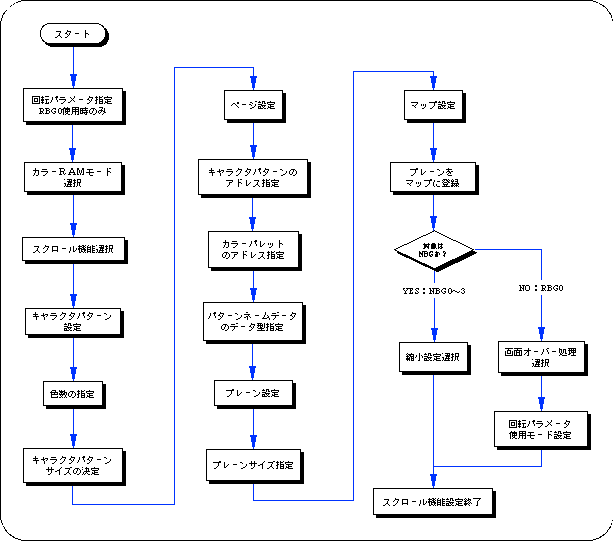
    Flow of scroll setting

    Here, the procedure of scroll setting from character pattern setting to page → plane → map setting, reduction setting, scroll registration, is explained with a simple flowchart, and the scroll function setting is summarized.

    Flow 8-1 Flow of scroll function setting

  • BackForward
    SGL User's ManualPROGRAMMER'S STRUCT
    Copyright SEGA ENTERPRISES, LTD., 1997