SGL User's ManualPROGRAMMER'S STRUCT
BackForward
8. Scroll

8-7. Scroll drawing

Here, the flow up to the actual drawing of the scroll screen after scroll function setting and scroll registration will be explained step by step in the order of the library functions to be used.

Back screen settings

● Back screen settings
Select a color for the back screen.
The back screen refers to the single-color display surface that is drawn on the back side, which is displayed in the area (dot unit) where nothing is drawn during the monitor.
Use the library function "slBack1ColSet" to set the back screen.

[Void slBack1ColSet (void * back_col_adr, Uint16 RGB_col);]
Single color Specifies the color of the back screen.
Substitute the start address in VRAM that stores the color data of the back screen and the 1-word RGB value (#define value) that indicates the color of the back screen as parameters.
The value used to specify the RGB color is defined in the header file “sl_def.h”, so refer to it.

Figure 8-15 RGB color mode sample (RGB_Flag)

● RGB mode color sample ●
#define CD_Blank (0 << 10) | (0 << 5) | (0) | RGB_Flag
#define CD_DarkRed (0 << 10) | (0 << 5) | (8) | RGB_Flag
#define CD_DarkGreen (0 << 10) | (8 << 5) | (0) | RGB_Flag
		::
		::
#define CD_Purple (31 << 10) | (0 << 5) | (31) | RGB_Flag
#define CD_Magenta (31 << 10) | (31 << 5) | (0) | RGB_Flag
#define CD_White (31 << 10) | (31 << 5) | (31) | RGB_Flag

Note) The above value is defined in “sl_def.h”.

Display position setting

● Normal scroll screen
Determines the display position of the normal scroll surface for which the function has been set.
The library function "slScrPosNbg0 to 3" is used to determine the display position of the normal scroll screen.

[Void slScrPosNbg0 ~ 3 (FIXED posx, FIXED posy);]
Set the display coordinates of the normal scroll screen.
Assign the XY coordinate values (scroll coordinate system) to determine where to place the monitor on the scroll map.
The placement reference point for the normal scroll screen is the upper left corner of the monitor.

● Rotating scroll screen
Function Determines the placement coordinates and rotation center coordinates of the set rotation scroll plane.
The function "slLookR" is used to determine the display position of the rotation scroll screen, and the function "slDispCenterR" is used to determine the coordinates of the center of rotation.

[Void slLookR (FIXED posx, FIXED posy);]
Rotation Scroll Set the placement coordinates of the screen and save the information in the current rotation parameters. Substitute the scroll XY coordinate value with the origin at the upper left of the scroll map as the parameter.
The display position of the rotation scroll is determined by the placement coordinates and the rotation center coordinates.

[Void slDispCenterR (FIXED posx, FIXED posy);]
Set the rotation center coordinates (vanishing point) of the rotation scroll screen and save the information in the current rotation parameters.
Substitute the screen XY coordinate values for arranging the rotation scroll screen into the parameters.
The display position of the rotation scroll is determined by the placement coordinates and the rotation center coordinates.

Fig. 8-16 Relationship between display position and rotation center position
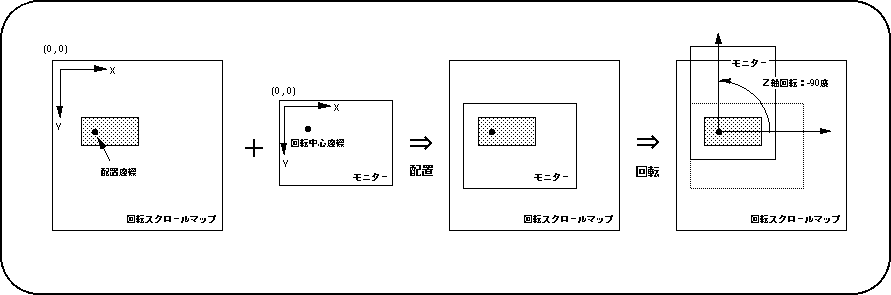
Note) The Z-axis of the scroll surface is in the positive direction in front of the screen.

In addition, the functions "slLookR" and "slDispCenterR" can be set for each of the rotation parameters A and B, and the rotation parameters to be set (currently used rotation parameters) can be switched with the function "slCurRpara". Of the functions used for rotation scrolling, for all functions ending with "R" in the function name, the function of the function can be set separately for rotation parameters A and B.

Scroll registration

The scroll screen after storing the scroll data and setting the scroll function must be registered for scrolling using the SGL library function "slScrAutoDisp".
Scroll registration means setting the cycle pattern and drawing settings for each scroll screen for which the function settings have been completed.

In addition, scroll registration may fail depending on the scroll function settings to be registered, the number of scroll faces, and the VRAM bank in which scroll data is stored.
This is due to some scrolling restrictions, including the scrolling restrictions based on the number of colors on the normal scroll screen mentioned above (the restrictions will be described in the next section).

[Bool slScrAutoDisp (Uint32 disp_bit);]
Register the scroll screen with the function set.
Substitute the values in the table below corresponding to the scroll screen to be registered for the parameters.
The function returns a return value of 0 if the scroll registration is successful and -1 if it is unsuccessful.

Table 8-18 Scroll registration parameter substitution value (disp_bit)

Scroll image to register
NBG0 NBG1 NBG2 NBG3 RBG0
Price NBG0ON NBG1ON NBG2ON NBG3ON RBG0ON

Note) The values in the above table are defined in “sl_def.h” attached to the system.

When registering multiple scroll screens, it is convenient to combine the parameter assignment values of the library function "slScrAutoDisp" with the #define values corresponding to each scroll with the or operator "|" (example shown in the figure below). indicate).

Figure 8-17 Registration of multiple scroll planes

● Registration of multiple scroll planes ●

Uint16 slScrAutoDisp (NBG0ON | NBG1ON | RBG0ON); ↑ ↑ ↑ | | RBG0 registration | NBG1 registration NBG0 registration

(| = or operator)

Note) The parameter assignment value is defined in “sl_def.h”.

Precautions regarding scroll registration

When scroll registration is performed using the SGL library function "slScrAutoDisp", the function may return a return value of -1 in some cases. This means that the function “slScrAutoDisp” failed to register the scroll.
If scroll registration fails, the causes can be summarized in the following four.

● Cause of scroll registration failure

1) Scroll limit by the number of colors on the normal scroll screen
I tried to register a scroll surface that should not be usable due to the color number setting of NBG0 and NBG1.

2) Bank occupancy by rotation scroll data
The scroll data of the rotary scroll screen and the normal scroll screen are stored in the same VRAM bank.

3) Pattern name data storage bank limit
Pattern name data is stored in both VRAM banks with the same ending number.

4) Deviation of allowable scrolling function
The scroll surface to be registered exceeds the scroll function and the number of surfaces that can be selected at the same time.

To resolve this, take the following actions.

● What to do when scroll registration fails

What to do in case of 1)
Decrease the number of colors of NBG0 or NBG1 or give up the registration of NBG2 or NBG3.

What to do in case of 2)
The scroll data of the rotary scroll screen and the normal scroll screen are stored in different VRAM banks.

What to do in case of 3)
Observe the VRAM bank storage limit for pattern name data.

What to do in case of 4)
Reduce the number of scroll faces to be registered, reduce the number of colors of the character pattern during function setting, increase the value of the reduction setting, and prevent too much scroll screen scroll data from being packed in one VRAM bank. please look.

About VRAM access restrictions

The cause of 4) is based on access restrictions to the VRAM bank. However, it is very difficult to explain VRAM access restrictions and read the contents that accompany them. Therefore, here, the solution / countermeasure is simply to reduce the scroll function and the number of faces.
For details on VRAM access, refer to "HARDWARE MANUAL vol.2: VDP2 User's Manual".

Start drawing

● Drawing declaration
In SGL, the drawing process on the scroll screen monitor is started for the first time when the library function "slTVOn" is executed.
After that, the scroll surface continues to draw the scroll screen in synchronization with the scanning line according to the stored scroll information (position, scale, rotation angle, graphic data, etc.).
In addition, there is a function "slTVOff" as a function that is paired with this function "slTVOn". This is to stop the scroll drawing process.

[Void slTVOn (void);]
Starts the drawing process of the scroll screen that has been set for drawing.

[Void slTVOff (void);]
Cancels the drawing process of the scroll screen for which drawing is set.

● Drawing settings
Set whether to actually draw the scroll surface with the function set on the monitor.
The scroll surface that has been registered for scrolling using the function "slScrAutoDisp" will be drawn as it is because the drawing setting is turned on at the registration stage, but it should not be drawn by turning off the drawing setting. It is also possible to. You can also draw a scroll surface with the drawing setting turned off by turning on the drawing setting.

[Void slScrDisp (Uint32 mode);]
Set the drawing settings for the scroll screen with the function settings.
The values in the table below that correspond to the drawing settings of each scroll surface are assigned to the parameters.

Table 8-19 List of parameter assignment values for “slScrDisp” (mode)
NBG0 NBG1 NBG2 NBG3 RBG0
ON OFF OFF ON OFF OFF ON OFF OFF ON OFF OFF ON OFF OFF
 Price
NBG0ON NBG0OFF NBG1ON NBG1OFF NBG2ON NBG2OFF NBG3ON NBG3OFF RBG0ON RBG0OFF
ON: Draw the scroll surface
OFF: Do not draw the scroll surface

Note) The values in the above table are defined in “sl_def.h” attached to the system.

● Screen synchronization (scroll rewriting)
The scroll drawing data is rewritten according to the scan line status.

[Void slSynch (void);]
The drawing data is rewritten while the monitor is not rewriting the screen.

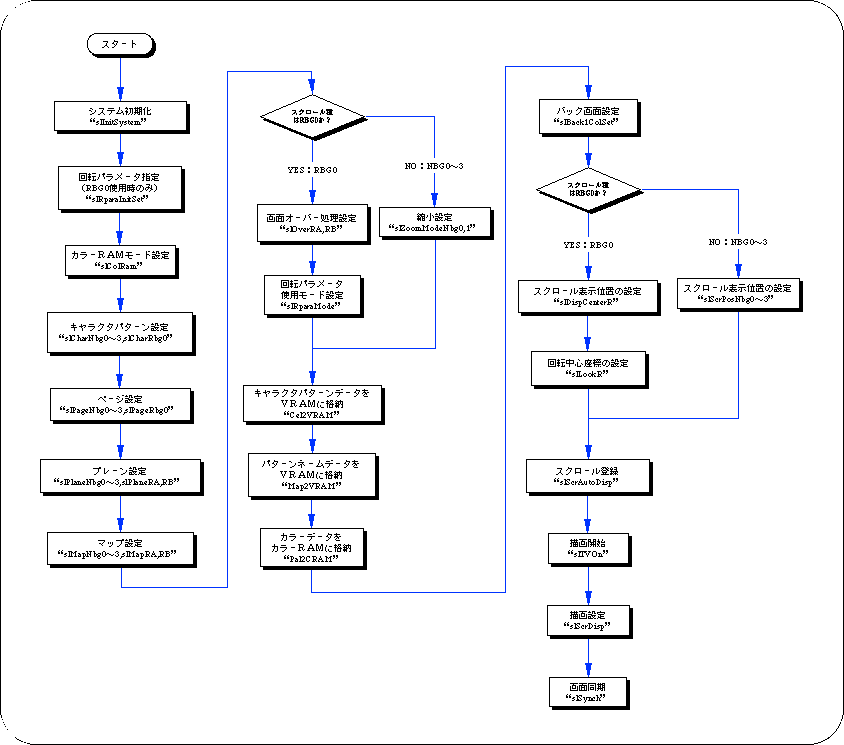
Flow until scroll drawing

Here, by showing the flow from the initialization of scroll data to the actual drawing with a flowchart, we will summarize from the scroll function setting to drawing.

Flow 8-2 Flow until scroll drawing

Access to VRAM and color RAM

Access to VRAM or color RAM during the display period of the monitor causes noise on the monitor.
Therefore, access to these two RAM areas is performed during the non-display period (during blanking) of the monitor using the function "slSynch", or the scroll drawing process is interrupted using the function "slTVOff". Either do this afterwards, or use the function “slScrDisp” to turn off the drawing settings and access the inaccessible VRAM bank.


BackForward
SGL User's ManualPROGRAMMER'S STRUCT
Copyright SEGA ENTERPRISES, LTD., 1997