 ★ SGL User's Manual ★ PROGRAMMER'S STRUCT
Also, if the scroll display position moves up, down, left, or right and the scroll exceeds the display area, the scroll will start drawing again from the opposite end.
<Fig. 8-19 Processing when scrolling exceeds the display area>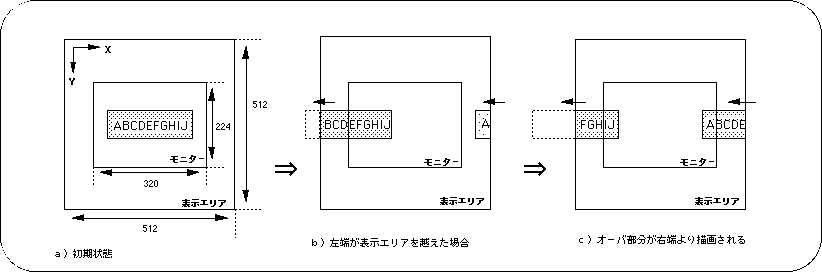
/ * ------------------------------------------------ ---------------------- * /
/ * Graphic Scroll [X axis] * /
/ * ------------------------------------------------ ---------------------- * /
#include "sgl.h"
#include "ss_scrol.h"

#define NBG1_CEL_ADR (VDP2_VRAM_B1 + 0x02000)
#define NBG1_MAP_ADR (VDP2_VRAM_B1 + 0x12000)
#define NBG1_COL_ADR (VDP2_COLRAM + 0x00200)
#define BACK_COL_ADR (VDP2_VRAM_A1 + 0x1fffe)

void ss_main (void)
{
	FIXED yama_posx = SIPOSX, yama_posy = SIPOSY;

	slInitSystem (TV_320x224, NULL, 1);
	slTVOff ();
	slPrint ("Sample program 8.8.1", slLocate (9,2));

	slColRAMMode (CRM16_1024);
	slBack1ColSet ((void *) BACK_COL_ADR, 0);

	slCharNbg1 (COL_TYPE_256, CHAR_SIZE_1x1);
	slPageNbg1 ((void *) NBG1_CEL_ADR, 0, PNB_1WORD | CN_12BIT);
	slPlaneNbg1 (PL_SIZE_1x1);
	slMapNbg1 ((void *) NBG1_MAP_ADR, (void *) NBG1_MAP_ADR, (void *) NBG1_MAP_ADR, (void *) NBG1_MAP_ADR);
	Cel2VRAM (yama_cel, (void *) NBG1_CEL_ADR, 31808);
	Map2VRAM (yama_map, (void *) NBG1_MAP_ADR, 32, 16, 1, 256);
	Pal2CRAM (yama_pal, (void *) NBG1_COL_ADR, 256);

	slScrPosNbg1 (yama_posx, yama_posy);
	slScrAutoDisp (NBG0ON | NBG1ON);
	slTVOn ();

	while (1) {
		slScrPosNbg1 (yama_posx, yama_posy);
		yama_posx + = POSX_UP;

		slSynch ();
	}
}
/ * ------------------------------------------------ ---------------------- * /
/ * Graphic Scroll [X & Y axis] * /
/ * ------------------------------------------------ ---------------------- * /
#include "sgl.h"
#include "ss_scrol.h"

#define NBG1_CEL_ADR (VDP2_VRAM_B1 + 0x02000)
#define NBG1_MAP_ADR (VDP2_VRAM_B1 + 0x12000)
#define NBG1_COL_ADR (VDP2_COLRAM + 0x00200)
#define BACK_COL_ADR (VDP2_VRAM_A1 + 0x1fffe)

void ss_main (void)
{
	FIXED yama_posx = SIPOSX, yama_posy = SIPOSY;
	Uint16 scroll_flg = YOKO;

	slInitSystem (TV_320x224, NULL, 1);
	slTVOff ();
	slPrint ("Sample program 8.8.2", slLocate (9,2));

	slColRAMMode (CRM16_1024);
	slBack1ColSet ((void *) BACK_COL_ADR, 0);

	slCharNbg1 (COL_TYPE_256, CHAR_SIZE_1x1);
	slPageNbg1 ((void *) NBG1_CEL_ADR, 0, PNB_1WORD | CN_12BIT);
	slPlaneNbg1 (PL_SIZE_1x1);
	slMapNbg1 ((void *) NBG1_MAP_ADR, (void *) NBG1_MAP_ADR, (void *) NBG1_MAP_ADR, (void *) NBG1_MAP_ADR);
	Cel2VRAM (yama_cel, (void *) NBG1_CEL_ADR, 31808);
	Map2VRAM (yama_map, (void *) NBG1_MAP_ADR, 32, 16, 1, 256);
	Pal2CRAM (yama_pal, (void *) NBG1_COL_ADR, 256);

	slScrPosNbg1 (yama_posx, yama_posy);
	slScrAutoDisp (NBG0ON | NBG1ON);
	slTVOn ();

	while (1) {
		if (scroll_flg == YOKO) {
			if (yama_posx> = (SX * 2 + SIPOSX)) {
				scroll_flg = TATE;
				yama_posx = SIPOSX;
			} else yama_posx + = POSX_UP;
		} else if (scroll_flg == TATE) {
			if (yama_posy> = (SY * 2 + SIPOSY)) {
				scroll_flg = YOKO;
				yama_posy = SIPOSY;
			} else yama_posy + = POSY_UP;
		}
		slScrPosNbg1 (yama_posx, yama_posy);

		slSynch ();
	}
}
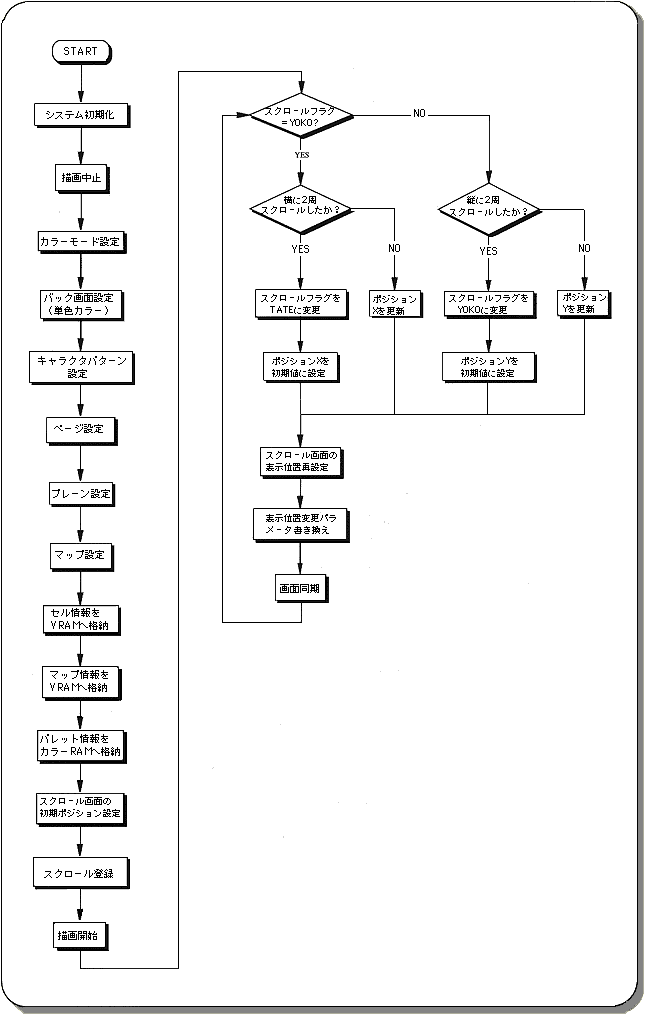
Figure 8-20 Scroll scaling image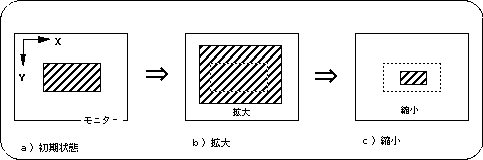
| Reduction setting | |||
|---|---|---|---|
| 1x | 1/2 times | 1/4 times | |
Expansion and contraction | 1 to 256 times | 1/2 to 256 times | 1/4 to 256 times |
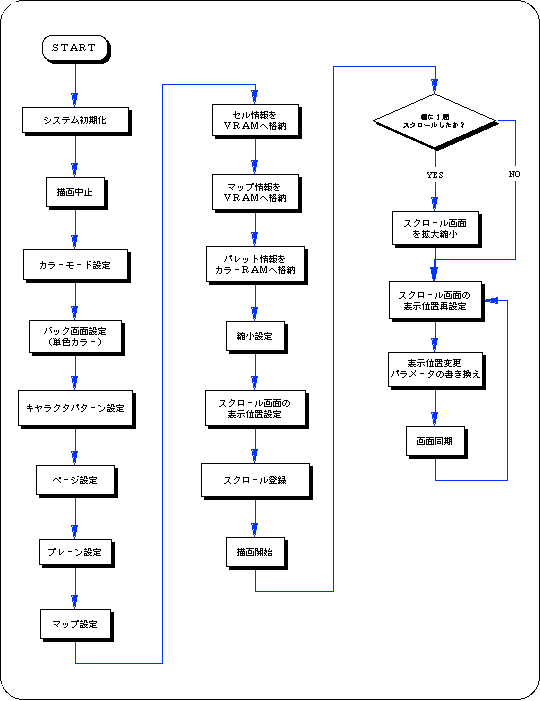
The following sample program (Listing 8-4) is an example of actually scaling the normal scroll screen using the SGL library function.
/ * ------------------------------------------------ ---------------------- * /
/ * Graphic Scroll & Expansion & Reduction * /
/ * ------------------------------------------------ ---------------------- * /
#include "sgl.h"
#include "ss_scrol.h"

#define NBG1_CEL_ADR VDP2_VRAM_B0
#define NBG1_MAP_ADR (VDP2_VRAM_B0 + 0x10000)
#define NBG1_COL_ADR (VDP2_COLRAM + 0x00200)
#define BACK_COL_ADR (VDP2_VRAM_A1 + 0x1fffe)

void ss_main (void)
{
	FIXED yama_posx = toFIXED (0.0), yama_posy = toFIXED (0.0);
	FIXED yama_zoom = toFIXED (1.0);
	FIXED up_down = toFIXED (-0.1);

	slInitSystem (TV_320x224, NULL, 1);
	slTVOff ();
	slPrint ("Sample program 8.8.3", slLocate (9,2));

	slColRAMMode (CRM16_1024);
	slBack1ColSet ((void *) BACK_COL_ADR, 0);

	slCharNbg1 (COL_TYPE_256, CHAR_SIZE_1x1);
	slPageNbg1 ((void *) NBG1_CEL_ADR, 0, PNB_1WORD | CN_10BIT);
	slPlaneNbg1 (PL_SIZE_1x1);
	slMapNbg1 ((void *) NBG1_MAP_ADR, (void *) NBG1_MAP_ADR, (void *) NBG1_MAP_ADR, (void *) NBG1_MAP_ADR);
	Cel2VRAM (yama_cel, (void *) NBG1_CEL_ADR, 31808);
	Map2VRAM (yama_map, (void *) NBG1_MAP_ADR, 32, 16, 1, 0);
	Pal2CRAM (yama_pal, (void *) NBG1_COL_ADR, 256);

	slZoomModeNbg1 (ZOOM_HALF);

	slScrPosNbg1 (yama_posx, yama_posy);
	slScrAutoDisp (NBG0ON | NBG1ON);
	slTVOn ();

	while (1) {
		if (yama_posx> = SX) {
			if (yama_zoom> = toFIXED (1.5))
				up_down = toFIXED (-0.1);
			else if (yama_zoom <= toFIXED (0.7))
				up_down = toFIXED (0.1);
			yama_zoom + = up_down;
			yama_posx = toFIXED (0.0);
			slZoomNbg1 (yama_zoom, yama_zoom);
		}
		slScrPosNbg1 (yama_posx, yama_posy);
		yama_posx + = POSX_UP;

		slSynch ();
	}
}
 ★ SGL User's Manual ★ PROGRAMMER'S STRUCT