 ★ SOUND Manual ★ Sound Driver Programmer's Guide
 The control command is issued to the following command block area. Write the command code and required parameters (P1--P14) in the 16-byte command block. Since there are 8 command blocks, up to 8 commands can be issued at the same time.
System interface area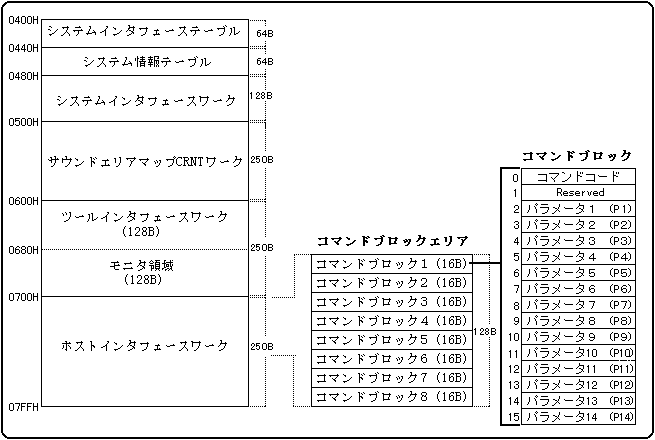
The image of the host interface is as follows. Write the command number in the CMD part. This will be explained in detail from the next page. P1, P2… set the parameters. The number of parameters depends on the command. There are also commands that do not require parameters.
| address | CMD | P1 | P2 | P3 | P4 | P5 | P6 | P7 | P8 | P9 | P10 | P11 | |||
| 0X0700 | |||||||||||||||
| 0X0710 | |||||||||||||||
| 0X0720 | |||||||||||||||
| 0X0730 | |||||||||||||||
| 0X0740 | |||||||||||||||
| 0X0750 | |||||||||||||||
| 0X0760 | |||||||||||||||
| 0X0770 |
There are two ways to issue commands: "timing flag handshake" and "command code handshake". Timing flag handshake is a command issuance method that takes into consideration the order of commands written by the main system. However, the command code handshake is compatible with sound drivers Ver1.00 to Ver1.29, so normally use the timing flag handshake. This is because the command code handshake may cause trouble because 68000 may not be in time for continuous requests. This will be discussed later.
The timing flag handshake is set as follows.
Issue a command using the timing flag as follows.
Main system processing (command issuance)
Bit 76543210
* ・ ・ ・ ・ ・ ・ ・
↑
|
Timing flag 0: Id1e
1: Command set completed
Next, I will touch on the command code handshake.
This is a method of issuing a command by checking whether the command code (the first byte at the beginning of the command block) is "00h". The main system confirms that the command code is "00h" and issues commands in the order from block 1 to block 8. Similarly, the sound driver simply repeats the operation of checking blocks 1 to 8 in order and processing the command code if it is written.
The command code is cleared by the sound driver when the processing is completed, so if the command code is not cleared to "00h", it means that the command is still being processed or waiting to start processing. Means On the contrary, the fact that the issued command code is cleared to "00h" means that the command processing of the sound driver is completely completed. However, if the sound driver that received the request writes the next request before clearing the command code to 0 due to a mistake on the command issuing side, the newer command code may be set to 0 (). In ver-2.04, some measures are taken against this phenomenon, but since there is a considerable speed difference between SH2 and 68000, it cannot be completely prevented).
Due to the nature of the game being real-time using a control pad, most of the trouble caused by command code handshakes is sound effects. As a typical example, it seems that phenomena such as "sometimes there is no sound effect" occur. Please be careful.
When issuing a command, write all the command parameters, and then write the command code at the end. The sound driver takes over the command parameters as soon as it detects the command code, so if you write the command code first, it may be processed with unexpected command parameters.
The sound driver checks blocks 1 to 8 in order, so if you simply search for an empty block and set the command, the commands may be executed in an order different from the order written by the main system. If the execution order is changed, the system may malfunction. Therefore, when executing a process that has a fixed execution order, set the command so that the order is not changed.
In this procedure, the main system and the sound driver perform processing asynchronously, so even if you follow the above precautions, the command order may change. If you need to keep the execution order, use only one command block to make sure that the previous command has been processed before issuing the next command.
| 01H | SEQUENCE START | Start playing songs and sound effects |
|---|---|---|
| 02H | SEQUENCE STOP | Stop playing songs and sound effects |
| 03H | PAUSE | Pause songs and sound effects |
| 04H | PAUSE OFF | Unpause songs and sound effects |
| 05H | SEQUENCE VOLUME | Volume control or fade in / out |
| 06H | STOP ALL | Stop playing all |
| 07H | TEMPO CHANGE | Change the tempo of songs and sound effects |
| 08H | MAP CHANGE | Make a map change |
| 09H | DIRECT MIDI CONTROL | Send MIDI event as a command |
| 0AH | START VOLUME ANALYZER | Digital Audio In input level analysis started |
| 0BH | STOP VOLUME ANALYZER | Digital Audio In input level analysis completed |
| 0CH | DSP STOP | DSP stop and initialization |
| 0DH | ALL NOTE OFF | Stop all pronunciation |
| 0EH | SEQUENCE PAN | Control PANPOT from the game |
| 10H | SOUND INITIALIZE | Initialize the sound driver |
| 11H | YAMAHA 3D CONTROL | YAMAHA 3D sound control |
| 12H | QSOUND CONTROL | Qsound control |
| 13H | YAMAHA 3D INITIALIZE | YAMAHA 3D, Qsound Localization initialization |
| 14H | TEMPO MODE | Tempo mode setting |
| 15H | TEMPO RATIO | Relative tempo value setting |
| 80H | CD-DA LEVEL | Adjust CD-DA level |
| 81H | CD-DA PAN | CD-DA output Panpot settings |
| 82H | TOTAL VOLUME | Total volume setting |
| 83H | EFFECT CHANGE | Switching effects |
| 85H | START PCM STREAM | PCM stream playback started |
| 86H | STOP PCM STREAM | PCM stream playback stop |
| 87H | MIXER CHANGE | Mixer switching |
| 88H | MIXER PARAMETER CHANGE | Switching mixer parameters |
| 89H | HARDWARE CHECK | Hardware check |
| 8AH | PCM PARAMETER CHANGE | Parameter switching for the PCM stream being played |
| 8BH | PCM SLOT ALLOCATION | Reserve a slot for the PCM stream |
| 8CH | PCM SLOT RELEASE | Free up slots for PCM streams |
★ SOUND Manual ★ Sound Driver Programmer's Guide