SOUND ManualSound Driver Programmer's Guide
BackForward
Sound Driver Programmer's Guide

2. Sound control


Required data files

Basically, all you need to start the sound driver is the sound driver program itself. The sound area map is also transferred here because once the sound area map is transferred, it does not need to be transferred afterwards. All the area maps in the game will be stored here in the sound area map area. When starting the sound driver with this procedure, prepare the following two data files.
  1. Sound driver (SDDRVS.TSK)
    The sound driver is provided in a binary file called "sddrvs.tsk". However, only when developing with Saturn Target Model M, use the file "sddrv.tsk". These file names should not be changed.

  2. Sound area map (name is arbitrary)
    It is a binary data file that combines all the area maps in the game. It depends on the game, so ask the sound creator to create it.


Sound area map

The sound area map is a combination of all the area maps in the game, and is created (output) by the sound simulator of the sound development tool.
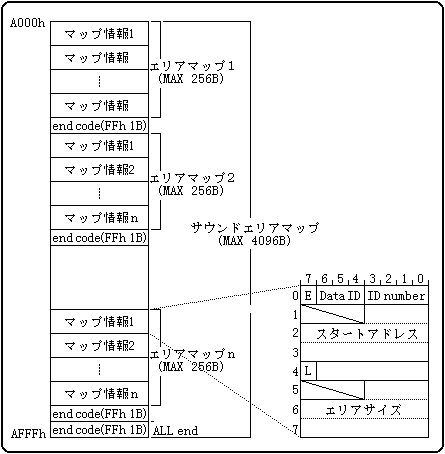
There is a 1-byte end code (FFh) at the end of each area map, and an all-end code (FFh) at the very end of the sound area map. The size of the sound area map is variable and its size depends on the number of area maps, up to 4096 bytes.

Sound area map configuration


What is an area map?

There are several scenes in the game, but when the scenes change, the music usually changes. When the music changes, the way the sound data is placed (how to use 512KB of sound memory) also changes, so the area map determines what kind of data should be placed in that situation. There are only three types of data to be placed, "tone data", "sequence data", and "DSP program", so the area map determines where and how large these three types of data should be placed in the sound memory. is. Also, when using DSP, "DSP work RAM" is required, so specify the location and size of DSP work RAM in the same way.
Normally, sequence playback is possible if there are two map information, tone color data and sequence data, in one area map, but if frequently used songs and SEs are divided into separate arrangements, memory efficiency and development efficiency will be improved. You can build a good system.
Assuming that the sound changes as the game scene changes, you will need as many area maps as there are game scenes. However, the area map mentioned here is just an area map seen from the sound, so it does not always correspond one-to-one with the game scene. If the sound is the same even if the game scene changes, there is no need to change the area map, and even if you only need to replace some sound data, you do not need to change the area map.

Relationship between area map and sound data
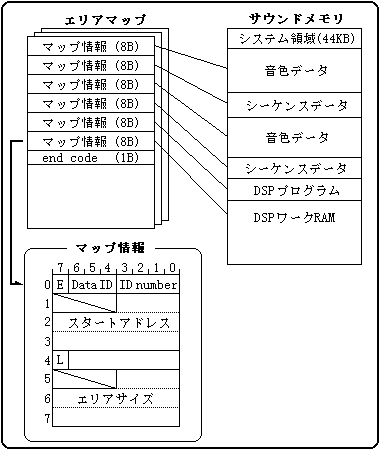
The area map is a combination of several map information and is variable in size. You can have up to 32 map information, and the size of the area map is determined by the number of map information. Since the size is variable, a 1-byte end code is inserted at the end of the area map.
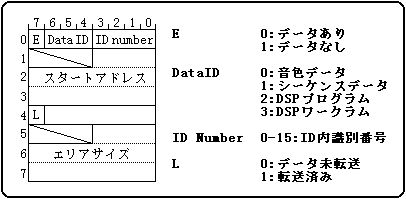
The map information is an 8-byte data block that describes where the sound data is placed in memory, and has the structure shown in the figure below.

Bit image of map information

Description of map information data
E Data end bit The end bit of map information. Actually, it is 1 byte of FFh.
Data ID Data type This is the type of data to be stored in the area defined here.
ID number Identification number in data type This is the identification number when there are multiple data of the same type.
Start address Start address The start address of the area defined here.
L Transferred bits This flag indicates that data has been transferred to this area.
Area size Area size The area size of the area defined here.


Sound type

There are three types of sound methods as follows. In addition, each has its own strengths and weaknesses as shown in the table below, so select the optimal playback method that suits the content of the game and each situation.
  1. Sequence playback
  2. PCM stream playback
  3. CD-DA playback
Sequence playback
Pronunciation method This is a method of playing while decompressing the sequence data using the tone data (waveform data) on the sound memory as the sound source.
feature This is a method of treating waveform data as a sound source (one instrument) and Saturn itself as a multi-sound source instrument.
Strong Points
  • Since the song data is small, you can have many songs.
  • It's easy to change and modify songs.
  • Real-time tempo change is possible.
  • No need for CD access.
  • The main just makes a request.
    (The sound driver controls everything)
Disadvantages
  • There is a limit of 4Mbit (512KB) in the capacity of waveforms that can be held at one time.

PCM stream playback
Pronunciation method This is a method of continuously playing back long waveform data by repeating the process of loop-playing the waveform data and transferring the next waveform data to the part where the sound has finished.
feature This is a method to play back the long waveform data recorded in advance as it is.
However, the waveform data must be continuously transferred so that the sound is not interrupted.
Strong Points
  • Long waveform data exceeding 4M bits can be played.
  • You can edit various playback patterns by devising the transfer. (Editing and compositing is possible)
  • The data width can be selected from 8 bits / 16 bits, and the frequency can be changed freely.
    (Memory efficiency is good, and the pitch can be changed during recording / playback.)
  • You can play multiple channels at the same time.
Disadvantages
  • Transferring waveform data puts a considerable load on the main system and sound CPU.

CD-DA playback
Pronunciation method This is a method to directly play the audio recorded on the audio track of a CD in hardware.
It's exactly the same as smoothing a commercial music CD.
feature This is a method to play back the long waveform data recorded in advance as it is.
The audio is automatically output by the hardware.
Strong Points
  • Since you can record live, you can play realistic and expressive performances.
  • No load on the main and sound CPUs.
Disadvantages
  • It is not easy to change or modify the song. I have to record again.
  • The data width is 16 bits, the frequency is fixed at 44.1KHz, and a large amount of waveform data is required.
  • You will always need to access the CD during playback, occupying the CD drive.
  • I can't change the tempo in real time.


About 3D sound

This sound driver supports the following two types of 3D sounds. The types of localization and the number of channels that can be specified are as follows. Specify any localization with the "3D control (11h)" command or the "Q sound control (12h)" command of the sound control command. The virtual sound source moves to the specified localization.
Since it is possible that the movement of the virtual sound source is random for both Q sound and YAMAHA 3D sound, the main system controls the movement of the localization. The sound driver only transfers the sound image to the specified localization. However, if simple linear movement is sufficient, or if you want the sound driver to have a little more intelligent control, we will handle it for each project as needed. As a YAMAHA DSP expansion module, three types of DSP programs are available: Q sound 4ch, Q sound 8ch, and YAMAHA 3D sound 1ch, so if you want to use 3D sound, you need one of the above four types of DSP programs. Download the DSP program with the "Effect Change (83h)" command.

Q sound

You can swing a wide-angle PAN up to 180 degrees to the left and right. The only type of localization is PAN, but you can control up to 8 channels at the same time.
Channel (0-7) You can specify 4 channels (0-3) or 8 channels (0-7).
PAN position (0-30) If the value is 0, you can swing the PAN to the left, 15 to the center, and 30 to the right, 180 degrees to the left and right, up to 15 levels.

YAMAHA 3D sound

You can move the virtual sound source to any position with 360 degrees in the horizontal direction, 360 degrees in the vertical direction, and 128 distances. The number of channels used is one, but you can specify any position up, down, left, or right.
Distance (0-127) The value is 0 and the distance is 0. The larger the value, the greater the distance.
Direction (0-127) Specify the 360-degree direction in 128 steps. A value of 0 is 0 degrees to the right, 32 is 90 degrees to the right, 64 is 180 degrees to the right, and 96 is 270 degrees to the right.
Height (0-127) Specify the height in 128 steps. A value of 0 is directly above, 32 is eye height, 64 is directly below, and 96 is rear eye height.


BackForward
SOUND ManualSound Driver Programmer's Guide
Copyright SEGA ENTERPRISES, LTD., 1997